
ThinQ Connect MCP Server
OfficialConnects Claude to LG ThinQ smart home devices for monitoring status and controlling appliances like air conditioners and other IoT devices. Requires LG ThinQ API access token.
Provides integrated control capabilities for LG ThinQ devices including status monitoring, device control, and profile information through a Model Context Protocol server.
What it does
- Query list of registered LG ThinQ devices
- Monitor real-time device status
- Control smart appliances remotely
- Check device control capabilities and methods
Best for
About ThinQ Connect MCP Server
ThinQ Connect MCP Server is an official MCP server published by thinq-connect that provides AI assistants with tools and capabilities via the Model Context Protocol. ThinQ Connect MCP Server — integrated LG ThinQ control for smart home server: monitor device status, control devices, and sync profiles via ThinQ API for home… It is categorized under developer tools.
How to install
You can install ThinQ Connect MCP Server in your AI client of choice. Use the install panel on this page to get one-click setup for Cursor, Claude Desktop, VS Code, and other MCP-compatible clients. This server runs locally on your machine via the stdio transport.
License
ThinQ Connect MCP Server is released under the Apache-2.0 license. This is a permissive open-source license, meaning you can freely use, modify, and distribute the software.

ThinQ Connect MCP Server (Beta)
This is the official MCP (Model Context Protocol) server for LG ThinQ devices. This server provides integrated control capabilities including status monitoring, device control, and profile information for various LG ThinQ devices, built on the LG ThinQ API and Python Open SDK. MCP connection method is stdio.
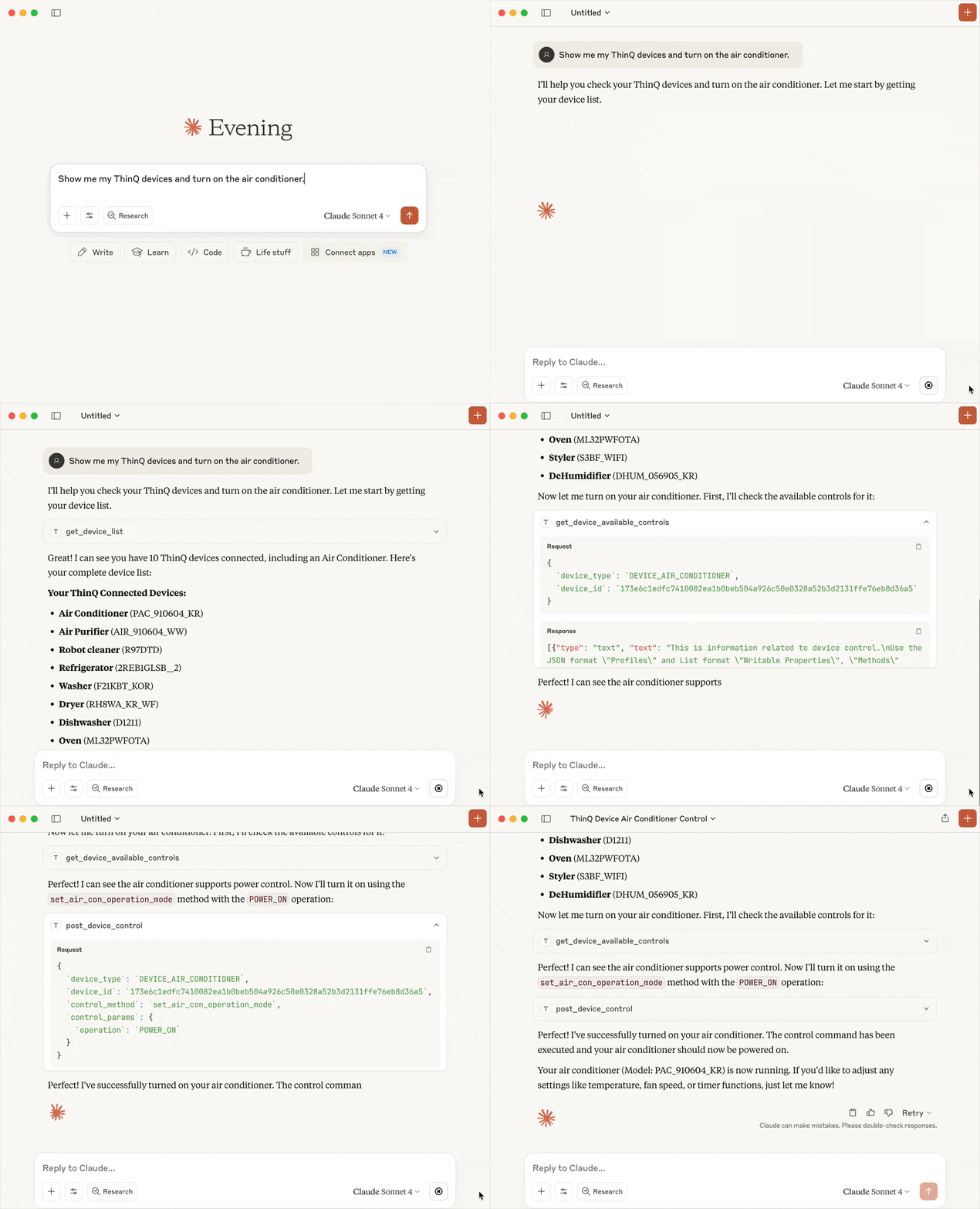
Table of Contents
Features
-
Device List Query
Retrieve a list of all registered LG ThinQ devices. -
Device Status Monitoring
Get real-time status information for specific devices. -
Device Control
Execute control commands defined in each device's profile.
(e.g., turn air conditioner on/off, set temperature, etc.) -
Device Control Capabilities Query
Provide detailed information about controllable properties, methods information for each device.
Prerequisites
- Prepare a Personal Access Token for ThinQ Open API calls
- Verify your ThinQ account's country code. You can find it in the Country Codes section.
- Python 3.11 or higher
- Install uv - A fast Python package installer and resolver for Python projects
- MCP client (Claude Desktop, etc.)
Quick Start
Claude Desktop
Open up the configuration file, and add ThinQ Connect MCP config.
- macOS: ~/Library/Application Support/Claude/claude_desktop_config.json
- Windows: %APPDATA%\Claude\claude_desktop_config.json
{
  "mcpServers": {
    "thinqconnect-mcp": {
      "command": "uvx",
      "args": [
        "thinqconnect-mcp"
      ],
      "env": {
          "THINQ_PAT": "your_personal_access_token_here",
          "THINQ_COUNTRY": "your_country_code_here"
      }
    }
  }
}
Detailed Usage
After setting up the configuration file as shown in the Quick Start section, you can use the ThinQ Connect MCP Server directly in your conversations with Claude.
Examples of prompts you can use:
- "Please provide a list of all devices"
- "Please check the status of the robot vacuum device"
- "Please set the temperature of the air conditioner device to 24 degrees"
Tool Reference
Available Tools
-
get_device_list
- Description: Retrieves a list of all devices connected to the ThinQ Connect platform
- Parameters: None
- Returns: String containing connected device list information
-
get_device_available_controls
- Description: Retrieves available control commands and parameter information for a specific device
- Parameters: device_type (string), device_id (string)
- Returns: String containing device control commands and parameter information
-
get_device_status
- Description: Retrieves status information for a specific device
- Parameters: device_id (string)
- Returns: String containing device status information
-
post_device_control
- Description: Send control commands to a specific device on the ThinQ Connect platform to change its settings or state
- Parameters: device_type (string), device_id (string), control_method (string), control_params (dict)
- Returns: String containing device control result message
Alternatives



Related Skills
Browse all skillsUse when building MCP servers or clients that connect AI systems with external tools and data sources. Invoke for MCP protocol compliance, TypeScript/Python SDKs, resource providers, tool functions.
CCXT cryptocurrency exchange library for TypeScript and JavaScript developers (Node.js and browser). Covers both REST API (standard) and WebSocket API (real-time). Helps install CCXT, connect to exchanges, fetch market data, place orders, stream live tickers/orderbooks, handle authentication, and manage errors. Use when working with crypto exchanges in TypeScript/JavaScript projects, trading bots, arbitrage systems, or portfolio management tools. Includes both REST and WebSocket examples.
UI design system toolkit for Senior UI Designer including design token generation, component documentation, responsive design calculations, and developer handoff tools. Use for creating design systems, maintaining visual consistency, and facilitating design-dev collaboration.
Answer questions about the AI SDK and help build AI-powered features. Use when developers: (1) Ask about AI SDK functions like generateText, streamText, ToolLoopAgent, embed, or tools, (2) Want to build AI agents, chatbots, RAG systems, or text generation features, (3) Have questions about AI providers (OpenAI, Anthropic, Google, etc.), streaming, tool calling, structured output, or embeddings, (4) Use React hooks like useChat or useCompletion. Triggers on: "AI SDK", "Vercel AI SDK", "generateText", "streamText", "add AI to my app", "build an agent", "tool calling", "structured output", "useChat".
Build agentic applications with GitHub Copilot SDK. Use when embedding AI agents in apps, creating custom tools, implementing streaming responses, managing sessions, connecting to MCP servers, or creating custom agents. Triggers on Copilot SDK, GitHub SDK, agentic app, embed Copilot, programmable agent, MCP server, custom agent.
Power BI semantic modeling assistant for building optimized data models. Use when working with Power BI semantic models, creating measures, designing star schemas, configuring relationships, implementing RLS, or optimizing model performance. Triggers on queries about DAX calculations, table relationships, dimension/fact table design, naming conventions, model documentation, cardinality, cross-filter direction, calculation groups, and data model best practices. Always connects to the active model first using power-bi-modeling MCP tools to understand the data structure before providing guidance.