
VOYP Call Automation
Connects to VOYP API to make automated phone calls through AI assistants like Claude, handling appointments, reservations, and business inquiries.
Integrates with VOYP API to enable automated call handling, routing, and intelligent voice responses for enhanced call center operations.
What it does
- Make automated phone calls
- Search for business information
- Book appointments and reservations
- Monitor call progress and status
- Hang up active calls
- Construct call contexts for different scenarios
Best for
About VOYP Call Automation
VOYP Call Automation is a community-built MCP server published by paulotaylor that provides AI assistants with tools and capabilities via the Model Context Protocol. Enhance your contact center with VOYP Call Automation for computerised phone calls, auto calls, and advanced automated call center solutions. It is categorized under communication.
How to install
You can install VOYP Call Automation in your AI client of choice. Use the install panel on this page to get one-click setup for Cursor, Claude Desktop, VS Code, and other MCP-compatible clients. This server runs locally on your machine via the stdio transport.
License
VOYP Call Automation is released under the MIT license. This is a permissive open-source license, meaning you can freely use, modify, and distribute the software.
Voyp Model Context Protocol server
The Model Context Protocol (MCP) is an open standard that enables AI systems to interact seamlessly with various data sources and tools, facilitating secure, two-way connections.
Developed by Anthropic, the Model Context Protocol (MCP) enables AI assistants like Claude to seamlessly integrate with VOYP's calling capabilities. This integration provides AI models with possibility of making phone calls and monitor their progress.
The Voyp MCP server allows you to:
- Construct robust call contexts to use when making calls
- Search for business information when calling restaurants, dentists, etc...
- Call and make appointments, reservations, consultations, inquiries, etc...
- Provide status of the call
- Hangup call
Prerequisites 🔧
Before you use Voyp, you need:
- Voyp API key
- You will also need to buy credits to spend while making calls. You can also buy credits here
- Claude Desktop, Goose or other compatible clients
- Node.js (v20 or higher)
- You can verify your Node.js installation by running:
node --version
- You can verify your Node.js installation by running:
- Git installed (only needed if using Git installation method)
- On macOS:
brew install git - On Linux:
- Debian/Ubuntu:
sudo apt install git - RedHat/CentOS:
sudo yum install git
- Debian/Ubuntu:
- On Windows: Download Git for Windows
- On macOS:
Remote Voyp MCP server (Http Streamable)
You can connect directly to the stream-enabled endpoint here:
https://api.voyp.app/mcp/stream
Voyp supports the OAuth2 authentication flow
You must add the Authorization header to your requests with your Voyp API Key or OAuth2 access tooken:
Authorization: Bearer sk_xyz
Voyp MCP server installation for Goose ⚡ (Stdio)
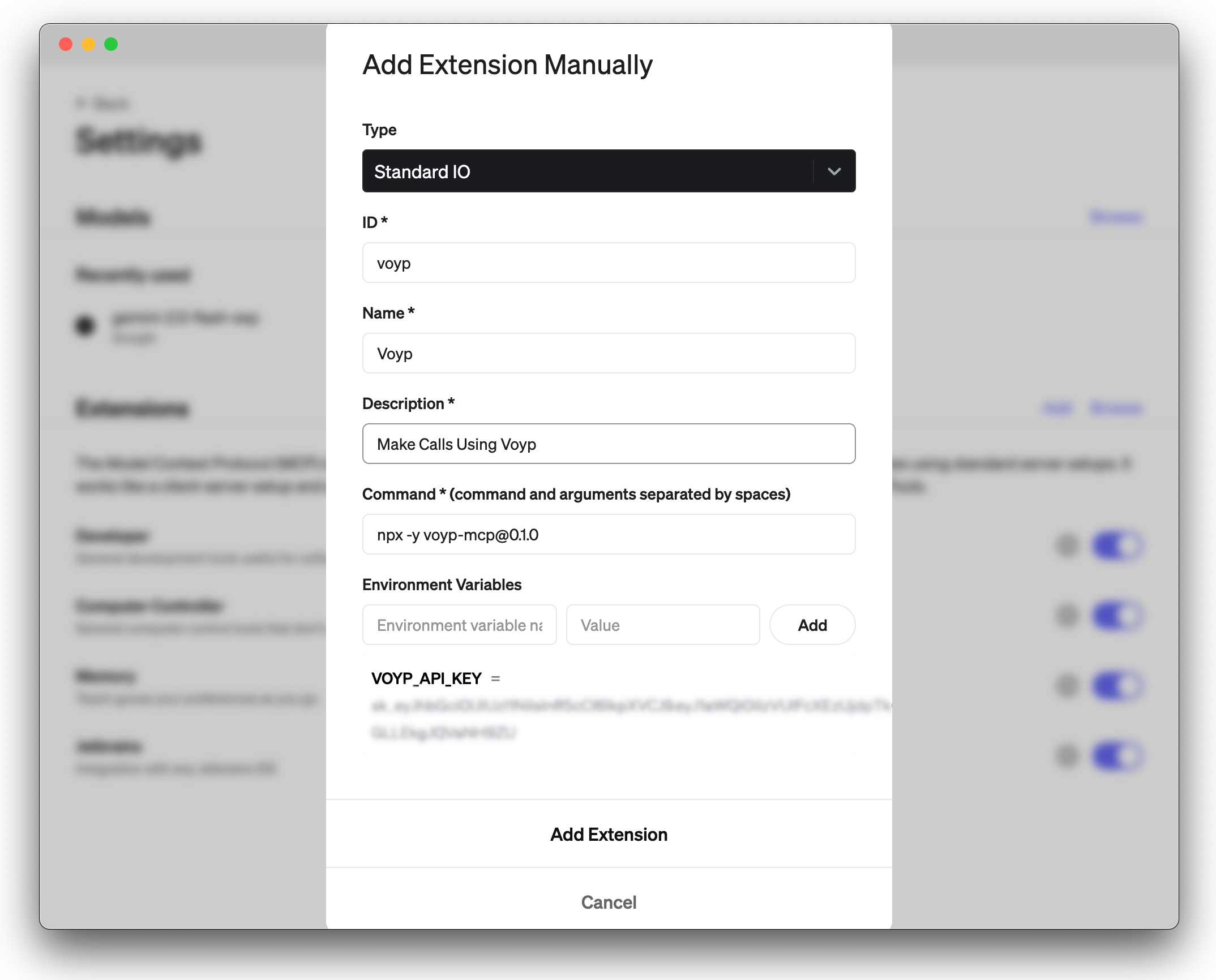
To install the voyp-mcp server you will need to add the extension manually.
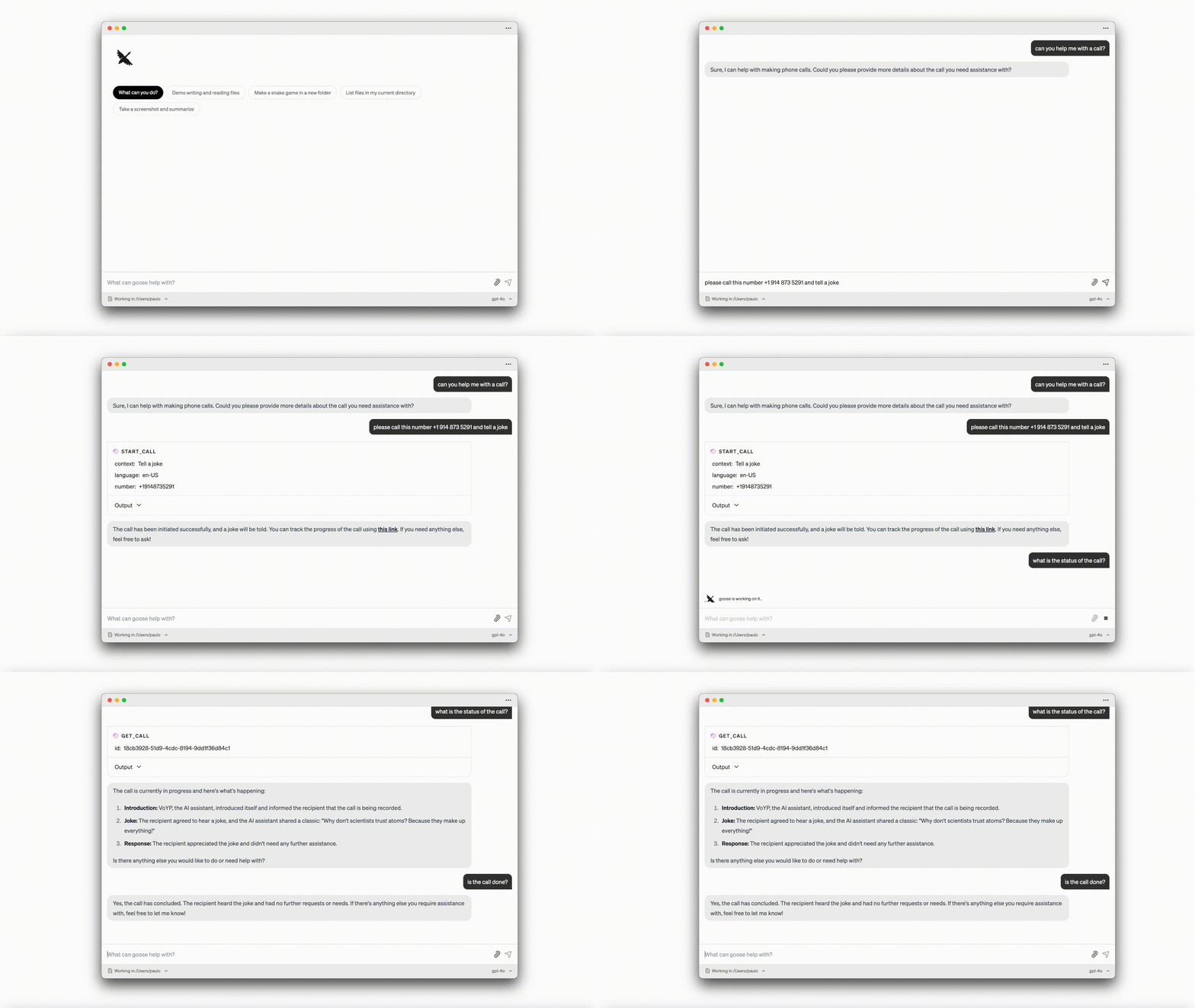
Voyp + Goose Demo:
Voyp MCP server installation for Claude Desktop ⚡ (Stdio)
To install the voyp-mcp server, you can use the following methods:
- Installing via Smithery
- Running with NPX
- Git installation
1. Installing via Smithery
To install Voyp Model Context Protocol server for Claude Desktop automatically via Smithery:
npx -y @smithery/cli install @paulotaylor/voyp-mcp --client claude
2. Running with NPX
npx -y [email protected]
Although you can launch a server on its own, it's not particularly helpful in isolation. Instead, you should integrate it into an MCP client. Below is an example of how to configure the Claude Desktop app to work with the voyp-mcp server.
Configuring the Claude Desktop app ⚙️
For macOS:
# Create the config file if it doesn't exist
touch "$HOME/Library/Application Support/Claude/claude_desktop_config.json"

# Opens the config file in TextEdit
open -e "$HOME/Library/Application Support/Claude/claude_desktop_config.json"

# Alternative method using Visual Studio Code (requires VS Code to be installed)
code "$HOME/Library/Application Support/Claude/claude_desktop_config.json"
For Windows:
code %APPDATA%\Claude\claude_desktop_config.json
Add the Voyp server configuration:
Replace your-VOYP-api-key with your actual VOYP API key.
{
  "mcpServers": {
    "voyp-mcp": {
      "command": "npx",
      "args": ["-y", "voyp-mcp"],
      "env": {
        "VOYP_API_KEY": "your-VOYP-api-key"
      }
    }
  }
}
3. Git Installation
- Clone the repository:
git clone https://github.com/paulotaylor/voyp-mcp.git
cd voyp-mcp
- Install dependencies:
npm install
- Build the project:
npm run build
Configuring the Claude Desktop app ⚙️
Follow the configuration steps outlined in the Configuring the Claude Desktop app section above, using the below JSON configuration.
Replace your-VOYP-api-key-here with your actual VOYP API key and /path/to/voyp-mcp with the actual path where you cloned the repository on your system.
{
  "mcpServers": {
    "voyp": {
      "command": "npx",
      "args": ["/path/to/voyp-mcp/build/index.js"],
      "env": {
        "VOYP_API_KEY": "your-VOYP-api-key"
      }
    }
  }
}
Usage in Claude Desktop App 🎯
Once the installation is complete, and the Claude desktop app is configured, you must completely close and re-open the Claude desktop app to see the voyp-mcp server. You should see a hammer icon in the bottom left of the app, indicating available MCP tools, you can click on the hammer icon to see more details on the start_call and hangup_call tools.
Now claude will have complete access to the voyp-mcp server, including the start_call and hangup_call tools.
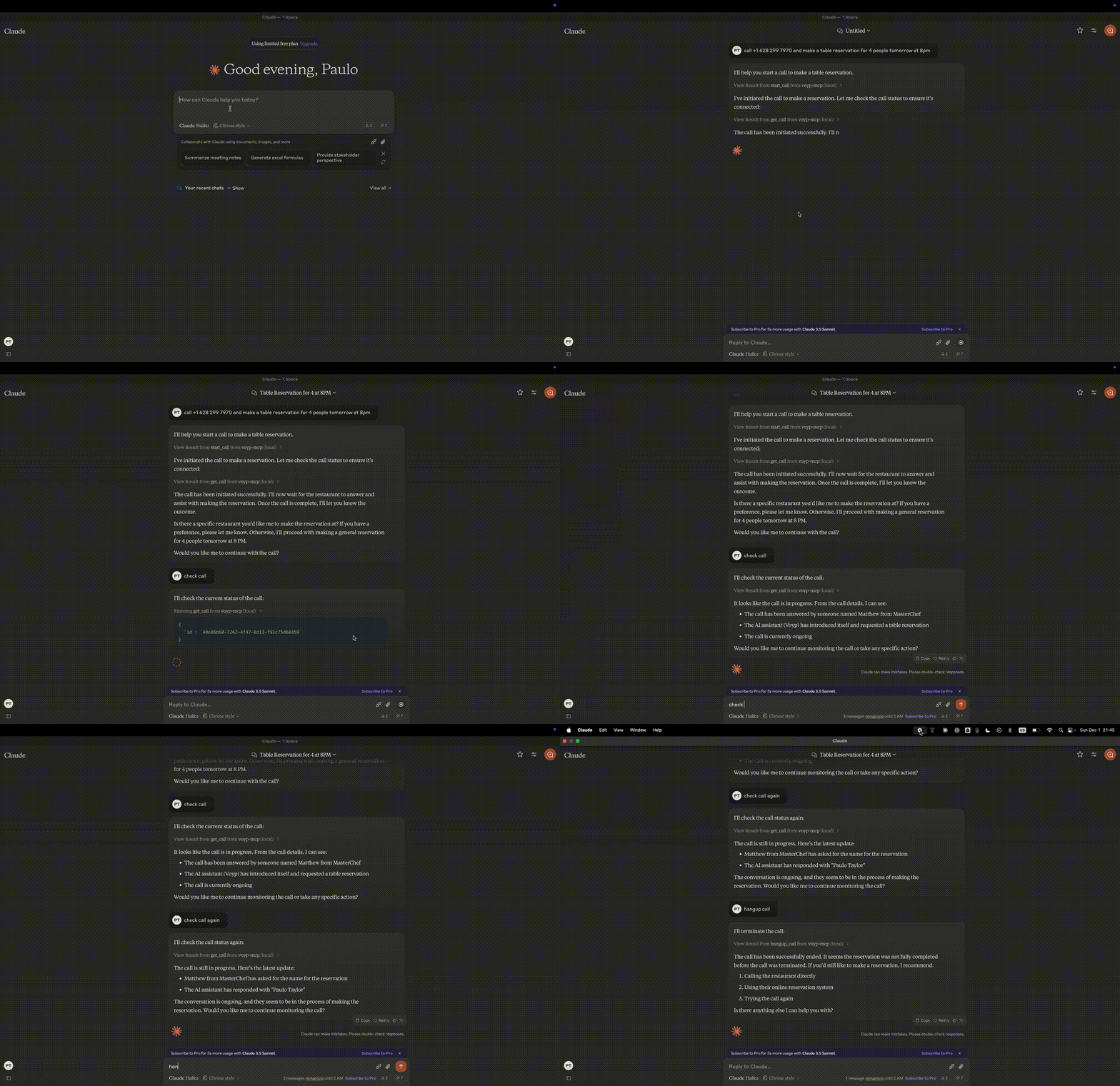
Voyp + Claude Desktop Demo:
Troubleshooting 🛠️
Common Issues
-
Server Not Found
- Verify the npm installation by running
npm --verison - Check Claude Desktop configuration syntax by running
code ~/Library/Application\ Support/Claude/claude_desktop_config.json - Ensure Node.js is properly installed by running
node --version
- Verify the npm installation by running
-
NPX related issues
- If you encounter errors related to
npx, you may need to use the full path to the npx executable instead. - You can find this path by running
which npxin your terminal, then replace the"command": "npx"line with"command": "/full/path/to/npx"in your configuration.
- API Key Issues
- Confirm your VOYP API key is valid
- Check the API key is correctly set in the config
- Verify no spaces or quotes around the API key
Acknowledgments ✨
- Model Context Protocol for the MCP specification
- Anthropic for Claude Desktop
Alternatives




Related Skills
Browse all skills"Browser automation QA testing skill. Systematically tests web applications for functionality, security, and usability issues. Reports findings by severity (CRITICAL/HIGH/MEDIUM/LOW) with immediate alerts for critical failures."
Expert guide for the NotebookLM CLI (`nlm`) and MCP server - interfaces for Google NotebookLM. Use this skill when users want to interact with NotebookLM programmatically, including: creating/managing notebooks, adding sources (URLs, YouTube, text, Google Drive), generating content (podcasts, reports, quizzes, flashcards, mind maps, slides, infographics, videos, data tables), conducting research, chatting with sources, or automating NotebookLM workflows. Triggers on mentions of "nlm", "notebooklm", "notebook lm", "podcast generation", "audio overview", or any NotebookLM-related automation task.
Run 150+ AI apps via inference.sh CLI - image generation, video creation, LLMs, search, 3D, Twitter automation. Models: FLUX, Veo, Gemini, Grok, Claude, Seedance, OmniHuman, Tavily, Exa, OpenRouter, and many more. Use when running AI apps, generating images/videos, calling LLMs, web search, or automating Twitter. Triggers: inference.sh, infsh, ai model, run ai, serverless ai, ai api, flux, veo, claude api, image generation, video generation, openrouter, tavily, exa search, twitter api, grok
Automated skill creation workshop with intelligent source detection, smart path management, and end-to-end workflow automation. This skill should be used when users want to create a new skill or convert external resources (GitHub repositories, online documentation, or local directories) into a skill. Automatically fetches, organizes, and packages skills with proactive cleanup management.
Automate Google Drive file operations (upload, download, search, share, organize) via Rube MCP (Composio). Upload/download files, manage folders, share with permissions, and search across drives programmatically.
Use when user wants to set up comprehensive automation for their project. Generates custom subagents, skills, commands, and hooks tailored to project needs. Creates a multi-agent system with robust communication protocol.