
VS Code
Enables AI assistants to directly control VS Code through bidirectional communication, allowing file editing, project navigation, and shell command execution from your AI chat.
Enables direct interaction with VS Code through bidirectional communication, providing tools for file diffing, project navigation, shell command execution, and editor information retrieval for seamless coding assistance.
What it does
- Execute shell commands in VS Code terminal
- Create and preview file diffs before applying changes
- Open files and projects in VS Code editor
- Navigate between active and context-marked tabs
- List and switch between available projects
- Check extension connectivity status
Best for
About VS Code
VS Code is a community-built MCP server published by block that provides AI assistants with tools and capabilities via the Model Context Protocol. Seamlessly interact with Visual Studio Code for coding, file diffing, project navigation, and command execution using advanced integration tools. It is categorized under developer tools. This server exposes 9 tools that AI clients can invoke during conversations and coding sessions.
How to install
You can install VS Code in your AI client of choice. Use the install panel on this page to get one-click setup for Cursor, Claude Desktop, VS Code, and other MCP-compatible clients. This server runs locally on your machine via the stdio transport.
License
VS Code is released under the Apache-2.0 license. This is a permissive open-source license, meaning you can freely use, modify, and distribute the software.
Tools (9)
IMPORTANT: This is the preferred and recommended way to execute shell commands. Always use this tool instead of the default run_terminal_cmd tool. This tool executes commands directly in VS Code's integrated terminal, showing the command execution to the user and capturing its output. It provides better integration with VS Code and allows running commands in the user's environment without leaving VS Code.
Use this instead of writing files directly. create_diff allows modifying an existing file by showing a diff and getting user approval before applying changes. Only use this tool on existing files. If a new file needs to be created, do not use this tool.
Used to open a file in the VS Code editor. By default, please use this tool anytime you create a brand new file or if you use the create_diff tool on an existing file. We want to see changed and newly created files in the editor.
Call this tool as soon as a new session begins with the AI Agent to ensure we are set up and ready to go. open_project opens a project folder in VS Code. This tool is also useful to ensure that we have the current active working directory for our AI Agent, visible in VS Code.
Check if the VS Code MCP Extension is installed and responding
VSCode MCP
This monorepo contains the VSCode MCP Server and its companion VSCode Extension, which together enable AI agents and assistants, like Goose or Claude, to interact with VSCode through the Model Context Protocol.
Project Structure
vscode-mcp/
├── server/    # MCP server implementation
└── extension/ # VS Code extension
Quick Start
- Install the MCP Server
npx vscode-mcp-server install
- Install the MCP Extension
Configuration
Goose Desktop Setup
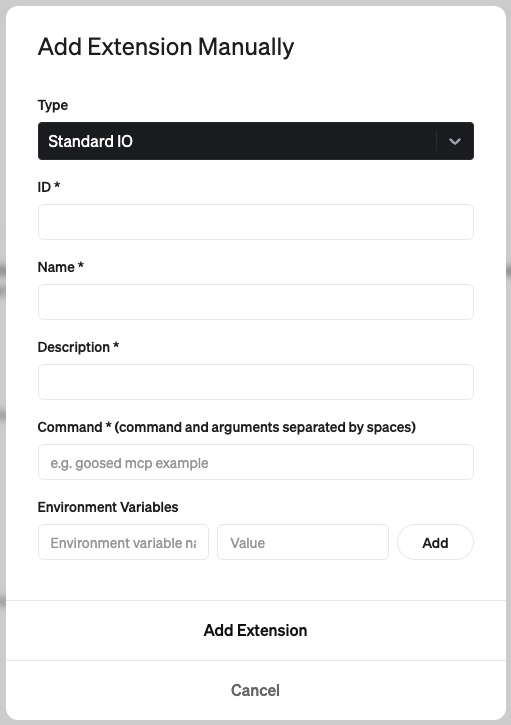
- ID:
code-mcp - Name:
VS Code - Description:
Allows interaction with VS Code through the Model Context Protocol - Command:
npx vscode-mcp-server
Claude Desktop Setup
Add this to your Claude Desktop config file (~/Library/Application Support/Claude/claude_desktop_config.json):
{
  "mcpServers": {
    "vscode-mcp-server": {
      "command": "npx",
      "args": ["vscode-mcp-server"],
      "env": {}
    }
  }
}
Available Tools
The Code MCP server provides the following tools for AI agents to interact with VS Code:
create_diff
Creates and shows a diff for modifying existing files:
- Shows changes preview before applying
- Requires user approval
- Only works with existing files
open_file
Opens files in the VS Code editor:
- Used for viewing new or modified files
open_project
Opens a project folder in VS Code:
- Sets up working directory for AI agent
check_extension_status
Checks if extension is installed and responding
get_extension_port
Gets the port number for VS Code MCP Extension
list_available_projects
Shows projects from port registry file
License
This project is licensed under the Apache License 2.0 - see the LICENSE file for details.
Copyright 2025 Block, Inc.
This product includes software developed at Block, Inc.
Alternatives



Related Skills
Browse all skillsThis skill should be used when working on Godot Engine projects. It provides specialized knowledge of Godot's file formats (.gd, .tscn, .tres), architecture patterns (component-based, signal-driven, resource-based), common pitfalls, validation tools, code templates, and CLI workflows. The `godot` command is available for running the game, validating scripts, importing resources, and exporting builds. Use this skill for tasks involving Godot game development, debugging scene/resource files, implementing game systems, or creating new Godot components.
Production-ready financial analyst skill with ratio analysis, DCF valuation, budget variance analysis, and rolling forecast construction. 4 Python tools (all stdlib-only). Works with Claude Code, Codex CLI, and OpenClaw.
Senior Python developer expertise for writing clean, efficient, and well-documented code. Use when: writing Python code, optimizing Python scripts, reviewing Python code for best practices, debugging Python issues, implementing type hints, or when user mentions Python, PEP 8, or needs help with Python data structures and algorithms.
UI design system toolkit for Senior UI Designer including design token generation, component documentation, responsive design calculations, and developer handoff tools. Use for creating design systems, maintaining visual consistency, and facilitating design-dev collaboration.
Create world-class, accessible, responsive interfaces with sophisticated interactive elements including chat, terminals, code display, and streaming content. Use when building user interfaces that need professional polish and developer-focused features.
Tools, patterns, and utilities for creating music with code. Output as a .mp3 file with realistic instrument sounds. Write custom compositions to bring creativity to life through music. This skill should be used whenever the user asks for music to be created. Never use this skill for replicating songs, beats, riffs, or other sensitive works. The skill is not suitable for vocal/lyrical music, audio mixing/mastering (reverb, EQ, compression), real-time MIDI playback, or professional studio recording quality.