
webclaw
Fast, local-first web content extraction for LLMs. Scrape, crawl, extract structured data — all from Rust. CLI, REST API, and MCP server.
A high-performance web scraper optimized for AI agents that extracts clean, structured content from URLs with 67% fewer tokens than raw HTML and sub-millisecond extraction speed.
About webclaw
webclaw is a community-built MCP server published by 0xMassi that provides AI assistants with tools and capabilities via the Model Context Protocol. Fast, local-first web content extraction for LLMs. Scrape, crawl, extract structured data — all from Rust. CLI, REST API, and MCP server. It is categorized under productivity. This server exposes 10 tools that AI clients can invoke during conversations and coding sessions.
How to install
You can install webclaw in your AI client of choice. Use the install panel on this page to get one-click setup for Cursor, Claude Desktop, VS Code, and other MCP-compatible clients. This server runs locally on your machine via the stdio transport.
License
webclaw is released under the AGPL-3.0 license.
Tools (10)
Extract content from any URL
Recursive site crawl
Discover URLs from sitemaps
Parallel multi-URL extraction
LLM-powered structured extraction
The fastest web scraper for AI agents.
67% fewer tokens. Sub-millisecond extraction. Zero browser overhead.








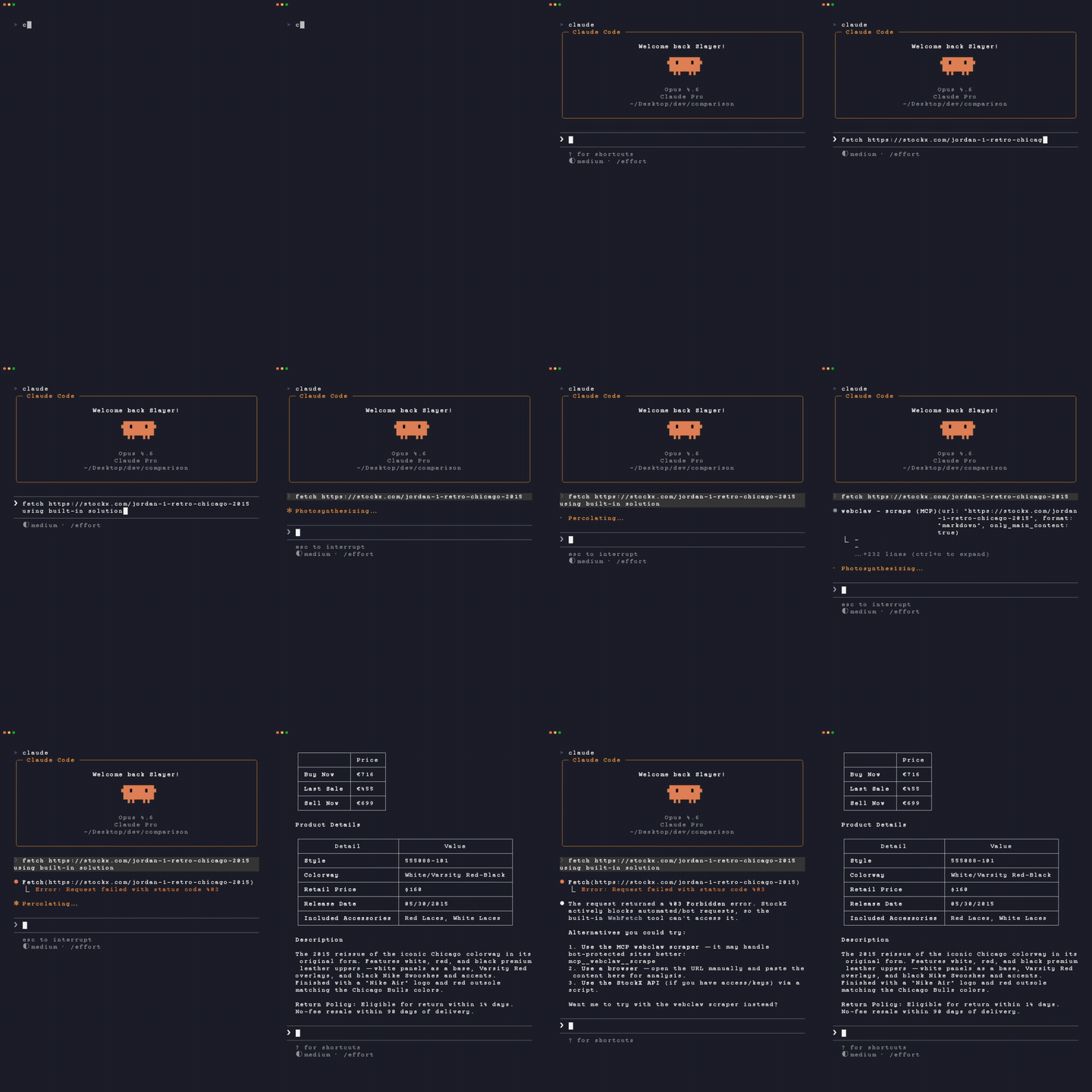
Claude Code's built-in web_fetch → 403 Forbidden. webclaw → clean markdown.
Your AI agent calls fetch() and gets a 403. Or 142KB of raw HTML that burns through your token budget. webclaw fixes both.
It extracts clean, structured content from any URL using Chrome-level TLS fingerprinting — no headless browser, no Selenium, no Puppeteer. Output is optimized for LLMs: 67% fewer tokens than raw HTML, with metadata, links, and images preserved.
                     Raw HTML                          webclaw
┌──────────────────────────────────┐    ┌──────────────────────────────────┐
│ <div class="ad-wrapper">         │    │ # Breaking: AI Breakthrough      │
│ <nav class="global-nav">         │    │                                  │
│ <script>window.__NEXT_DATA__     │    │ Researchers achieved 94%         │
│ ={...8KB of JSON...}</script>    │    │ accuracy on cross-domain         │
│ <div class="social-share">       │    │ reasoning benchmarks.            │
│ <button>Tweet</button>           │    │                                  │
│ <footer class="site-footer">     │    │ ## Key Findings                  │
│ <!-- 142,847 characters -->      │    │ - 3x faster inference            │
│                                  │    │ - Open-source weights            │
│         4,820 tokens             │    │         1,590 tokens             │
└──────────────────────────────────┘    └──────────────────────────────────┘
Get Started (30 seconds)
For AI agents (Claude, Cursor, Windsurf, VS Code)
npx create-webclaw
Auto-detects your AI tools, downloads the MCP server, and configures everything. One command.
Homebrew (macOS/Linux)
brew tap 0xMassi/webclaw
brew install webclaw
Prebuilt binaries
Download from GitHub Releases for macOS (arm64, x86_64) and Linux (x86_64, aarch64).
Cargo (from source)
cargo install --git https://github.com/0xMassi/webclaw.git webclaw-cli
cargo install --git https://github.com/0xMassi/webclaw.git webclaw-mcp
Docker
docker run --rm ghcr.io/0xmassi/webclaw https://example.com
Docker Compose (with Ollama for LLM features)
cp env.example .env
docker compose up -d
Why webclaw?
| webclaw | Firecrawl | Trafilatura | Readability | |
|---|---|---|---|---|
| Extraction accuracy | 95.1% | — | 80.6% | 83.5% |
| Token efficiency | -67% | — | -55% | -51% |
| Speed (100KB page) | 3.2ms | ~500ms | 18.4ms | 8.7ms |
| TLS fingerprinting | Yes | No | No | No |
| Self-hosted | Yes | No | Yes | Yes |
| MCP (Claude/Cursor) | Yes | No | No | No |
| No browser required | Yes | No | Yes | Yes |
| Cost | Free | $$$$ | Free | Free |
Choose webclaw if you want fast local extraction, LLM-optimized output, and native AI agent integration.
What it looks like
$ webclaw https://stripe.com -f llm

> URL: https://stripe.com
> Title: Stripe | Financial Infrastructure for the Internet
> Language: en
> Word count: 847

# Stripe | Financial Infrastructure for the Internet

Stripe is a suite of APIs powering online payment processing
and commerce solutions for internet businesses of all sizes.

## Products
- Payments — Accept payments online and in person
- Billing — Manage subscriptions and invoicing
- Connect — Build a marketplace or platform
...
$ webclaw https://github.com --brand

{
  "name": "GitHub",
  "colors": [{"hex": "#59636E", "usage": "Primary"}, ...],
  "fonts": ["Mona Sans", "ui-monospace"],
  "logos": [{"url": "https://github.githubassets.com/...", "kind": "svg"}]
}
$ webclaw https://docs.rust-lang.org --crawl --depth 2 --max-pages 50

Crawling... 50/50 pages extracted
---
# Page 1: https://docs.rust-lang.org/
...
# Page 2: https://docs.rust-lang.org/book/
...
MCP Server — 10 tools for AI agents
webclaw ships as an MCP server that plugs into Claude Desktop, Claude Code, Cursor, Windsurf, OpenCode, Antigravity, Codex CLI, and any MCP-compatible client.
npx create-webclaw # auto-detects and configures everything
Or manual setup — add to your Claude Desktop config:
{
  "mcpServers": {
    "webclaw": {
      "command": "~/.webclaw/webclaw-mcp"
    }
  }
}
Then in Claude: "Scrape the top 5 results for 'web scraping tools' and compare their pricing" — it just works.
Available tools
| Tool | Description | Requires API key? |
|---|---|---|
scrape | Extract content from any URL | No |
crawl | Recursive site crawl | No |
map | Discover URLs from sitemaps | No |
batch | Parallel multi-URL extraction | No |
extract | LLM-powered structured extraction | No (needs Ollama) |
summarize | Page summarization | No (needs Ollama) |
diff | Content change detection | No |
brand | Brand identity extraction | No |
search | Web search + scrape results | Yes |
research | Deep multi-source research | Yes |
8 of 10 tools work locally — no account, no API key, fully private.
Features
Extraction
- Readability scoring — multi-signal content detection (text density, semantic tags, link ratio)
- Noise filtering — strips nav, footer, ads, modals, cookie banners (Tailwind-safe)
- Data island extraction — catches React/Next.js JSON payloads, JSON-LD, hydration data
- YouTube metadata — structured data from any YouTube video
- PDF extraction — auto-detected via Content-Type
- 5 output formats — markdown, text, JSON, LLM-optimized, HTML
Content control
webclaw URL --include "article, .content"       # CSS selector include
webclaw URL --exclude "nav, footer, .sidebar"    # CSS selector exclude
webclaw URL --only-main-content                  # Auto-detect main content
Crawling
webclaw URL --crawl --depth 3 --max-pages 100   # BFS same-origin crawl
webclaw URL --crawl --sitemap                    # Seed from sitemap
webclaw URL --map                                # Discover URLs only
LLM features (Ollama / OpenAI / Anthropic)
webclaw URL --summarize                          # Page summary
webclaw URL --extract-prompt "Get all prices"    # Natural language extraction
webclaw URL --extract-json '{"type":"object"}'   # Schema-enforced extraction
Change tracking
webclaw URL -f json > snap.json                  # Take snapshot
webclaw URL --diff-with snap.json                # Compare later
Brand extraction
webclaw URL --brand # Colors, fonts, logos, OG image
Proxy rotation
webclaw URL --proxy http://user:pass@host:port   # Single proxy
webclaw URLs --proxy-file proxies.txt            # Pool rotation
Benchmarks
All numbers from real tests on 50 diverse pages. See benchmarks/ for methodology and reproduction instructions.
Extraction quality
Accuracy      webclaw     ███████████████████ 95.1%
              readability ████████████████▋   83.5%
              trafilatura ████████████████    80.6%
              newspaper3k █████████████▎      66.4%

Noise removal webclaw     ███████████████████ 96.1%
              readability █████████████████▊  89.4%
              trafilatura ██████████████████▏ 91.2%
              newspaper3k ███████████████▎    76.8%
Speed (pure extraction, no network)
10KB page     webclaw     ██                   0.8ms
              readability █████                2.1ms
              trafilatura ██████████           4.3ms

100KB page    webclaw     ██                   3.2ms
              readability █████                8.7ms
              trafilatura ██████████           18.4ms
Token efficiency (feeding to Claude/GPT)
| Format | Tokens
README truncated. View full README on GitHub.
Alternatives




Related Skills
Browse all skillsPERSONAL APP ARCHITECT - Strategic development orchestrator for personal productivity applications. Analyzes project context, makes architectural decisions for single-developer projects, delegates to specialized skills, and ensures alignment between user experience goals and technical implementation. Optimized for personal apps targeting 10-100 users.
Boost your productivity with automated task management
Creates educational Teams channel posts for internal knowledge sharing about Claude Code features, tools, and best practices. Applies when writing posts, announcements, or documentation to teach colleagues effective Claude Code usage, announce new features, share productivity tips, or document lessons learned. Provides templates, writing guidelines, and structured approaches emphasizing concrete examples, underlying principles, and connections to best practices like context engineering. Activates for content involving Teams posts, channel announcements, feature documentation, or tip sharing.
Expert methodology for defining, tracking, and interpreting engineering performance metrics including DORA, team health, productivity, and executive reporting.
Leveraging AI coding assistants and tools to boost development productivity, while maintaining oversight to ensure quality results.
This skill should be used whenever users request personal assistance tasks such as schedule management, task tracking, reminder setting, habit monitoring, productivity advice, time management, or any query requiring personalized responses based on user preferences and context. On first use, collects comprehensive user information including schedule, working habits, preferences, goals, and routines. Maintains an intelligent database that automatically organizes and prioritizes information, keeping relevant data and discarding outdated context.