
Ableton
Connects AI assistants to Ableton Live for automated music production tasks like adding notes, loading devices, and managing clips. Helps producers automate tedious DAW operations using natural language commands.
AI assistant for Ableton Live music production.
What it does
- Add and modify MIDI notes in clips
- Load instruments and audio effects into tracks
- Browse and access Ableton Live resources
- Get and set clip properties
- Remove and replace notes in clips
- Batch modify clip settings
Best for
About Ableton
Ableton is a community-built MCP server published by xiaolaa2 that provides AI assistants with tools and capabilities via the Model Context Protocol. Boost your Ableton Live music production with an AI assistant designed for seamless Ableton integration and enhanced creative workflows. It is categorized under productivity, developer tools. This server exposes 35 tools that AI clients can invoke during conversations and coding sessions.
How to install
You can install Ableton in your AI client of choice. Use the install panel on this page to get one-click setup for Cursor, Claude Desktop, VS Code, and other MCP-compatible clients. This server runs locally on your machine via the stdio transport.
License
Ableton is released under the MIT license. This is a permissive open-source license, meaning you can freely use, modify, and distribute the software.
Tools (35)
List Ableton live Browser resources of specified type
Load a resource which is loadable (audio effect/instrument/plugin/drums/midi effect/sounds) into a track. If track_id is not provided, will load to currently selected track. If no track is selected, instruments will be loaded to the last MIDI track, and audio effects will be loaded to the last MIDI or audio track.
Get clip properties by clip id. To get specific properties, set the corresponding property name to true in the properties parameter.
Get clip notes by clip id. Returns NoteExtended array for Live 11+ and Note array for Live 10 and below
Remove clip notes by clip id
ableton-copilot-mcp




An MCP (Model Context Protocol) server built on ableton-js for real-time interaction and control with Ableton Live's Arrangement View, dedicated to assisting music producers in their music production.
🎯 Note
As a music producer, I have some understanding of using Ableton for music creation. During the creative process, we often need to handle various tedious operations, such as humanizing note properties, merging notes, recording one track to another audio track, etc. Previously, we could only rely on the functions provided by the host DAW for these operations. However, with the emergence of large language models and MCP, we now have the possibility to let AI help us with automation. Although it's still not realistic for AI to directly generate notes or create a complete song (it can't generate a good-sounding song), having AI assist us with auxiliary operations presents a new possibility.
🎥 Demo
This is a simple demonstration video of MIDI operations.
https://github.com/user-attachments/assets/8d635c4c-a1f2-44be-93ae-062038d14c71
🚀 Features
🎵 Song Control
- Get basic song information (root note, scale name, tempo, song length, etc.)
- Get a list of all tracks
- Create MIDI, audio, and return tracks
- Delete and duplicate tracks
🎹 Track Management
- Get all clips in a track
- Create empty MIDI clips in the arrangement view tracks
- Create audio clips in tracks based on provided sample file paths
- Set track properties (mute, color, name, arm, solo, etc.)
- Duplicate MIDI clips to specified tracks
🎼 Clip Operations
- Get clips in the piano roll view
- Get and manage all notes in a clip
- Add, delete, and replace notes in clips
- Set clip properties (name, color, looping, loop_start, loop_end, etc.)
🎧 Audio Operations
- Supports recording track content based on time range
🔌 Device Management
- Load audio effects, instruments and plugins
- Modify device parameters
- Browse available devices in the library
📝 State Management
- Operation history tracking and detailed logging
- Support for operation rollback (currently only supports note operations)
- Browse and restore previous states
📝 To-Do List
- Support automatic envelope adjustment
- Support more snapshot types (track properties, device parameters, etc.)
⚠️ Warning
- Direct manipulation of MIDI clips by AI may result in the loss of original notes and cannot be undone with Ctrl + Z. Please operate with caution. If needed, you can ask the AI to help you roll back note operations.
📥 Installation
Prerequisites
- Node.js environment: Ensure Node.js is installed (v20+ recommended) and the
npxcommand is available🔗 Download: Node.js official website
Installation Steps
1. Install AbletonJS MIDI Remote Scripts
Choose ONE of the following three methods to install MIDI Remote Scripts:
-
Method 1: One-line installation (Recommended)
npx @xiaolaa2/ableton-copilot-mcp --install-scripts # or use the short form npx @xiaolaa2/ableton-copilot-mcp -is -
Method 2: Tool-assisted installation
- First, start ableton-copilot-mcp (see Usage section below)
- Let AI assistant or manually call the MCP tool
init_ableton_jsto complete the installation automatically
-
Method 3: Manual installation
- Create a folder named "Remote Scripts" in your Ableton User Library:
- Windows:
C:\Users\[username]\Documents\Ableton\User Library\Remote Scripts - Mac:
/Users/[username]/Music/Ableton/User Library/Remote Scripts
- Windows:
- Download MIDI Remote Scripts from the ableton-js project
- Copy the downloaded
midi-scriptfolder to the location above - Rename it to
AbletonJS
- Create a folder named "Remote Scripts" in your Ableton User Library:
🔧 Usage
Quick Start
-
Launch Ableton Live
-
Enable AbletonJS Control Surface
- Open Ableton Live Preferences:
Preferences→Link/MIDI - In the
MIDItab, locate theControl Surfacesection - Select
AbletonJSfrom the dropdown menu
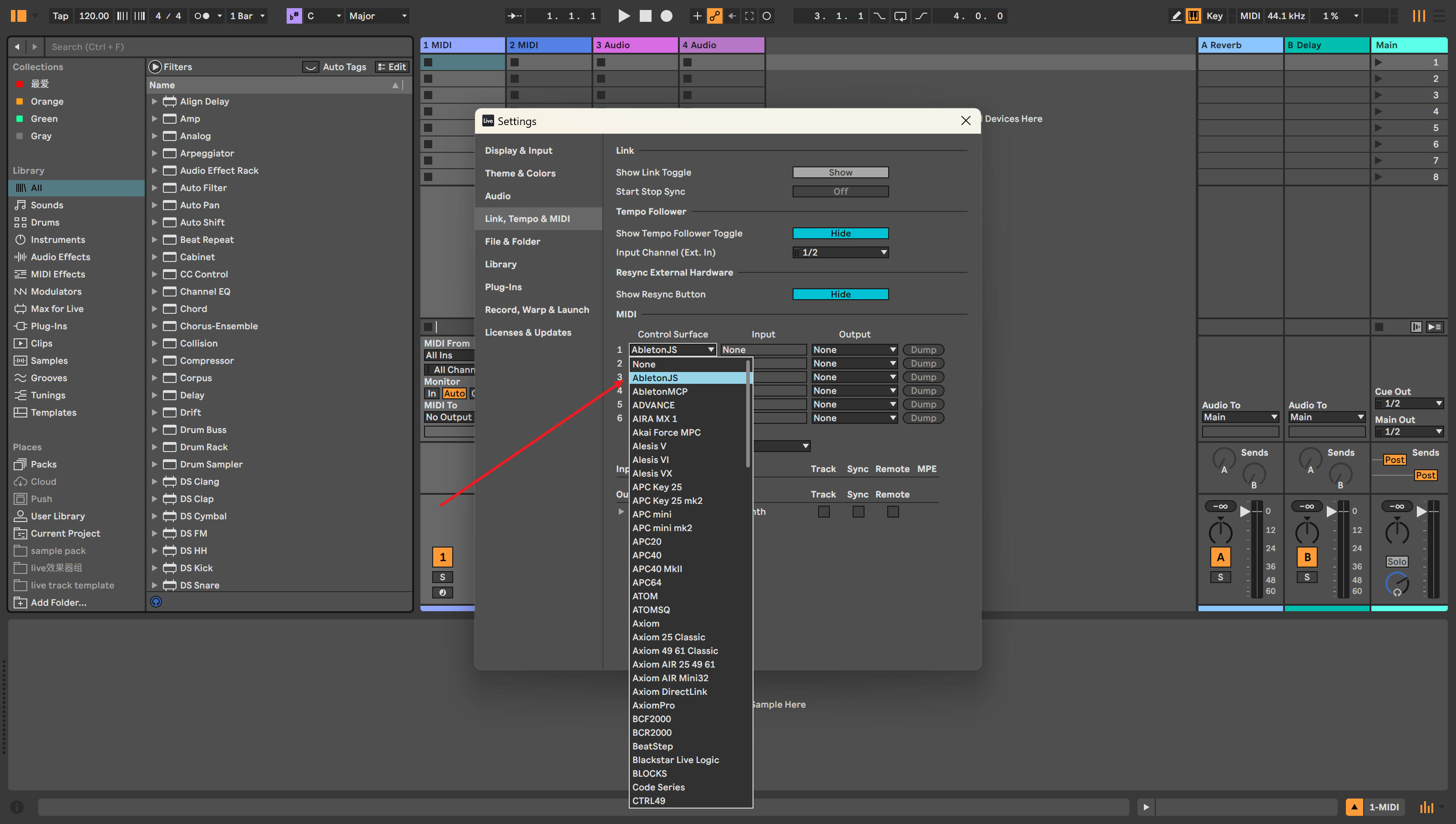
Figure 1: Enabling AbletonJS Control Surface in Ableton Live Configuration
- Open Ableton Live Preferences:
-
Connect using an MCP client
The following clients can be used as MCP endpoints:
- Cursor
- Cherry Studio
- Claude Desktop
- Other MCP clients
Client Configuration
Cursor Configuration Example
Add the following configuration to your Cursor settings:
"ableton-js-mcp": {
    "command": "npx",
    "args": [
        "-y",
        "@xiaolaa2/ableton-copilot-mcp"
    ]
}
For the latest version:
"ableton-js-mcp": {
    "command": "npx",
    "args": [
        "-y",
        "@xiaolaa2/ableton-copilot-mcp@latest"
    ]
}
Custom Storage Path (Optional)
You can specify a custom data storage location using the BASE_PATH environment variable:
"ableton-js-mcp": {
    "command": "npx",
    "args": [
        "-y",
        "@xiaolaa2/ableton-copilot-mcp"
    ],
    "env": {
        "BASE_PATH": "D:\\ableton_copilot_mcp"
    }
}
💡 Tip: The storage path is used to save log files, operation history, and state snapshots
✅ Compatibility Testing
Compatibility primarily depends on the version support of the ableton-js library.
| Ableton Live Version | Test Status |
|---|---|
| 12.1.10 | ✅ Tested and working |
| 11.x | ⚠️ Not tested yet |
| 10.x | ⚠️ Not tested yet |
🤝 Contributing
Issues and contributions are welcome. Please submit issues or suggestions through GitHub Issues.
📄 License
This project is licensed under the MIT License.
⚠️ Disclaimer
This is a third-party integration and not made by Ableton.
Alternatives



Related Skills
Browse all skillsUI design system toolkit for Senior UI Designer including design token generation, component documentation, responsive design calculations, and developer handoff tools. Use for creating design systems, maintaining visual consistency, and facilitating design-dev collaboration.
Answer questions about the AI SDK and help build AI-powered features. Use when developers: (1) Ask about AI SDK functions like generateText, streamText, ToolLoopAgent, embed, or tools, (2) Want to build AI agents, chatbots, RAG systems, or text generation features, (3) Have questions about AI providers (OpenAI, Anthropic, Google, etc.), streaming, tool calling, structured output, or embeddings, (4) Use React hooks like useChat or useCompletion. Triggers on: "AI SDK", "Vercel AI SDK", "generateText", "streamText", "add AI to my app", "build an agent", "tool calling", "structured output", "useChat".
PERSONAL APP ARCHITECT - Strategic development orchestrator for personal productivity applications. Analyzes project context, makes architectural decisions for single-developer projects, delegates to specialized skills, and ensures alignment between user experience goals and technical implementation. Optimized for personal apps targeting 10-100 users.
Creates educational Teams channel posts for internal knowledge sharing about Claude Code features, tools, and best practices. Applies when writing posts, announcements, or documentation to teach colleagues effective Claude Code usage, announce new features, share productivity tips, or document lessons learned. Provides templates, writing guidelines, and structured approaches emphasizing concrete examples, underlying principles, and connections to best practices like context engineering. Activates for content involving Teams posts, channel announcements, feature documentation, or tip sharing.
Use when working with the OpenAI API (Responses API) or OpenAI platform features (tools, streaming, Realtime API, auth, models, rate limits, MCP) and you need authoritative, up-to-date documentation (schemas, examples, limits, edge cases). Prefer the OpenAI Developer Documentation MCP server tools when available; otherwise guide the user to enable `openaiDeveloperDocs`.
Guide for building TypeScript CLIs with Bun. Use when creating command-line tools, adding subcommands to existing CLIs, or building developer tooling. Covers argument parsing, subcommand patterns, output formatting, and distribution.