
arch-linux-mcp
Provides AI-assisted access to Arch Linux documentation, package management, and the AUR with security checking. Works on both Arch and non-Arch systems.
Arch Linux MCP (Model Context Protocol)
What it does
- Search Arch Wiki documentation
- Browse and install AUR packages safely
- Get official Arch repository package info
- Check for system updates without applying them
- Audit AUR packages for security risks
- Manage orphaned packages and file ownership
Best for
About arch-linux-mcp
arch-linux-mcp is a community-built MCP server published by nihalxkumar that provides AI assistants with tools and capabilities via the Model Context Protocol. High-performance Arch Linux MCP server — Model Context Protocol implementation for lightweight, secure, and custom deployments. It is categorized under auth security, developer tools. This server exposes 22 tools that AI clients can invoke during conversations and coding sessions.
How to install
You can install arch-linux-mcp in your AI client of choice. Use the install panel on this page to get one-click setup for Cursor, Claude Desktop, VS Code, and other MCP-compatible clients. This server runs locally on your machine via the stdio transport.
License
arch-linux-mcp is released under the GPL-3.0 license.
Tools (22)
[DISCOVERY] Search the Arch Wiki for documentation. Returns a list of matching pages with titles, snippets, and URLs. Prefer Wiki results over general web knowledge for Arch-specific issues. Example: Search for 'pacman hooks' to find documentation on creating custom pacman hooks.
[DISCOVERY] Search the Arch User Repository (AUR) for packages with smart ranking. ⚠️ WARNING: AUR packages are user-produced and potentially unsafe. Returns package info including votes, maintainer, and last update. Always check official repos first using get_official_package_info. Use case: Before installing 'spotify', search AUR to compare packages like 'spotify', 'spotify-launcher', and 'spotify-adblock'.
[DISCOVERY] Get information about an official Arch repository package (Core, Extra, etc.). Uses local pacman if available, otherwise queries archlinux.org API. Always prefer official packages over AUR when available. Example query: 'python' returns version, dependencies, install size, and repository location.
[LIFECYCLE] Check for available system updates without applying them. Only works on Arch Linux systems. Requires pacman-contrib package. Safe read-only operation that shows pending updates. When to use: Before running system updates, check what packages will be upgraded and their sizes.
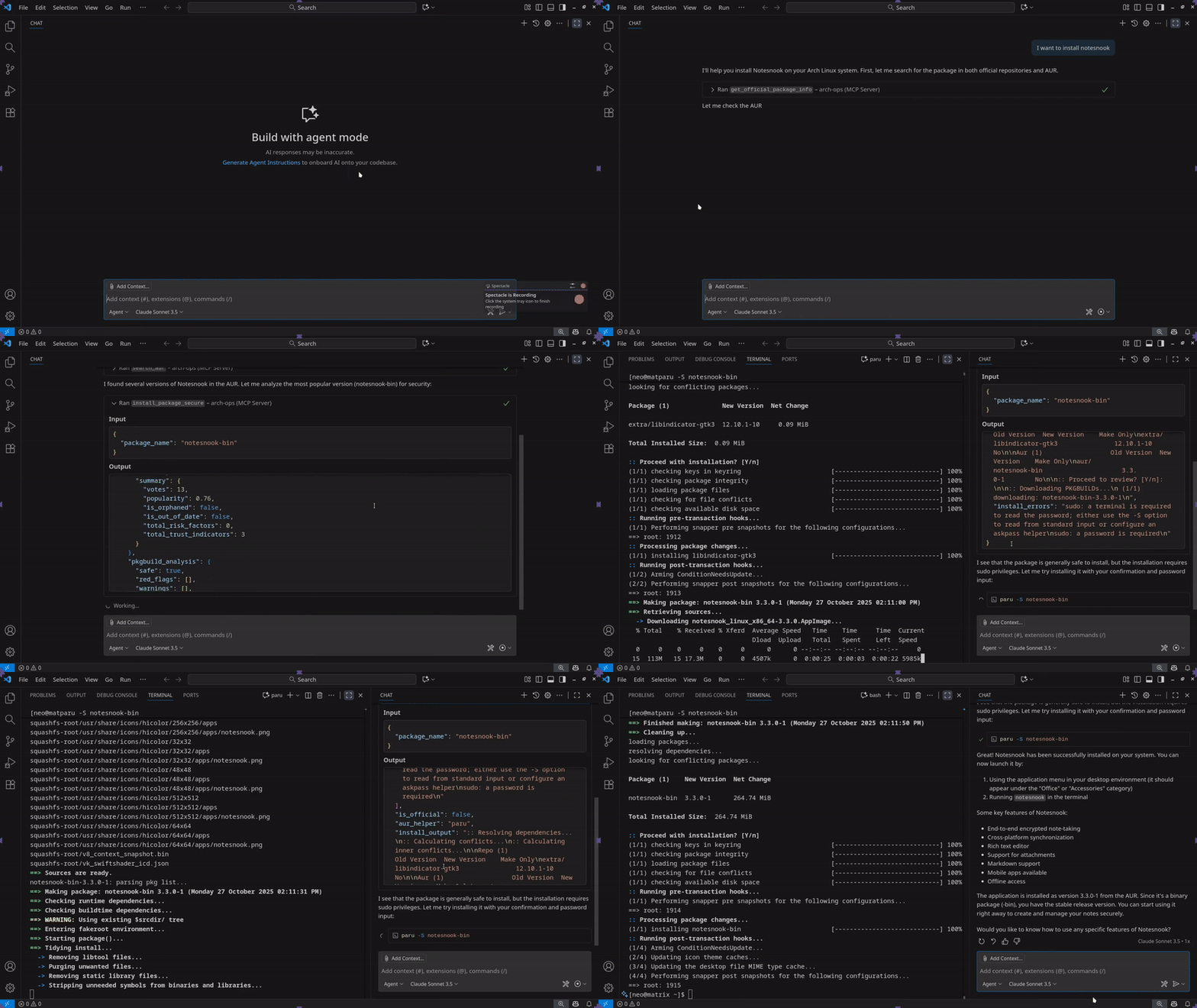
[LIFECYCLE] Install a package with comprehensive security checks. Workflow: 1. Check official repos first (safer) 2. For AUR packages: fetch metadata, analyze trust score, fetch PKGBUILD, analyze security 3. Block installation if critical security issues found 4. Check for AUR helper (paru > yay) 5. Install with --noconfirm if all checks pass. Only works on Arch Linux. Requires sudo access and paru/yay for AUR packages.
Arch Linux MCP Server

Disclaimer: Unofficial community project, not affiliated with Arch Linux.
A Model Context Protocol (MCP) server that bridges AI assistants with the Arch Linux ecosystem. Enables intelligent, safe, and efficient access to the Arch Wiki, AUR, and official repositories for AI-assisted Arch Linux usage on Arch and non-Arch systems.
Leverage AI to get digestible, structured results that are ready for follow up questions and actions.
📖 Complete Documentation with Comfy Guides
Sneak Peak into what's available
Using VS Code Sonnet 3.5 for Safe Installation from AUR
Asking Claude Code Sonnet 4.5 for fedora equivalent command

Resources (URI-based Access)
Direct access to Arch ecosystem data via custom URI schemes:
Documentation & Search
| URI Scheme | Example | Returns |
|---|---|---|
archwiki:// | archwiki://Installation_guide | Markdown-formatted Wiki page |
Package Information
| URI Scheme | Example | Returns |
|---|---|---|
archrepo:// | archrepo://vim | Official repository package details |
aur://*/info | aur://yay/info | AUR package metadata (votes, maintainer, dates) |
aur://*/pkgbuild | aur://yay/pkgbuild | Raw PKGBUILD with safety analysis |
System Packages (Arch only)
| URI Scheme | Example | Returns |
|---|---|---|
pacman://installed | pacman://installed | System installed packages list |
pacman://orphans | pacman://orphans | Orphaned packages |
pacman://explicit | pacman://explicit | Explicitly installed packages |
pacman://groups | pacman://groups | All package groups |
pacman://group/* | pacman://group/base-devel | Packages in specific group |
pacman://database/freshness | pacman://database/freshness | Package database sync status |
System Monitoring & Logs
| URI Scheme | Example | Returns |
|---|---|---|
system://info | system://info | System information (kernel, memory, uptime) |
system://disk | system://disk | Disk space usage statistics |
system://services/failed | system://services/failed | Failed systemd services |
system://logs/boot | system://logs/boot | Recent boot logs |
pacman://log/recent | pacman://log/recent | Recent package transactions |
pacman://log/failed | pacman://log/failed | Failed package transactions |
News & Updates
| URI Scheme | Example | Returns |
|---|---|---|
archnews://latest | archnews://latest | Latest Arch Linux news |
archnews://critical | archnews://critical | Critical news requiring manual intervention |
archnews://since-update | archnews://since-update | News since last system update |
Configuration
| URI Scheme | Example | Returns |
|---|---|---|
config://pacman | config://pacman | Parsed pacman.conf configuration |
config://makepkg | config://makepkg | Parsed makepkg.conf configuration |
mirrors://active | mirrors://active | Currently configured mirrors |
mirrors://health | mirrors://health | Mirror configuration health status |
Tools (Executable Functions)
Package Search & Information
| Tool | Description | Platform |
|---|---|---|
search_archwiki | Query Arch Wiki with ranked results | Any |
search_aur | Search AUR (relevance/votes/popularity/modified) | Any |
get_official_package_info | Get official package details (hybrid local/remote) | Any |
Package Lifecycle Management
| Tool | Description | Platform |
|---|---|---|
check_updates_dry_run | Check for available updates | Arch only |
install_package_secure | Install with security checks (blocks malicious packages) | Arch only |
remove_packages | Remove packages - accepts single package name or list (with deps, forced) | Arch only |
Package Analysis & Maintenance
| Tool | Description | Platform |
|---|---|---|
manage_orphans | Manage orphaned packages (2 actions: list orphaned packages, remove orphans). Always runs in dry-run mode first for safety. | Arch only |
verify_package_integrity | Check file integrity (modified/missing files) | Arch only |
manage_install_reason | Manage install reasons (3 actions: list explicit packages, mark as explicit/dependency) | Arch only |
Package Organization
| Tool | Description | Platform |
|---|---|---|
query_file_ownership | Unified file-package ownership queries (3 modes: file→package, package→files, filename search) | Arch only |
list_package_groups | List all groups (base, base-devel, etc.) | Arch only |
list_group_packages | Show packages in specific group | Arch only |
System Monitoring & Diagnostics
| Tool | Description | Platform |
|---|---|---|
get_system_info | System info (kernel, memory, uptime) | Any |
check_disk_space | Disk usage with warnings | Any |
get_pacman_cache_stats | Package cache size and age | Arch only |
check_failed_services | Find failed systemd services | systemd |
get_boot_logs | Retrieve journalctl boot logs | systemd |
check_database_freshness | Check package database sync status | Arch only |
Transaction History & Logs
| Tool | Description | Platform |
|---|---|---|
query_package_history | Unified tool for querying package history from pacman logs (4 query types). Examples: query_type='all' shows recent transactions; query_type='package', package_name='docker' shows when docker was installed/upgraded; query_type='failures' shows failed operations; query_type='sync' shows database sync history. | Arch only |
News & Safety Checks
| Tool | Description | Platform |
|---|---|---|
get_latest_news | Fetch Arch Linux news from RSS | Any |
check_critical_news | Fi |
README truncated. View full README on GitHub.
Alternatives



Related Skills
Browse all skillsUse when working with the OpenAI API (Responses API) or OpenAI platform features (tools, streaming, Realtime API, auth, models, rate limits, MCP) and you need authoritative, up-to-date documentation (schemas, examples, limits, edge cases). Prefer the OpenAI Developer Documentation MCP server tools when available; otherwise guide the user to enable `openaiDeveloperDocs`.
Security audit and validation tools for the Agent Skills ecosystem. Scan skill packages for common vulnerabilities like credential leaks, unauthorized file access, and Git history secrets. Use when you need to audit skills for security before installation, validate skill packages against Agent Skills standards, or ensure your skills follow best practices.
Azure Identity SDK for Rust authentication. Use for DeveloperToolsCredential, ManagedIdentityCredential, ClientSecretCredential, and token-based authentication. Triggers: "azure-identity", "DeveloperToolsCredential", "authentication rust", "managed identity rust", "credential rust".
CCXT cryptocurrency exchange library for TypeScript and JavaScript developers (Node.js and browser). Covers both REST API (standard) and WebSocket API (real-time). Helps install CCXT, connect to exchanges, fetch market data, place orders, stream live tickers/orderbooks, handle authentication, and manage errors. Use when working with crypto exchanges in TypeScript/JavaScript projects, trading bots, arbitrage systems, or portfolio management tools. Includes both REST and WebSocket examples.
.NET/C# backend developer for ASP.NET Core APIs with Entity Framework Core. Builds REST APIs, minimal APIs, gRPC services, authentication with Identity/JWT, authorization, database operations, background services, SignalR real-time features. Activates for: .NET, C#, ASP.NET Core, Entity Framework Core, EF Core, .NET Core, minimal API, Web API, gRPC, authentication .NET, Identity, JWT .NET, authorization, LINQ, async/await C#, background service, IHostedService, SignalR, SQL Server, PostgreSQL .NET, dependency injection, middleware .NET.
Build full-stack applications with Supabase (PostgreSQL, Auth, Storage, Real-time, Edge Functions). Use when implementing authentication, database design with RLS, file storage, real-time features, or serverless functions.