
Confluent Cloud
OfficialManages Kafka topics, connectors, and Flink SQL statements in Confluent Cloud through natural language commands via REST APIs.
Enables natural language management of Kafka topics, connectors, and Flink SQL statements through Confluent Cloud REST APIs for streamlined data streaming operations
What it does
- Create and manage Kafka topics
- Configure data connectors
- Execute Flink SQL statements
- Query streaming data pipelines
- Monitor Kafka cluster status
- Manage schema registry objects
Best for
About Confluent Cloud
Confluent Cloud is an official MCP server published by confluentinc that provides AI assistants with tools and capabilities via the Model Context Protocol. Manage Kafka data streaming with Confluent Cloud APIs. Streamline Kafka stream operations using natural language and REST APIs for efficient data streaming. It is categorized under cloud infrastructure, analytics data.
How to install
You can install Confluent Cloud in your AI client of choice. Use the install panel on this page to get one-click setup for Cursor, Claude Desktop, VS Code, and other MCP-compatible clients. This server runs locally on your machine via the stdio transport.
License
Confluent Cloud is released under the MIT license. This is a permissive open-source license, meaning you can freely use, modify, and distribute the software.
mcp-confluent
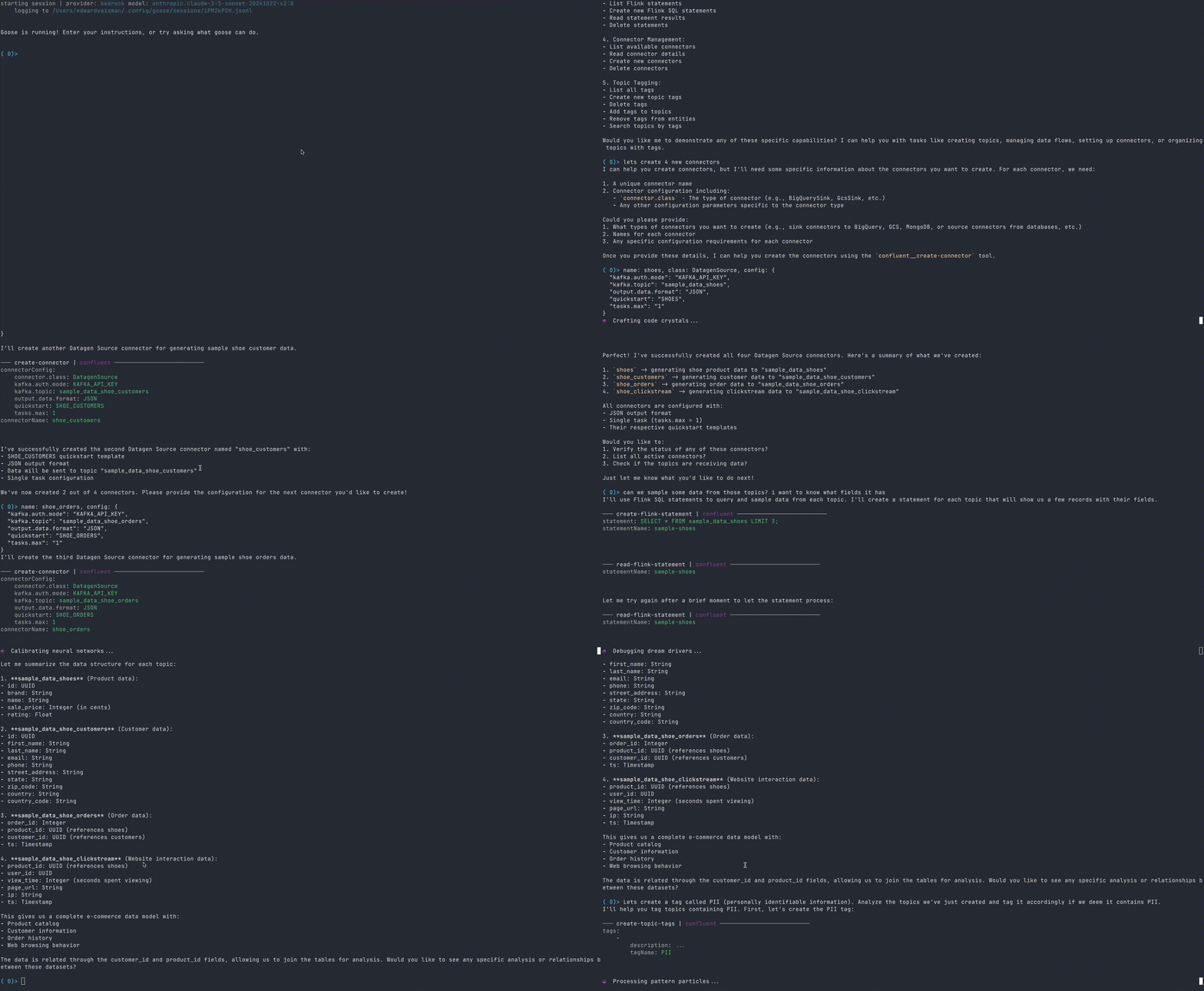
An MCP server implementation that enables AI assistants to interact with Confluent Cloud REST APIs. This server allows AI tools like Claude Desktop and Goose CLI to manage Kafka topics, connectors, and Flink SQL statements through natural language interactions.

Demo
Goose CLI
Claude Desktop
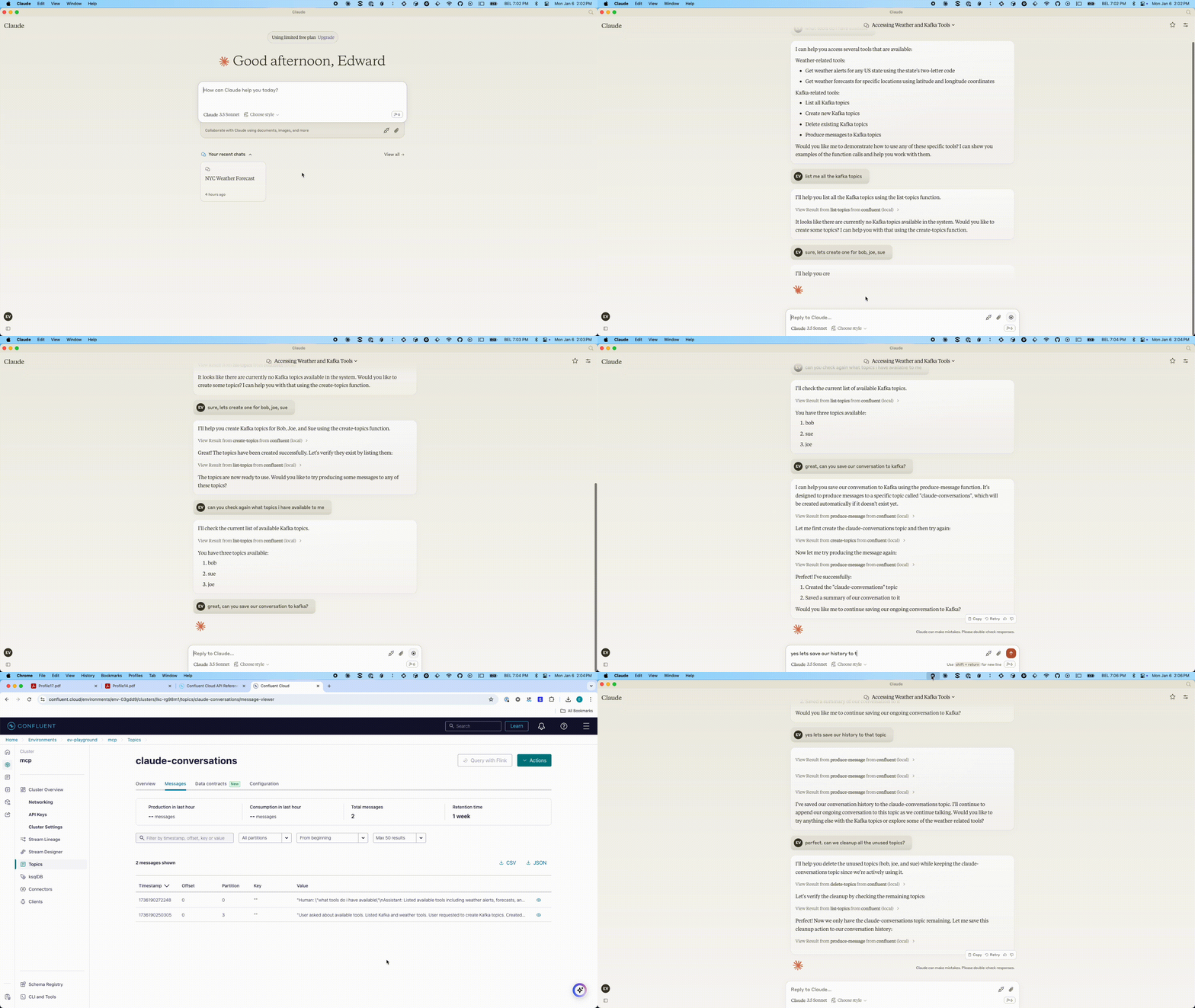
Table of Contents
- mcp-confluent
User Guide
Getting Started
-
Create a
.envfile: Copy the provided.env.examplefile to.envin the root of your project:cp .env.example .env -
Populate the
.envfile: Fill in the necessary values for your Confluent Cloud environment. See the Configuration section for details on each variable. -
Install Node.js (if not already installed)
- We recommend using NVM (Node Version Manager) to manage Node.js versions
- Install and use Node.js:
nvm install 22
nvm use 22
Configuration
Copy .env.example to .env in the root directory and fill in your values. See the example structure below:
Example .env file structure
# .env file
BOOTSTRAP_SERVERS="pkc-v12gj.us-east4.gcp.confluent.cloud:9092"
KAFKA_API_KEY="..."
KAFKA_API_SECRET="..."
KAFKA_REST_ENDPOINT="https://pkc-v12gj.us-east4.gcp.confluent.cloud:443"
KAFKA_CLUSTER_ID=""
KAFKA_ENV_ID="env-..."
FLINK_ENV_ID="env-..."
FLINK_ORG_ID=""
FLINK_REST_ENDPOINT="https://flink.us-east4.gcp.confluent.cloud"
FLINK_ENV_NAME=""
FLINK_DATABASE_NAME=""
FLINK_API_KEY=""
FLINK_API_SECRET=""
FLINK_COMPUTE_POOL_ID="lfcp-..."
TABLEFLOW_API_KEY=""
TABLEFLOW_API_SECRET=""
CONFLUENT_CLOUD_API_KEY=""
CONFLUENT_CLOUD_API_SECRET=""
CONFLUENT_CLOUD_REST_ENDPOINT="https://api.confluent.cloud"
SCHEMA_REGISTRY_API_KEY="..."
SCHEMA_REGISTRY_API_SECRET="..."
SCHEMA_REGISTRY_ENDPOINT="https://psrc-zv01y.northamerica-northeast2.gcp.confluent.cloud"
Prerequisites & Setup for Tableflow Commands
In order to leverage Tableflow commands to interact with your data ecosystem and successfully execute these Tableflow commands and manage resources (e.g., interacting with data storage like AWS S3 and metadata catalogs like AWS Glue), certain IAM (Identity and Access Management) permissions and configurations are essential.
It is crucial to set up the necessary roles and policies in your cloud environment (e.g., AWS) and link them correctly within Confluent Cloud. This ensures your Flink SQL cluster, which powers Tableflow, has the required authorization to perform operations on your behalf.
Please refer to the following Confluent Cloud documentation for detailed instructions on setting up these permissions and integrating with custom storage and Glue:
- Confluent Cloud Tableflow Quick Start with Custom Storage & Glue: https://docs.confluent.io/cloud/current/topics/tableflow/get-started/quick-start-custom-storage-glue.html
Ensuring these prerequisites are met will prevent authorization errors when the mcp-server attempts to provision or manage Tableflow-enabled tables.
Authentication for HTTP/SSE Transports
When using HTTP or SSE transports, the MCP server requires API key authentication to prevent unauthorized access and protect against DNS rebinding attacks. This is enabled by default.
Generating an API Key
Generate a secure API key using the built-in utility:
npx @confluentinc/mcp-confluent --generate-key
This will output a 64-character key generated using secure cryptography:
Generated MCP API Key:
================================================================
a1b2c3d4e5f6...your-64-char-key-here...
================================================================
Configuring Authentication
Add the generated key to your .env file:
# MCP Server Authentication (required for HTTP/SSE transports)
MCP_API_KEY=your-generated-64-char-key-here
Making Authenticated Requests
Include the API key in the cflt-mcp-api-Key header for all HTTP/SSE requests:
curl -H "cflt-mcp-api-Key: your-api-key" http://localhost:8080/mcp
DNS Rebinding Protection
The server includes additional protections against DNS rebinding attacks:
- Host Header Validation: Only requests with allowed Host headers are accepted
Configure allowed hosts if needed:
# Allow additional hosts (comma-separated)
MCP_ALLOWED_HOSTS=localhost,127.0.0.1,myhost.local
Additional security to prevent internet exposure of MCP server
- Localhost Binding: Server binds to
127.0.0.1by default (not0.0.0.0)
Disabling Authentication (Development Only)
For local development, you can disable authentication:
# Via CLI flag
npx @confluentinc/mcp-confluent -e .env --transport http --disable-auth

# Or via environment variable
MCP_AUTH_DISABLED=true
Warning: Never disable authentication in production or when the server is network-accessible.
Environment Variables Reference
| Variable | Description | Default Value | Required |
|---|---|---|---|
| HTTP_HOST | Host to bind for HTTP transport. Defaults to localhost only for security. | "127.0.0.1" | Yes |
| HTTP_MCP_ENDPOINT_PATH | HTTP endpoint path for MCP transport (e.g., '/mcp') (string) | "/mcp" | Yes |
| HTTP_PORT | Port to use for HTTP transport (number (min: 0)) | 8080 | Yes |
| LOG_LEVEL | Log level for application logging (trace, debug, info, warn, error, fatal) | "info" | Yes |
| MCP_API_KEY | API key for HTTP/SSE authentication. Generate using --generate-key. Required when auth is enabled. | No* | |
| MCP_AUTH_DISABLED | Disable authentication for HTTP/SSE transports. WARNING: Only use in development environments. | false | No |
| MCP_ALLOWED_HOSTS | Comma-separated list of allowed Host header values for DNS rebinding protection. | "localhost,127.0.0.1" | No |
| SSE_MCP_ENDPOINT_PATH | SSE endpoint path for establishing SSE connections (e.g., '/sse', '/events') (string) | "/sse" | Yes |
| SSE_MCP_MESSAGE_ENDPOINT_PATH | SSE message endpoint path for receiving messages (e.g., '/messages', '/events/messages') (string) | "/messages" | Yes |
| BOOTSTRAP_SERVERS | List of Kafka broker addresses in the format host1:port1,host |
README truncated. View full README on GitHub.
Alternatives




Related Skills
Browse all skillsBuild scalable data pipelines, modern data warehouses, and real-time streaming architectures. Implements Apache Spark, dbt, Airflow, and cloud-native data platforms. Use PROACTIVELY for data pipeline design, analytics infrastructure, or modern data stack implementation.
YouTube Data API v3 analytics toolkit. Analyze YouTube channels, videos, and search results. Use when the user asks to: check YouTube channel stats, analyze video performance, compare channels, search for videos, get subscriber counts, view engagement metrics, find trending videos, get channel uploads, or analyze YouTube competition. Requires a YouTube Data API v3 key from Google Cloud Console.
You are a cloud cost optimization expert specializing in reducing infrastructure expenses while maintaining performance and reliability. Analyze cloud spending, identify savings opportunities, and implement cost-effective architectures across AWS, Azure, and GCP.
Google Analytics 4, Search Console, and Indexing API toolkit. Analyze website traffic, page performance, user demographics, real-time visitors, search queries, and SEO metrics. Use when the user asks to: check site traffic, analyze page views, see traffic sources, view user demographics, get real-time visitor data, check search console queries, analyze SEO performance, request URL re-indexing, inspect index status, compare date ranges, check bounce rates, view conversion data, or get e-commerce revenue. Requires a Google Cloud service account with GA4 and Search Console access.
This skill should be used when the user asks to "pentest AWS", "test AWS security", "enumerate IAM", "exploit cloud infrastructure", "AWS privilege escalation", "S3 bucket testing", "metadata SSRF", "Lambda exploitation", or needs guidance on Amazon Web Services security assessment.
Execute Hugging Face Hub operations using the `hf` CLI. Use when the user needs to download models/datasets/spaces, upload files to Hub repositories, create repos, manage local cache, or run compute jobs on HF infrastructure. Covers authentication, file transfers, repository creation, cache operations, and cloud compute.