
Cycode Security Scanner
OfficialPerforms comprehensive security scans on code repositories to detect vulnerabilities, secrets, misconfigurations, and other security issues using Cycode's platform.
Integrates with Cycode's security platform to perform automated SAST, SCA, IaC, and secrets scanning on local files, Git repositories, and commit ranges with detailed vulnerability reports and remediation guidance.
What it does
- Scan repositories for hardcoded secrets
- Detect infrastructure as code misconfigurations
- Analyze software composition vulnerabilities
- Run static application security testing
- Scan specific commit ranges or branches
- Generate detailed vulnerability reports with remediation guidance
Best for
About Cycode Security Scanner
Cycode Security Scanner is an official MCP server published by cycodehq that provides AI assistants with tools and capabilities via the Model Context Protocol. Use Cycode Security Scanner for automated SAST and site scanner virus checks on local files and repos, with detailed vulnerability reports. It is categorized under auth security, developer tools.
How to install
You can install Cycode Security Scanner in your AI client of choice. Use the install panel on this page to get one-click setup for Cursor, Claude Desktop, VS Code, and other MCP-compatible clients. This server runs locally on your machine via the stdio transport.
License
Cycode Security Scanner is released under the MIT license. This is a permissive open-source license, meaning you can freely use, modify, and distribute the software.
Cycode CLI User Guide
The Cycode Command Line Interface (CLI) is an application you can install locally to scan your repositories for secrets, infrastructure as code misconfigurations, software composition analysis vulnerabilities, and static application security testing issues.
This guide walks you through both installation and usage.
Table of Contents
- Prerequisites
- Installation
- Cycode CLI Commands
- MCP Command
- Scan Command
- Report command
- Import command
- Scan logs
- Syntax Help
Prerequisites
- The Cycode CLI application requires Python version 3.9 or later. The MCP command is available only for Python 3.10 and above. If you're using an earlier Python version, this command will not be available.
- Use the
cycode authcommand to authenticate to Cycode with the CLI- Alternatively, you can get a Cycode Client ID and Client Secret Key by following the steps detailed in the Service Account Token and Personal Access Token pages, which contain details on getting these values.
Installation
The following installation steps are applicable to both Windows and UNIX / Linux operating systems.
[!NOTE] The following steps assume the use of
python3andpip3for Python-related commands; however, some systems may instead use thepythonandpipcommands, depending on your Python environment’s configuration.
Install Cycode CLI
To install the Cycode CLI application on your local machine, perform the following steps:
-
Open your command line or terminal application.
-
Execute one of the following commands:
-
To install from PyPI:
pip3 install cycode -
To install from Homebrew:
brew install cycode -
To install from GitHub Releases navigate and download executable for your operating system and architecture, then run the following command:
cd /path/to/downloaded/cycode-cli chmod +x cycode ./cycode -
-
Finally authenticate the CLI. There are three methods to set the Cycode client ID and credentials (client secret or OIDC ID token):
- cycode auth (Recommended)
- cycode configure
- Add them to your environment variables
Using the Auth Command
[!NOTE] This is the recommended method for setting up your local machine to authenticate with Cycode CLI.
-
Type the following command into your terminal/command line window:
cycode auth -
A browser window will appear, asking you to log into Cycode (as seen below):

-
Enter your login credentials on this page and log in.
-
You will eventually be taken to the page below, where you'll be asked to choose the business group you want to authorize Cycode with (if applicable):
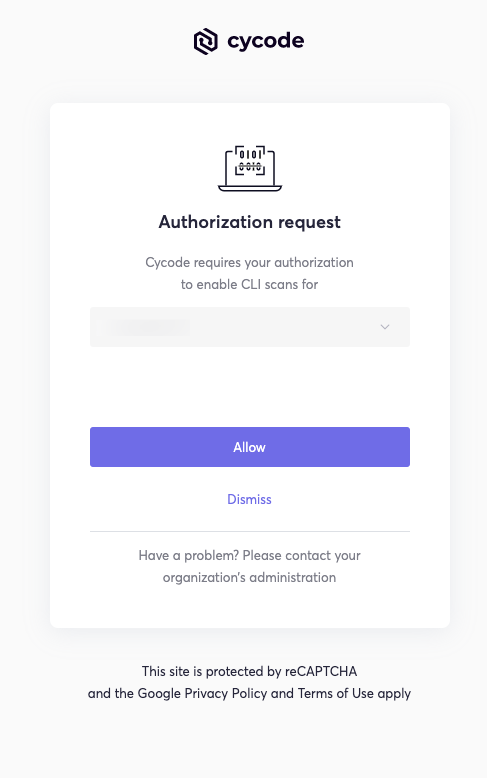
[!NOTE] This will be the default method for authenticating with the Cycode CLI.
-
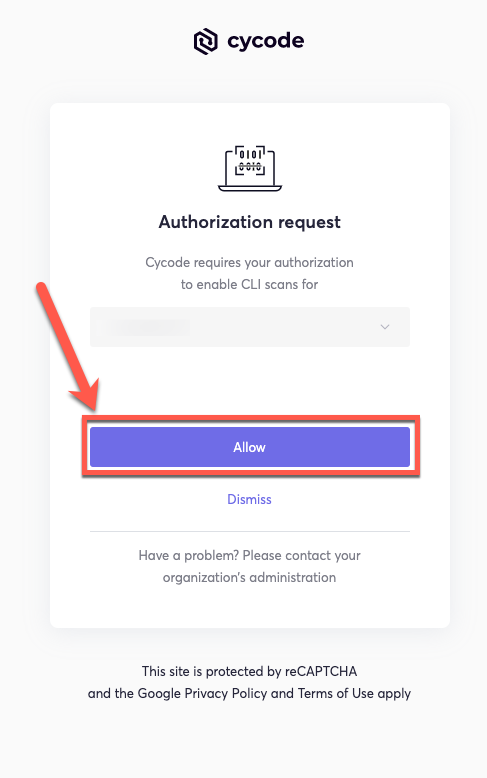
Click the Allow button to authorize the Cycode CLI on the selected business group.
-
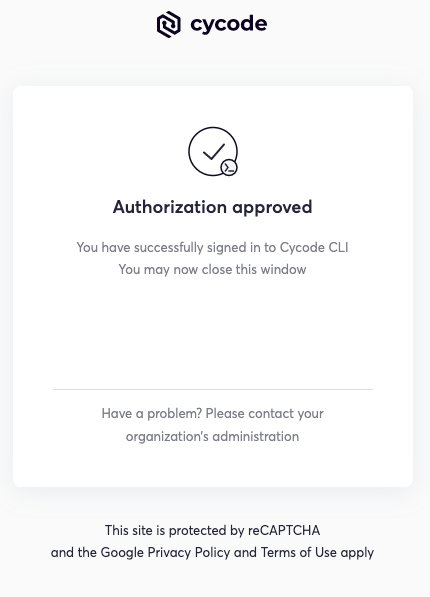
Once completed, you'll see the following screen if it was selected successfully:
-
In the terminal/command line screen, you will see the following when exiting the browser window:
Successfully logged into cycode
Using the Configure Command
[!NOTE] If you already set up your Cycode Client ID and Client Secret through the Linux or Windows environment variables, those credentials will take precedent over this method.
-
Type the following command into your terminal/command line window:
cycode configure -
Enter your Cycode API URL value (you can leave blank to use default value).
Cycode API URL [https://api.cycode.com]: https://api.onpremise.com -
Enter your Cycode APP URL value (you can leave blank to use default value).
Cycode APP URL [https://app.cycode.com]: https://app.onpremise.com -
Enter your Cycode Client ID value.
Cycode Client ID []: 7fe5346b-xxxx-xxxx-xxxx-55157625c72d -
Enter your Cycode Client Secret value (skip if you plan to use an OIDC ID token).
Cycode Client Secret []: c1e24929-xxxx-xxxx-xxxx-8b08c1839a2e -
Enter your Cycode OIDC ID Token value (optional).
Cycode ID Token []: eyJhbGciOiJSUzI1NiIsInR5cCI6IkpXVCJ9... -
If the values were entered successfully, you'll see the following message:
Successfully configured CLI credentials!or/and
Successfully configured Cycode URLs!
If you go into the .cycode folder under your user folder, you'll find these credentials were created and placed in the credentials.yaml file in that folder.
The URLs were placed in the config.yaml file in that folder.
Add to Environment Variables
On Unix/Linux:
export CYCODE_CLIENT_ID={your Cycode ID}
and
export CYCODE_CLIENT_SECRET={your Cycode Secret Key}
If your organization uses OIDC authentication, you can provide the ID token instead (or in addition):
export CYCODE_ID_TOKEN={your Cycode OIDC ID token}
On Windows
-
From the Control Panel, navigate to the System menu:
-
Next, click Advanced system settings:

-
In the System Properties window that opens, click the Environment Variables button:

-
Create
CYCODE_CLIENT_IDandCYCODE_CLIENT_SECRETvariables with values matching your ID and Secret Key, respectively. If you authenticate via OIDC, addCYCODE_ID_TOKENwith your OIDC ID token value as well: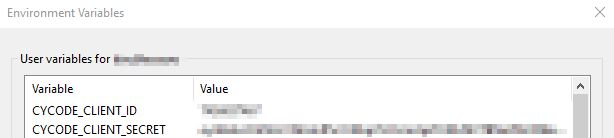
-
Insert the
cycode.exeinto the path to complete the installation.
Install Pre-Commit Hook
Cycode's pre-commit and pre-push hooks can be set up within your local repository so that the Cycode CLI application will identify any issues with your code automatically before you commit or push it to your codebase.
[!NOTE] pre-commit and pre-push hooks are not available for IaC scans.
Perform the following steps to install the pre-commit hook:
Installing Pre-Commit Hook
-
Install the pre-commit framework (Python 3.9 or higher must be installed):
pip3 install pre-commit -
Navigate to
README truncated. View full README on GitHub.
Alternatives



Related Skills
Browse all skillsExpertise in LLVM-based static analysis including dataflow analysis, pointer analysis, taint tracking, and program verification. Use this skill when implementing security scanners, bug finders, code quality tools, or performing program analysis research.
Use when working with the OpenAI API (Responses API) or OpenAI platform features (tools, streaming, Realtime API, auth, models, rate limits, MCP) and you need authoritative, up-to-date documentation (schemas, examples, limits, edge cases). Prefer the OpenAI Developer Documentation MCP server tools when available; otherwise guide the user to enable `openaiDeveloperDocs`.
ONVIF device security scanner for testing authentication and brute-forcing credentials. Use when you need to assess security of IP cameras or ONVIF-enabled devices.
Security audit and validation tools for the Agent Skills ecosystem. Scan skill packages for common vulnerabilities like credential leaks, unauthorized file access, and Git history secrets. Use when you need to audit skills for security before installation, validate skill packages against Agent Skills standards, or ensure your skills follow best practices.
Scans Android APKs for Firebase security misconfigurations including open databases, storage buckets, authentication issues, and exposed cloud functions. Use when analyzing APK files for Firebase vulnerabilities, performing mobile app security audits, or testing Firebase endpoint security. For authorized security research only.
Azure Identity SDK for Rust authentication. Use for DeveloperToolsCredential, ManagedIdentityCredential, ClientSecretCredential, and token-based authentication. Triggers: "azure-identity", "DeveloperToolsCredential", "authentication rust", "managed identity rust", "credential rust".