
dbt
OfficialConnects AI agents to dbt projects, allowing natural language queries to be converted to SQL and executed against your data warehouse using dbt's Semantic Layer and metadata.
Provides a bridge between dbt (data build tool) resources and natural language interfaces, enabling execution of CLI commands, discovery of model metadata, and querying of the Semantic Layer for data transformation management.
What it does
- Execute SQL queries on dbt Platform infrastructure
- Generate SQL from natural language descriptions
- Query metrics with filtering and grouping
- Discover model metadata and macros
- List available metrics and saved queries
- Get compiled SQL for metrics without execution
Best for
About dbt
dbt is an official MCP server published by dbt-labs that provides AI assistants with tools and capabilities via the Model Context Protocol. dbt bridges data build tool resources and natural language, enabling top BI software features, metadata discovery, and data transformation. It is categorized under analytics data, developer tools.
How to install
You can install dbt in your AI client of choice. Use the install panel on this page to get one-click setup for Cursor, Claude Desktop, VS Code, and other MCP-compatible clients. This server runs locally on your machine via the stdio transport.
License
dbt is released under the Apache-2.0 license. This is a permissive open-source license, meaning you can freely use, modify, and distribute the software.
dbt MCP Server
This MCP (Model Context Protocol) server provides various tools to interact with dbt. You can use this MCP server to provide AI agents with context of your project in dbt Core, dbt Fusion, and dbt Platform.
Read our documentation here to learn more. This blog post provides more details for what is possible with the dbt MCP server.
Experimental MCP Bundle
We publish an experimental Model Context Protocol Bundle (dbt-mcp.mcpb) with each release so that MCPB-aware clients can import this server without additional setup. Download the bundle from the latest release assets and follow Anthropic's mcpb CLI docs to install or inspect it.
Feedback
If you have comments or questions, create a GitHub Issue or join us in the community Slack in the #tools-dbt-mcp channel.
Architecture
The dbt MCP server architecture allows for your agent to connect to a variety of tools.
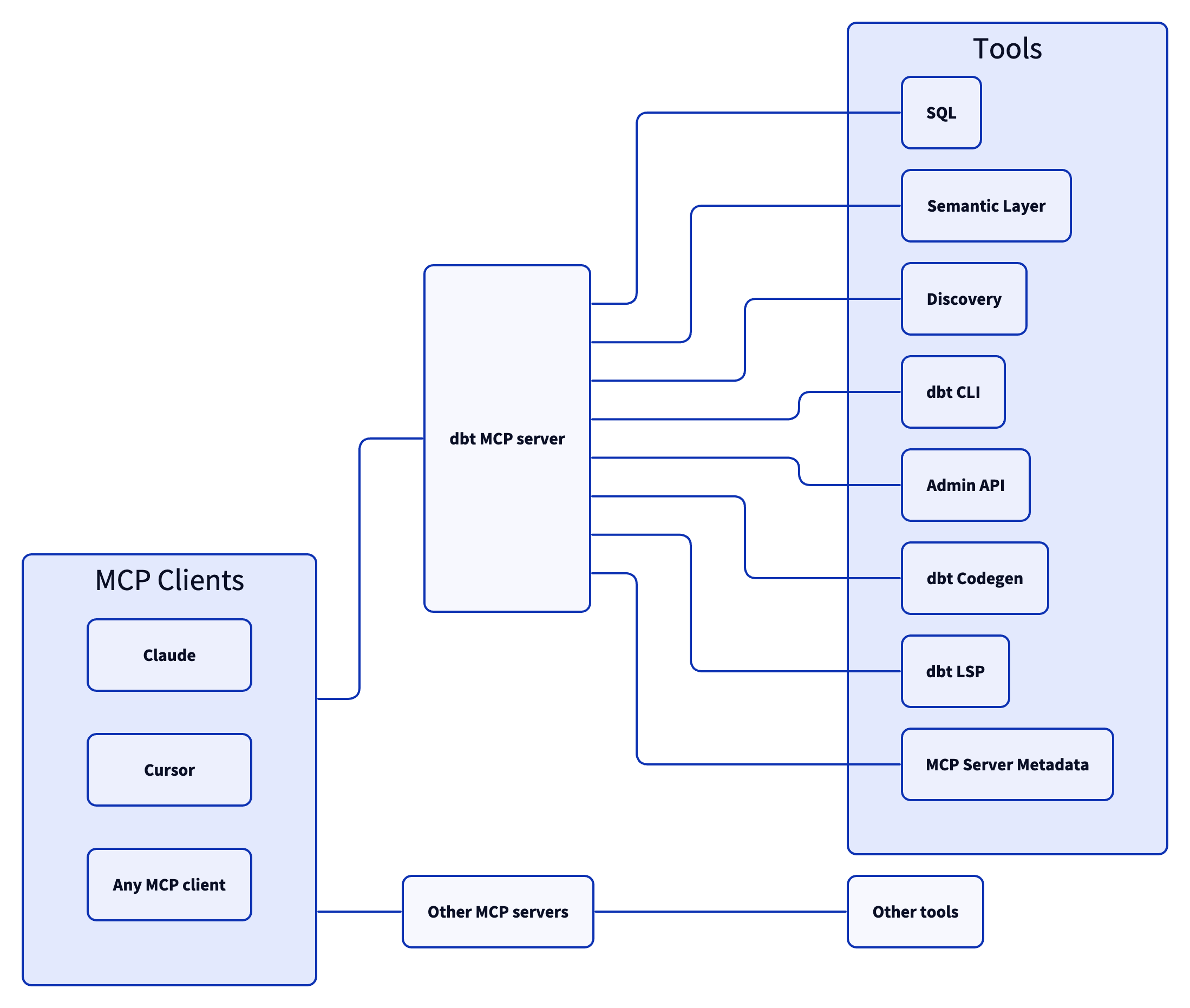
Tools
SQL
execute_sql: Executes SQL on dbt Platform infrastructure with Semantic Layer support.text_to_sql: Generates SQL from natural language using project context.
Semantic Layer
get_dimensions: Gets dimensions for specified metrics.get_entities: Gets entities for specified metrics.get_metrics_compiled_sql: Returns compiled SQL for metrics without executing the query.list_metrics: Retrieves all defined metrics.list_saved_queries: Retrieves all saved queries.query_metrics: Executes metric queries with filtering and grouping options.
Discovery
get_all_macros: Retrieves macros; option to filter by package or return package names only.get_all_models: Retrieves name and description of all models.get_all_sources: Gets all sources with freshness status; option to filter by source name.get_exposure_details: Gets exposure details including owner, parents, and freshness status.get_exposures: Gets all exposures (downstream dashboards, apps, or analyses).get_lineage: Gets full lineage graph (ancestors and descendants) with type and depth filtering.get_macro_details: Gets details for a specific macro.get_mart_models: Retrieves all mart models.get_model_children: Gets downstream dependents of a model.get_model_details: Gets model details including compiled SQL, columns, and schema.get_model_health: Gets health signals: run status, test results, and upstream source freshness.get_model_parents: Gets upstream dependencies of a model.get_model_performance: Gets execution history for a model; option to include test results.get_related_models: Finds similar models using semantic search.get_seed_details: Gets details for a specific seed.get_semantic_model_details: Gets details for a specific semantic model.get_snapshot_details: Gets details for a specific snapshot.get_source_details: Gets source details including columns and freshness.get_test_details: Gets details for a specific test.search: [Alpha] Searches for resources across the dbt project (not generally available).
dbt CLI
build: Executes models, tests, snapshots, and seeds in DAG order.compile: Generates executable SQL from models/tests/analyses; useful for validating Jinja logic.docs: Generates documentation for the dbt project.get_lineage_dev: Retrieves lineage from local manifest.json with type and depth filtering.get_node_details_dev: Retrieves node details from local manifest.json (models, seeds, snapshots, sources).list: Lists resources in the dbt project by type with selector support.parse: Parses and validates project files for syntax correctness.run: Executes models to materialize them in the database.show: Executes SQL against the database and returns results.test: Runs tests to validate data and model integrity.
Admin API
cancel_job_run: Cancels a running job.get_job_details: Gets job configuration including triggers, schedule, and dbt commands.get_job_run_artifact: Downloads a specific artifact file from a job run.get_job_run_details: Gets run details including status, timing, steps, and artifacts.get_job_run_error: Gets error and/or warning details for a job run; option to include or show warnings only.get_project_details: Gets project information for a specific dbt project.list_job_run_artifacts: Lists available artifacts from a job run.list_jobs: Lists jobs in a dbt Platform account; option to filter by project or environment.list_jobs_runs: Lists job runs; option to filter by job, status, or order by field.retry_job_run: Retries a failed job run.trigger_job_run: Triggers a job run; option to override git branch, schema, or other settings.
dbt Codegen
generate_model_yaml: Generates model YAML with columns; option to inherit upstream descriptions.generate_source: Generates source YAML by introspecting database schemas; option to include columns.generate_staging_model: Generates staging model SQL from a source table.
dbt LSP
fusion.compile_sql: Compiles SQL in project context via dbt Platform.fusion.get_column_lineage: Traces column-level lineage via dbt Platform.get_column_lineage: Traces column-level lineage locally (requires dbt-lsp via dbt Labs VSCE).
MCP Server Metadata
get_mcp_server_branch: Returns the current git branch of the running dbt MCP server.get_mcp_server_version: Returns the current version of the dbt MCP server.
Examples
Commonly, you will connect the dbt MCP server to an agent product like Claude or Cursor. However, if you are interested in creating your own agent, check out the examples directory for how to get started.
Dependencies
Dependencies are pinned to specific versions and are not updated automatically. Only security-related dependency updates are submitted via automated pull requests.
Contributing
Read CONTRIBUTING.md for instructions on how to get involved!
Alternatives



Related Skills
Browse all skillsMaster dbt (data build tool) for analytics engineering with model organization, testing, documentation, and incremental strategies. Use when building data transformations, creating data models, or implementing analytics engineering best practices.
Build scalable data pipelines, modern data warehouses, and real-time streaming architectures. Implements Apache Spark, dbt, Airflow, and cloud-native data platforms. Use PROACTIVELY for data pipeline design, analytics infrastructure, or modern data stack implementation.
Use when building MCP servers or clients that connect AI systems with external tools and data sources. Invoke for MCP protocol compliance, TypeScript/Python SDKs, resource providers, tool functions.
Export OpenClaw usage data to CSV for analytics tools like Power BI. Hourly aggregates by activity type, model, and channel.
Build, configure, and deploy Lightdash analytics projects. Supports both dbt projects with embedded Lightdash metadata and pure Lightdash YAML projects without dbt. Create metrics, dimensions, charts, and dashboards using the Lightdash CLI.
CCXT cryptocurrency exchange library for TypeScript and JavaScript developers (Node.js and browser). Covers both REST API (standard) and WebSocket API (real-time). Helps install CCXT, connect to exchanges, fetch market data, place orders, stream live tickers/orderbooks, handle authentication, and manage errors. Use when working with crypto exchanges in TypeScript/JavaScript projects, trading bots, arbitrage systems, or portfolio management tools. Includes both REST and WebSocket examples.