
Dynatrace Managed MCP Server
OfficialConnects AI assistants to self-hosted Dynatrace environments to query observability data, problems, logs, and performance metrics through natural language.
Enables AI assistants to interact with self-hosted Dynatrace Managed environments to retrieve observability data, security insights, and performance metrics. It allows users to query problems, logs, events, and SLOs through natural language interfaces in both local and remote modes.
What it does
- Query performance metrics and SLOs
- Retrieve problem reports and incidents
- Access application logs and events
- Get security insights from Dynatrace data
- Monitor service health status
Best for
About Dynatrace Managed MCP Server
Dynatrace Managed MCP Server is an official MCP server published by dynatrace-oss that provides AI assistants with tools and capabilities via the Model Context Protocol. Dynatrace Managed MCP Server delivers AI-driven access to self-hosted monitoring and observability platform, AIOps insights for logs, events, problems, SLOs. It is categorized under auth security, developer tools.
How to install
You can install Dynatrace Managed MCP Server in your AI client of choice. Use the install panel on this page to get one-click setup for Cursor, Claude Desktop, VS Code, and other MCP-compatible clients. This server runs locally on your machine via the stdio transport.
License
Dynatrace Managed MCP Server is released under the Apache-2.0 license. This is a permissive open-source license, meaning you can freely use, modify, and distribute the software.
Dynatrace Managed MCP Server
 Link to github.com


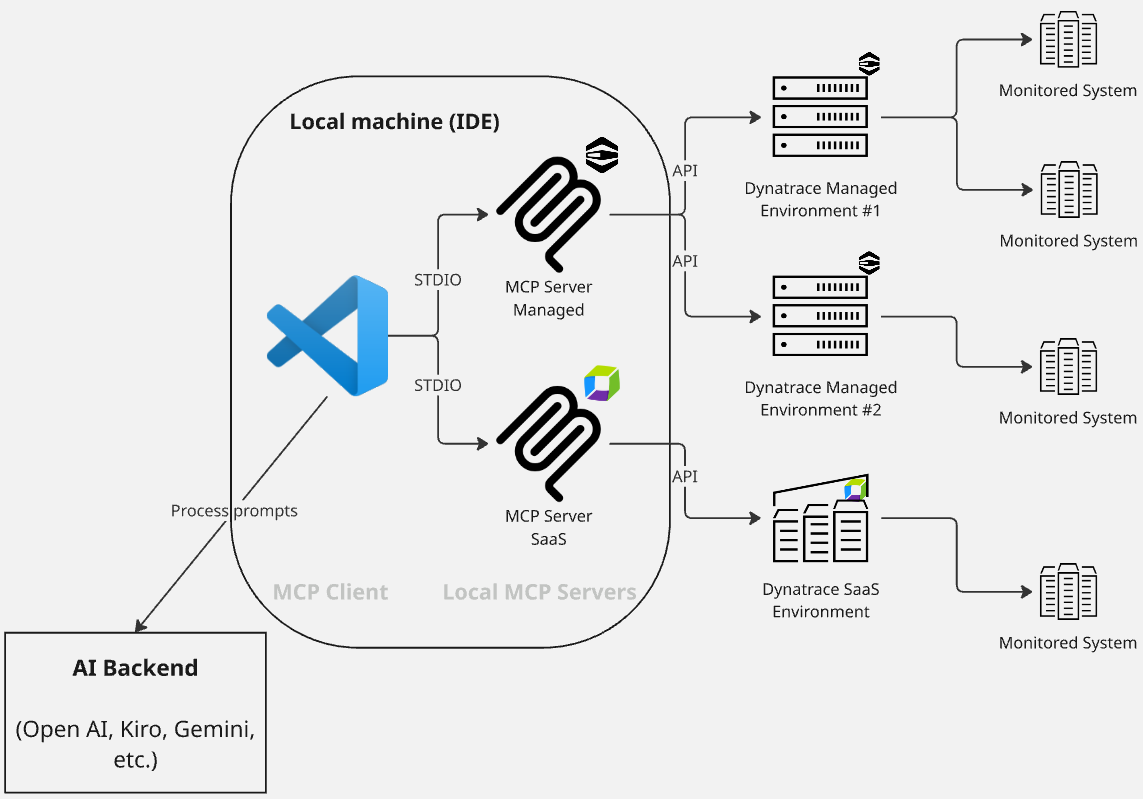
The local Dynatrace Managed MCP server allows AI Assistants to interact with one or more self-hosted Dynatrace Managed deployments, bringing observability data directly into your AI-assisted workflow.
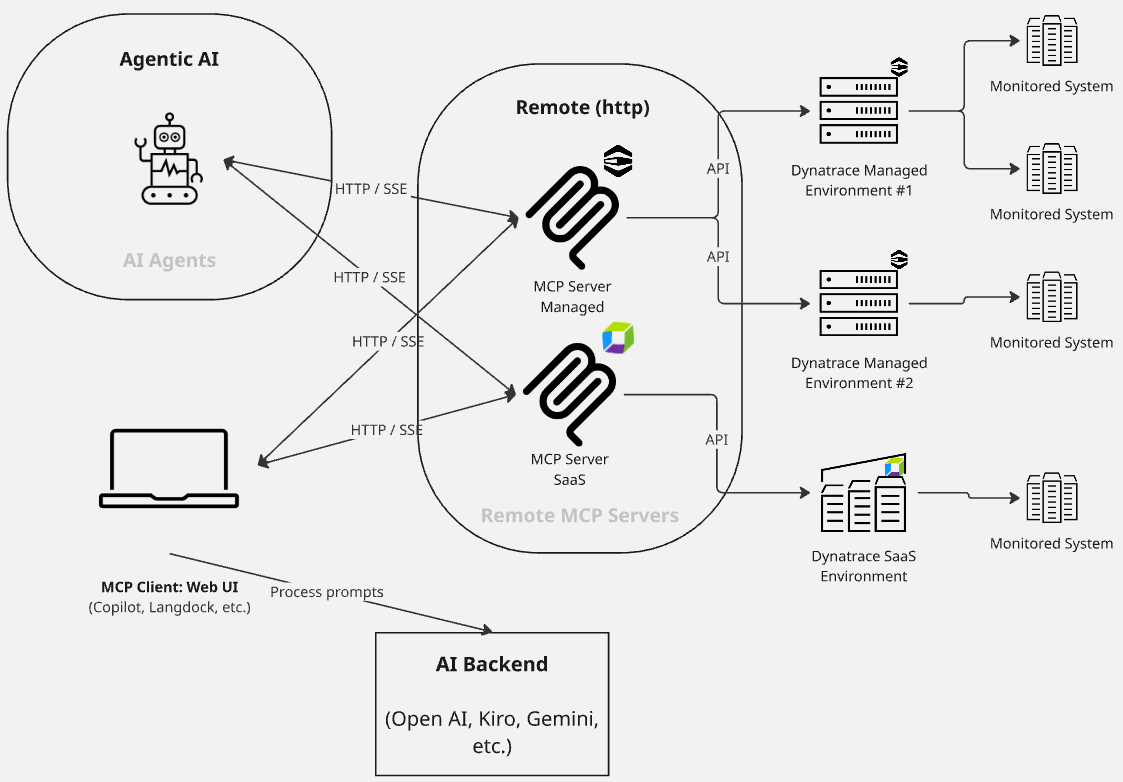
This MCP server supports two modes:
- Local mode: Runs on your machine for development and testing.
- Remote mode: Connects over HTTP/SSE for distributed or production-like setups.
[!TIP] This MCP server is specifically designed for Dynatrace Managed (self-hosted) deployments. For Dynatrace SaaS environments, please use the Dynatrace MCP.
[!NOTE] This open source product is supported by the community. For feature requests, questions, or assistance, please use GitHub Issues.
Quickstart
You can add this MCP server to your AI Assistant, such as VSCode, Claude, Cursor, Kiro, Windsurf, ChatGPT, or Github Copilot. For more details, please refer to the configuration section below.
Configuration Methods
There are three ways to configure your Dynatrace Managed environments. Choose the method that works best for your use case:
Method 1: Configuration File (Recommended for Local Development)
The easiest way to configure multiple environments is by using a configuration file (JSON or YAML). This method supports:
- ✅ Clean, readable format - No quote escaping needed
- ✅ Comments (YAML only) - Document your configuration
- ✅ Environment variable interpolation - Keep tokens secure with
${VAR_NAME}syntax - ✅ Version control friendly - Commit config files without tokens
Example: dt-config.yaml
# Production environment
- dynatraceUrl: https://my-dashboard.company.com/
  apiEndpointUrl: https://my-api.company.com/
  environmentId: abc-123
  alias: production
  # Token is injected from an environment variable at runtime
  apiToken: ${DT_PROD_TOKEN}
  httpProxyUrl: http://proxy.company.com:8080

# Staging environment
- dynatraceUrl: https://staging-dashboard.company.com/
  apiEndpointUrl: https://staging-api.company.com/
  environmentId: xyz-789
  alias: staging
  apiToken: ${DT_STAGING_TOKEN}
Example: dt-config.json
[
  {
    "dynatraceUrl": "https://my-dashboard.company.com/",
    "apiEndpointUrl": "https://my-api.company.com/",
    "environmentId": "abc-123",
    "alias": "production",
    "apiToken": "${DT_PROD_TOKEN}",
    "httpProxyUrl": "http://proxy.company.com:8080"
  }
]
Usage in MCP configuration (e.g., claude_desktop_config.json):
Option A: Using npx (Recommended - no installation required)
{
  "mcpServers": {
    "dynatrace-managed": {
      "command": "npx",
      "args": ["-y", "@dynatrace-oss/dynatrace-managed-mcp-server@latest"],
      "env": {
        "DT_CONFIG_FILE": "./dt-config.yaml",
        "DT_PROD_TOKEN": "dt0c01.ABC123...",
        "DT_STAGING_TOKEN": "dt0c01.XYZ789...",
        "LOG_LEVEL": "info"
      }
    }
  }
}
Option B: Local development (requires cloning the repository)
{
  "mcpServers": {
    "dynatrace-managed": {
      "command": "node",
      "args": ["./dist/index.js"],
      "env": {
        "DT_CONFIG_FILE": "./dt-config.yaml",
        "DT_PROD_TOKEN": "dt0c01.ABC123...",
        "DT_STAGING_TOKEN": "dt0c01.XYZ789...",
        "LOG_LEVEL": "info"
      }
    }
  }
}
Note: Option B requires cloning this repository and running
npm install && npm run buildfirst.
Security Best Practice: Use environment variable interpolation (
${TOKEN_NAME}) in your config files so you can commit them to version control without exposing secrets!
See examples/dt-config.yaml and examples/dt-config.json for complete examples.
Method 2: Environment Variable (Docker/Kubernetes)
For Kubernetes deployments or if you prefer environment variables, you can set DT_ENVIRONMENT_CONFIGS with a JSON string:
DT_ENVIRONMENT_CONFIGS='[{"apiEndpointUrl":"https://api.example.com/","environmentId":"abc-123","alias":"production","apiToken":"dt0c01.ABC123"}]'
This method works well for:
- ✅ Kubernetes ConfigMaps/Secrets
- ✅ Docker containers
- ✅ CI/CD pipelines
- ⚠️ Not ideal for local development (quote escaping is cumbersome)
Method 3: .env File (Not Recommended)
While you can use a .env file, multiline values don't work reliably. Use Method 1 (config file) instead for cleaner local development.
Configuration Priority
If multiple configuration methods are set, the MCP server uses this priority:
DT_CONFIG_FILE- External file (highest priority)DT_ENVIRONMENT_CONFIGS- JSON string- Error - If neither is set
Configuration Fields
You need to configure the connection to your Dynatrace Managed environment(s). Each environment requires:
Configuration structure:
[
  {
    "dynatraceUrl": "https://my-dashboard-endpoint.com/",
    "apiEndpointUrl": "https://my-api-endpoint.com/",
    "environmentId": "my-env-id-1",
    "alias": "alias-env",
    "apiToken": "my-api-token",
    "httpProxyUrl": "",
    "httpsProxyUrl": ""
  }
]
Field descriptions:
dynatraceUrl: base URL for Dynatrace Managed dashboard, to which the environment ID will be appended (e.g.https://dmz123.dynatrace-managed.com). If not specified, will default to use the same value asDT_API_ENDPOINT_URL.apiEndpointUrl: base URL for Dynatrace Managed API, to which the environment ID will be appended (e.g.https://abc123.dynatrace-managed.com:9999)environmentId: ID of the managed environment, used for constructing URL for API and dashboards (e.g., of the form01234567-89ab-cdef-abcd-ef0123456789)alias: a friendly/human-readable name for the environmentapiToken: API token with required scopes (see Authentication)- (optional)
httpProxyUrl/httpsProxyUrl: URL of proxy server for requests (see Environment Variables)
Getting Started
If you are using multiple environments, we strongly recommend that you set up rules (see Rules) to guide your LLM in better understanding each environment.
Changes to the environment configuration will need an MCP server restart/reload. Changes won't be picked up until a fresh reload.
Once configured, you can start using example prompts like Get all details of the Dynatrace entity 'my-service' or What problems has Dynatrace identified? Give details of the first problem..
These queries use V2 REST APIs and incur no additional costs beyond your standard Managed license.
Minimum supported version: Dynatrace Managed 1.328.0
Architecture
Local mode
Remote mode
Use cases
There are two ways that Dynatrace Managed, and thus the MCP, may be used:
- Your Dynatrace Managed environment(s) is/are the primary Observability system, containing all live data; or
- There has been a migration from a Dynatrace Managed environment to a Dynatrace Saas environment; however, historical observability data has not been migrated and can still be accessed via a Dynatrace Managed environment. The Dynatrace Managed MCP is used to access historical data, and a separate Dynatrace SaaS MCP is used to access live and more recent data.
Specific use cases for the Dynatrace Managed MCP include:
- Real-time observability - Fetch production-level data for early detection and proactive monitoring
- Contextual debugging - Fix issues with full context from monitored exceptions, logs, and anomalies
- Security insights - Get detailed vulnerability analysis and security problem tracking. This can include multicloud compliance assessment with evidence-based investigation.
- Natural language queries - Queries are mapped to MCP tool usage, and thus API queries, with guidance for the next step
- Multiphase incident investigation - Systematic impact assessment and troubleshooting
- Multienvironment support - Query multiple Dynatrace Managed environments from the same MCP server
Capabilities
- Problems - List and get problem details from your services (for example Kubernetes)
- Security - List and get security problems / vulnerability details
- Entities - Get more information about a monitored entity, including relationship mappings
- SLO - List and get Service Level Objective details, including evaluation and error budgets
- Event Tracking - Li
README truncated. View full README on GitHub.
Alternatives



Related Skills
Browse all skillsAzure Identity SDK for Rust authentication. Use for DeveloperToolsCredential, ManagedIdentityCredential, ClientSecretCredential, and token-based authentication. Triggers: "azure-identity", "DeveloperToolsCredential", "authentication rust", "managed identity rust", "credential rust".
Use when working with the OpenAI API (Responses API) or OpenAI platform features (tools, streaming, Realtime API, auth, models, rate limits, MCP) and you need authoritative, up-to-date documentation (schemas, examples, limits, edge cases). Prefer the OpenAI Developer Documentation MCP server tools when available; otherwise guide the user to enable `openaiDeveloperDocs`.
Security audit and validation tools for the Agent Skills ecosystem. Scan skill packages for common vulnerabilities like credential leaks, unauthorized file access, and Git history secrets. Use when you need to audit skills for security before installation, validate skill packages against Agent Skills standards, or ensure your skills follow best practices.
Azure Identity SDK for .NET. Authentication library for Azure SDK clients using Microsoft Entra ID. Use for DefaultAzureCredential, managed identity, service principals, and developer credentials. Triggers: "Azure Identity", "DefaultAzureCredential", "ManagedIdentityCredential", "ClientSecretCredential", "authentication .NET", "Azure auth", "credential chain".
CCXT cryptocurrency exchange library for TypeScript and JavaScript developers (Node.js and browser). Covers both REST API (standard) and WebSocket API (real-time). Helps install CCXT, connect to exchanges, fetch market data, place orders, stream live tickers/orderbooks, handle authentication, and manage errors. Use when working with crypto exchanges in TypeScript/JavaScript projects, trading bots, arbitrage systems, or portfolio management tools. Includes both REST and WebSocket examples.
.NET/C# backend developer for ASP.NET Core APIs with Entity Framework Core. Builds REST APIs, minimal APIs, gRPC services, authentication with Identity/JWT, authorization, database operations, background services, SignalR real-time features. Activates for: .NET, C#, ASP.NET Core, Entity Framework Core, EF Core, .NET Core, minimal API, Web API, gRPC, authentication .NET, Identity, JWT .NET, authorization, LINQ, async/await C#, background service, IHostedService, SignalR, SQL Server, PostgreSQL .NET, dependency injection, middleware .NET.