
Figma to Code
Converts Figma designs directly into HTML, CSS, and React code with pixel-perfect accuracy. Works with selected nodes in the Figma desktop app to generate production-ready code.
Bridges Figma design files to code generation, enabling direct conversion of designs into HTML, CSS, and other assets with customizable output paths and file organization.
What it does
- Generate HTML/CSS code from Figma designs
- Export React components from design nodes
- Create Tailwind CSS markup from designs
- Extract images from Figma design elements
- Convert selected Figma nodes to code
- Parse Figma file URLs for code generation
Best for
About Figma to Code
Figma to Code is a community-built MCP server published by f2c-ai that provides AI assistants with tools and capabilities via the Model Context Protocol. Convert Figma designs into clean HTML & CSS with customizable file paths and organization—fast, accurate code generation for website design and development. It is categorized under developer tools, design. This server exposes 2 tools that AI clients can invoke during conversations and coding sessions.
How to install
You can install Figma to Code in your AI client of choice. Use the install panel on this page to get one-click setup for Cursor, Claude Desktop, VS Code, and other MCP-compatible clients. This server runs locally on your machine via the stdio transport.
License
Figma to Code is released under the MIT license. This is a permissive open-source license, meaning you can freely use, modify, and distribute the software.
Tools (2)
Generate UI code for a given node or the currently selected node in the Figma desktop app. Use the nodeId parameter to specify a node id. If no node id is provided, the currently selected node will be used. If a URL is provided, extract the node id from the URL, for example, if given the URL https://figma.com/design/:fileKey/:fileName?node-id=1-2, the extracted nodeId would be 1:2.
Generate an image for a given node or the currently selected node in the Figma desktop app. Use the nodeId parameter to specify a node id. If no node id is provided, the currently selected node will be used. If a URL is provided, extract the node id from the URL, for example, if given the URL https://figma.com/design/:fileKey/:fileName?node-id=1-2, the extracted nodeId would be 1:2. Also export Figma design images for visual verification and design fidelity validation. Essential for comparing generated code output against original designs, ensuring pixel-perfect implementation and catching visual discrepancies during the design-to-code process.
F2C MCP Server




Due to Figma REST API rate limits, if you are affected, please switch to @f2c/mcp-plugin for normal operation.
English | 简体中文
A Model Context Protocol server for Figma Design to Code using F2C.
Features
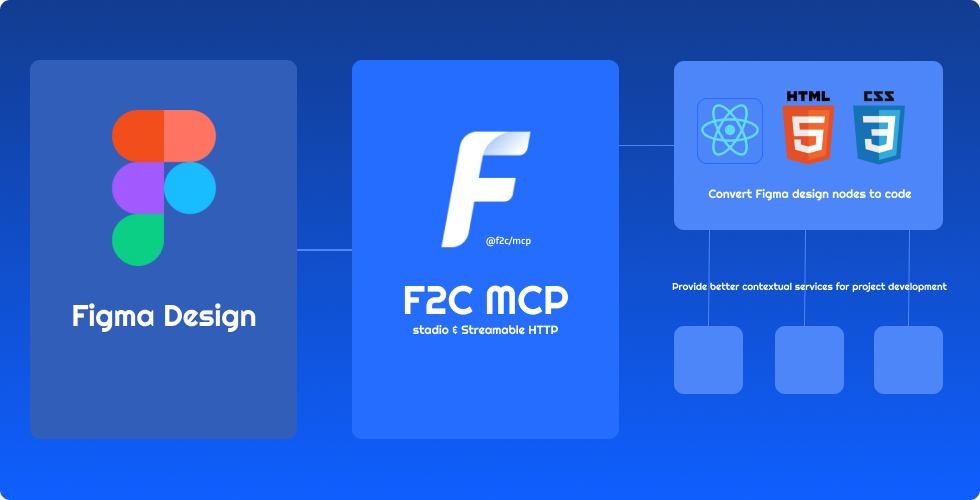
- 🎨 Pixel-Perfect HTML/CSS:F2C converts Figma designs to pixel-perfect HTML/CSS with precision.
- ⚛️ Multi-Framework Support:F2C generates React, CSS Modules, and Tailwind CSS code for fast development.
- 🧠 Figma Design Context:F2C integrates design context, ensuring compatibility with AI tools like Cursor.
- 🔗 Figma File URL Parsing:F2C converts design nodes via Figma URLs, streamlining workflows.
- 🖼️ Remote Image Localization:F2C automates downloading Figma images to local assets for efficiency.
How it works
- Configure the Server in an MCP-supported IDE (e.g., Cursor, Trae).
recommended to use Comate AI IDE
- Open your chat in IDE (e.g. agent mode in Cursor).
- Paste a link to a Figma Node (Right-click any node in the Figma Layer panel to copy it).
- Enter your requirements in the chat, such as fetching node data, downloading images, converting to code, etc.
Configuration and Development
See Configuration and Development
Data Privacy Notice
The logging tools integrated in this project are used solely for basic usage statistics and error log reporting. No sensitive information or user data is collected. All reported data is used exclusively to improve product quality and user experience.
FAQ
See FAQ
Credits
Thanks to:
- Framelink Figma MCP Server Give Cursor and other AI-powered coding tools access to your Figma files with this Model Context Protocol server.
- Cursor Talk to Figma MCP Allowing Cursor to communicate with Figma for reading designs and modifying them programmatically.
- Figma MCP Server This server provides tools for viewing, commenting, and analyzing Figma designs directly through the ModelContextProtocol.
Alternatives



Related Skills
Browse all skillsContext-aware routing to the Anytype iOS design system including icons, typography, colors, and spacing. Use when working with Figma-to-code translation, design assets, or UI components.
UI design system toolkit for Senior UI Designer including design token generation, component documentation, responsive design calculations, and developer handoff tools. Use for creating design systems, maintaining visual consistency, and facilitating design-dev collaboration.
Create world-class, accessible, responsive interfaces with sophisticated interactive elements including chat, terminals, code display, and streaming content. Use when building user interfaces that need professional polish and developer-focused features.
Use the Figma MCP server to fetch design context, screenshots, variables, and assets from Figma, and to translate Figma nodes into production code. Trigger when a task involves Figma URLs, node IDs, design-to-code implementation, or Figma MCP setup and troubleshooting.
Translate Figma nodes into production-ready code with 1:1 visual fidelity using the Figma MCP workflow (design context, screenshots, assets, and project-convention translation). Trigger when the user provides Figma URLs or node IDs, or asks to implement designs or components that must match Figma specs. Requires a working Figma MCP server connection.
Guides design-to-code workflow using Figma integration. Helps extract designs, analyze components, and generate implementation specs. Auto-activates when users mention Figma URLs, design implementation, component conversion, or design-to-code workflows. Works with /ccpm:planning:design-ui, design-approve, design-refine, and /ccpm:utils:figma-refresh commands.