
Google Cloud Platform
Manages Google Cloud Platform resources through natural language commands with automated OAuth authentication. Lets you control compute instances, storage, networking, databases, and monitoring without leaving your chat interface.
Integrates with Google Cloud Platform services, providing tools for interacting with Compute Engine, Cloud Storage, Cloud Functions, Cloud Run, BigQuery, and more using official client libraries and robust error handling.
What it does
- Authenticate with GCP using browser OAuth flow
- List and manage compute instances across projects
- Create and configure storage buckets and disks
- Set up VPC networks and firewall rules
- Monitor GKE clusters and databases
- View billing information and usage metrics
Best for
About Google Cloud Platform
Google Cloud Platform is a community-built MCP server published by eniayomi that provides AI assistants with tools and capabilities via the Model Context Protocol. Integrate with Google Drive and GCloud Storage via Google Cloud Platform for seamless access to Compute Engine, BigQuery, and more. It is categorized under cloud infrastructure, analytics data. This server exposes 9 tools that AI clients can invoke during conversations and coding sessions.
How to install
You can install Google Cloud Platform in your AI client of choice. Use the install panel on this page to get one-click setup for Cursor, Claude Desktop, VS Code, and other MCP-compatible clients. This server runs locally on your machine via the stdio transport.
License
Google Cloud Platform is released under the MIT license. This is a permissive open-source license, meaning you can freely use, modify, and distribute the software.
Tools (9)
Run GCP code
List all GCP projects accessible with current credentials
Selects GCP project to use for subsequent interactions
Get billing information for the current project
Get cost forecast for the current project
GCP MCP
A Model Context Protocol (MCP) server that enables AI assistants like Claude to interact with your Google Cloud Platform environment. This allows for natural language querying and management of your GCP resources during conversations.
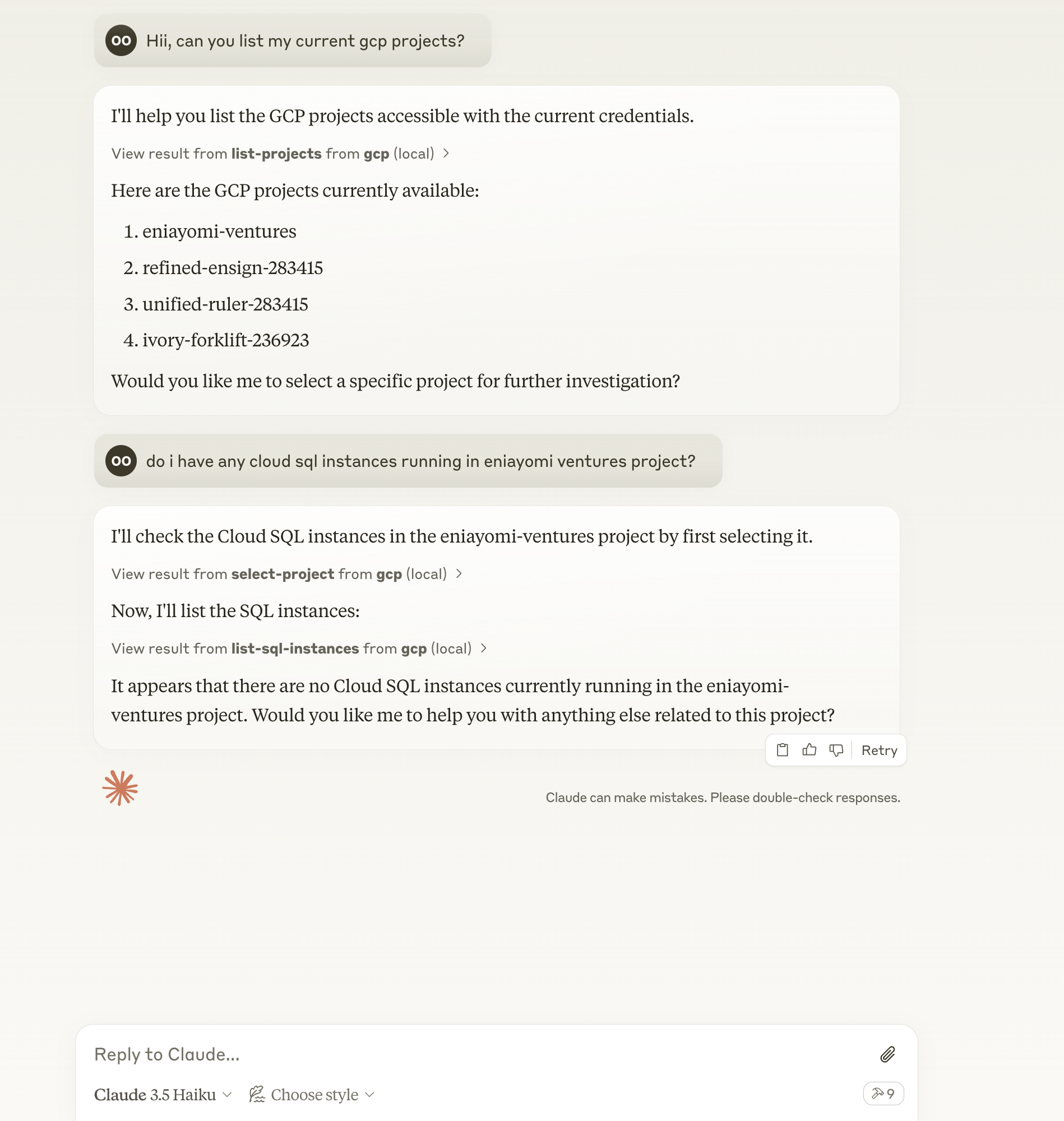
Features
- 🔍 Query and modify GCP resources using natural language
- ☁️ Support for multiple GCP projects
- 🌐 Multi-region support
- 🔐 Secure credential handling (no credentials are exposed to external services)
- 🏃♂️ Local execution with your GCP credentials
- 🔄 Automatic retries for improved reliability
Prerequisites
- Node.js
- Claude Desktop/Cursor/Windsurf
- GCP credentials configured locally (application default credentials)
Installation
- Clone the repository:
git clone https://github.com/eniayomi/gcp-mcp
cd gcp-mcp
- Install dependencies:
npm install
Configuration
Claude Desktop
-
Open Claude desktop app and go to Settings -> Developer -> Edit Config
-
Add the following entry to your
claude_desktop_config.json:
via npm:
{
  "mcpServers": {
    "gcp": {
      "command": "sh",
      "args": ["-c", "npx -y gcp-mcp"]
    }
  }
}
If you installed from source:
{
  "mcpServers": {
    "gcp": {
      "command": "npm",
      "args": [
        "--silent",
        "--prefix",
        "/path/to/gcp-mcp",
        "start"
      ]
    }
  }
}
Replace /path/to/gcp-mcp with the actual path to your project directory if using source installation.
Cursor
- Open Cursor and go to Settings (⌘,)
- Navigate to AI -> Model Context Protocol
- Add a new MCP configuration:
{
  "gcp": {
    "command": "npx -y gcp-mcp"
  }
}
Windsurf
- Open
~/.windsurf/config.json(create if it doesn't exist) - Add the MCP configuration:
{
  "mcpServers": {
    "gcp": {
      "command": "npx -y gcp-mcp"
    }
  }
}
GCP Setup
-
Set up GCP credentials:
- Set up application default credentials using
gcloud auth application-default login
- Set up application default credentials using
-
Refresh your AI assistant (Claude Desktop/Cursor/Windsurf)
Usage
Start by selecting a project or asking questions like:
- "List all GCP projects I have access to"
- "Show me all Cloud SQL instances in project X"
- "What's my current billing status?"
- "Show me the logs from my Cloud Run services"
- "List all GKE clusters in us-central1"
- "Show me all Cloud Storage buckets in project X"
- "What Cloud Functions are deployed in us-central1?"
- "List all Cloud Run services"
- "Show me BigQuery datasets and tables"
Available Tools
run-gcp-code: Execute GCP API calls using TypeScript codelist-projects: List all accessible GCP projectsselect-project: Select a GCP project for subsequent operationsget-billing-info: Get billing information for the current projectget-cost-forecast: Get cost forecast for the current projectget-billing-budget: Get billing budgets for the current projectlist-gke-clusters: List all GKE clusters in the current projectlist-sql-instances: List all Cloud SQL instances in the current projectget-logs: Get Cloud Logging entries for the current project
Example Interactions
- List available projects:
List all GCP projects I have access to
- Select a project:
Use project my-project-id
- Check billing status:
What's my current billing status?
- View logs:
Show me the last 10 log entries from my project
Supported Services
- Google Compute Engine
- Cloud Storage
- Cloud Functions
- Cloud Run
- BigQuery
- Cloud SQL
- Google Kubernetes Engine (GKE)
- Cloud Logging
- Cloud Billing
- Resource Manager
- More coming soon...
Troubleshooting
To see logs:
tail -n 50 -f ~/Library/Logs/Claude/mcp-server-gcp.log
Common issues:
- Authentication errors: Ensure you've run
gcloud auth application-default login - Permission errors: Check IAM roles for your account
- API errors: Verify that required APIs are enabled in your project
Contributing
Contributions are welcome! Please feel free to submit a Pull Request.
License
MIT
Alternatives




Related Skills
Browse all skillsBuild scalable data pipelines, modern data warehouses, and real-time streaming architectures. Implements Apache Spark, dbt, Airflow, and cloud-native data platforms. Use PROACTIVELY for data pipeline design, analytics infrastructure, or modern data stack implementation.
YouTube Data API v3 analytics toolkit. Analyze YouTube channels, videos, and search results. Use when the user asks to: check YouTube channel stats, analyze video performance, compare channels, search for videos, get subscriber counts, view engagement metrics, find trending videos, get channel uploads, or analyze YouTube competition. Requires a YouTube Data API v3 key from Google Cloud Console.
Google Analytics 4, Search Console, and Indexing API toolkit. Analyze website traffic, page performance, user demographics, real-time visitors, search queries, and SEO metrics. Use when the user asks to: check site traffic, analyze page views, see traffic sources, view user demographics, get real-time visitor data, check search console queries, analyze SEO performance, request URL re-indexing, inspect index status, compare date ranges, check bounce rates, view conversion data, or get e-commerce revenue. Requires a Google Cloud service account with GA4 and Search Console access.
Configure secure, high-performance connectivity between on-premises infrastructure and cloud platforms using VPN and dedicated connections. Use when building hybrid cloud architectures, connecting data centers to cloud, or implementing secure cross-premises networking.
Analyze Google Analytics data, review website performance metrics, identify traffic patterns, and suggest data-driven improvements. Use when the user asks about analytics, website metrics, traffic analysis, conversion rates, user behavior, or performance optimization.
Advanced content and topic research skill that analyzes trends across Google Analytics, Google Trends, Substack, Medium, Reddit, LinkedIn, X, blogs, podcasts, and YouTube to generate data-driven article outlines based on user intent analysis