
HyperTool
Acts as a proxy server that connects multiple MCP servers together, allowing you to organize their tools into custom toolsets and switch between them without restarting.
Proxy server that connects to multiple MCP servers as a client and exposes their tools through configurable toolsets that can be hot-swapped without restart, enabling dynamic toolset management and context switching for complex MCP server ecosystems.
What it does
- Connect unlimited MCP servers simultaneously
- Create task-specific toolsets from combined tools
- Hot-swap toolsets without server restart
- Enhance tool descriptions with examples and context
- Filter tools to show only relevant ones per context
- Switch between different tool contexts instantly
Best for
About HyperTool
HyperTool is a community-built MCP server published by toolprint that provides AI assistants with tools and capabilities via the Model Context Protocol. HyperTool is a dynamic proxy server for MCP, enabling toolset hot-swapping and seamless management across complex server ecosystems. It is categorized under productivity, developer tools.
How to install
You can install HyperTool in your AI client of choice. Use the install panel on this page to get one-click setup for Cursor, Claude Desktop, VS Code, and other MCP-compatible clients. This server runs locally on your machine via the stdio transport.
License
HyperTool is released under the NOASSERTION license.

Give your AI the best tools from all your MCPs 🎯






⚡ Features
🔓 Break Free from Tool Limits
Connect unlimited MCP servers. Use 10, 50, or 500+ tools total - your AI only sees what it needs.
🎯 Task-Specific Toolsets
Build "git-essentials" with 5 tools instead of drowning in 47 Git commands. Switch contexts instantly.
🧠 Smart Tool Descriptions
Enhance tools with examples and context. Watch your AI pick the right tool 89% more often.
🚀 Quick Start
Step 1: Copy Your Existing Config
# In your project directory
cp .mcp.json .mcp.hypertool.json
Step 2: Point Your AI to HyperTool
Replace your .mcp.json with:
{
  "mcpServers": {
    "hypertool": {
      "command": "npx",
      "args": ["-y", "@toolprint/hypertool-mcp", "mcp", "run", "--mcp-config", ".mcp.hypertool.json"]
    }
  }
}
Step 3: Create Your First Toolset
Restart your AI and try:
You: "Create a toolset called 'coding' with git and docker tools"
AI: "Created 'coding' toolset with 15 focused tools"

You: "Switch to coding toolset"
AI: "Equipped! I now have just the tools needed for development"
That's it! Your AI is now focused and effective. 🎉
💡 Want automated setup? Try our interactive setup command - see Advanced Guide for details.
📚 Configuration Mode: HyperTool uses a smart Configuration Mode to keep toolset management separate from your operational tools. Learn more in the Configuration Mode Guide.
🎭 Personas: Pre-configured Tool Bundles (NEW!)
Don't want to configure from scratch? Use personas - ready-to-use MCP server bundles with pre-built toolsets.
What are Personas?
Think of personas as "app bundles" for your AI - they come with:
- ✅ Pre-configured MCP servers
- ✅ Curated toolsets for specific workflows
- ✅ Everything you need to get started instantly
Quick Start with Personas
# 1. Clone the persona collection
git clone https://github.com/toolprint/awesome-mcp-personas

# 2. Add a persona (e.g., web-dev persona)
hypertool-mcp persona add awesome-mcp-personas/personas/web-dev

# 3. Run with the persona
npx -y @toolprint/hypertool-mcp mcp run --persona web-dev
That's it! No server configuration needed. The persona brings its own servers and toolsets.
📦 Browse all available personas: awesome-mcp-personas
Available Personas
| Persona | Included Servers | Best For |
|---|---|---|
| web-dev | Git, Docker, Filesystem, Browser, Testing | Full-stack web development |
| data-scientist | Python, Jupyter, Database, Filesystem, Plotting | Data analysis & ML workflows |
| devops | Docker, Kubernetes, AWS, Terraform, Monitoring | Infrastructure & deployment |
| content-creator | Notion, Slack, Grammar, SEO, Social | Writing & content management |
| researcher | Perplexity, Arxiv, Wikipedia, Filesystem | Research & knowledge work |
Persona vs Standard Mode
# Standard Mode (use your existing MCP servers):
npx -y @toolprint/hypertool-mcp mcp run --mcp-config .mcp.hypertool.json

# Persona Mode (bundled servers + pre-built toolsets):
npx -y @toolprint/hypertool-mcp mcp run --persona web-dev

# Persona Mode with specific toolset:
npx -y @toolprint/hypertool-mcp mcp run --persona web-dev --equip-toolset frontend
💡 Pro tip: Personas can be mixed with your existing servers! Add --mcp-config to include your custom servers alongside the persona's servers.
📚 Learn more: See the complete Personas Guide for detailed instructions, creating custom personas, and troubleshooting.
📊 Context Measurement (NEW!)
See exactly how much context each tool consumes. Optimize your toolsets with token estimates for every tool.
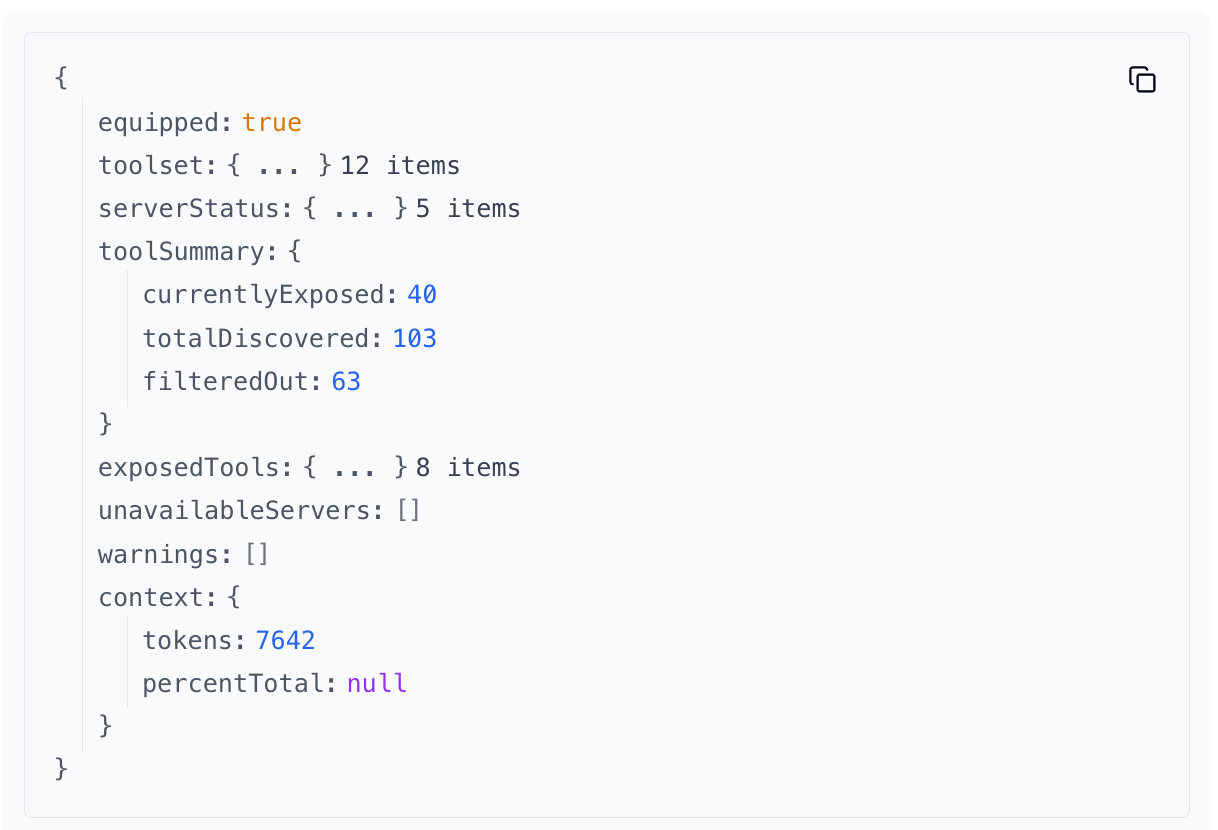
Active toolset showing token usage per tool
Why it matters:
- 🎯 Optimize context usage - Identify heavyweight tools consuming your context window
- 📉 Make informed decisions - See token costs before adding tools to toolsets
- 🔍 Compare alternatives - Find lighter tools that do the same job
- 💡 Budget your context - Understand exactly what you're exposing to your AI
How to use:
Ask your AI to use these MCP tools to see context information:
list-available-tools- Shows token estimates for all available toolsget-active-toolset- Shows token usage for your currently equipped toolset
Each tool displays estimated tokens and percentage of total context consumed. Perfect for building lean, efficient toolsets!
🎬 Demo
Hotswap toolsets across 100+ tools
Targeted toolsets across any number of MCPs. Swap to the best toolset for a goal with a tool call. Dynamic tool registration.
🏗️ How It Works
Before: Tool Chaos 😵
┌─────────────┐   ┌─────────────────────────────┐
│ Claude/     │──▶│ 50+ tools from 8 servers   │
│ Cursor      │   │ ❌ Wrong picks             │
│             │   │ ❌ Slow decisions          │
│             │   │ ❌ Confused context        │
└─────────────┘   └─────────────────────────────┘

After: Expert Mode 🎯
┌─────────────┐   ┌──────────────┐   ┌─────────────────┐
│ Claude/     │──▶│ HyperTool    │──▶│ ALL Your Tools  │
│ Cursor      │   │ (Local)      │   │ (Same servers)  │
└─────────────┘   └──────────────┘   └─────────────────┘
                         │
                         ▼
                  ┌─────────────────┐
                  │ Smart Toolsets  │
                  │ 🔨 coding (5)   │ ← "I'm coding now"
                  │ 📝 writing (3)  │ ← "I'm writing now"
                  │ 📊 analysis (4) │ ← "I'm analyzing now"
                  └─────────────────┘
                  ✅ Expert picks every time
What's a "Toolset"? Think Playlists for Your AI
Just like Spotify playlists organize your music, toolsets organize your AI tools:
ALL YOUR TOOLS (64 total)              YOUR TOOLSETS
┌────────────────────────────┐         ┌──────────────────┐
│ 🐳 Docker (19 tools)       │         │ 🔨 "coding"      │
│  • build_image             │   ┌───▶ │  • git.status    │
│  • create_container        │   │     │  • git.commit    │
│  • run_container           │   │     │  • docker.build  │
│  • stop_container          │   │     │  • docker.run    │
│  • [... 15 more]           │   │     │  • github.pr     │
├────────────────────────────┤   │     └──────────────────┘
│ 🔀 Git (12 tools)          │───┤
│  • status                  │   │     ┌──────────────────┐
│  • commit                  │   │     │ 📝 "writing"     │
│  • push                    │   └───▶ │  • notion.create │
│  • [... 9 more]            │         │  • slack.send    │
├────────────────────────────┤         │  • grammarly.fix │
│ 📝 Notion (8 tools)        │─────┐   └──────────────────┘
│ 💬 Slack (6 tools)         │     │
│ 📊 Linear (10 tools)       │     │   ┌──────────────────┐
│ 🧪 Testing (9 tools)       │     └─▶ │ 🐛 "debugging"   │
└────────────────────────────┘         │  • logs.search   │
                                       │  • docker.logs   │
AI sees ALL 64 tools = confused 😵     │  • traces.view   │
                                       └──────────────────┘

                                       AI sees 3-5 tools = focused 🎯
💼 Real-World Toolsets
Create focused toolsets for different workflows:
🔨 Development Mode
"deep-coding": git + docker + filesystem (12 tools)
→ Everything you need for feature development

"code-review": git + github + linear (10 tools)
→ Review PRs, update tickets, merge with confidence

"debugging": logs + docker + traces + alerts (8 tools)
→ Find and fix issues fast
📝 Content Creation
"writing": notion + grammarly + slack (6 tools)
→ Blog posts, docs, and team updates

"research": perplexity + notion + filesystem (7 tools)
→ Deep dives with organized notes
🎬 Real Chat Example
You: "I need to debug our API"
AI: "I'll switch to the debugging toolset for better focus"
[Now has: logs, traces, curl, docker]

You: "Actually, let's write the incident report"
AI: "Switching to writing toolset"
[Now has: notion, slack, templates]
💡 Pro tip: Start with 3-5 tools per toolset. Your AI will thank you!
📋 All Features
Explore everything HyperTool can do:
| Feature | Description | Guide |
|---|---|---|
| 🎭 Personas | Pre-configured MCP server bundles with curated |
README truncated. View full README on GitHub.
Alternatives



Related Skills
Browse all skillsUI design system toolkit for Senior UI Designer including design token generation, component documentation, responsive design calculations, and developer handoff tools. Use for creating design systems, maintaining visual consistency, and facilitating design-dev collaboration.
Answer questions about the AI SDK and help build AI-powered features. Use when developers: (1) Ask about AI SDK functions like generateText, streamText, ToolLoopAgent, embed, or tools, (2) Want to build AI agents, chatbots, RAG systems, or text generation features, (3) Have questions about AI providers (OpenAI, Anthropic, Google, etc.), streaming, tool calling, structured output, or embeddings, (4) Use React hooks like useChat or useCompletion. Triggers on: "AI SDK", "Vercel AI SDK", "generateText", "streamText", "add AI to my app", "build an agent", "tool calling", "structured output", "useChat".
PERSONAL APP ARCHITECT - Strategic development orchestrator for personal productivity applications. Analyzes project context, makes architectural decisions for single-developer projects, delegates to specialized skills, and ensures alignment between user experience goals and technical implementation. Optimized for personal apps targeting 10-100 users.
Creates educational Teams channel posts for internal knowledge sharing about Claude Code features, tools, and best practices. Applies when writing posts, announcements, or documentation to teach colleagues effective Claude Code usage, announce new features, share productivity tips, or document lessons learned. Provides templates, writing guidelines, and structured approaches emphasizing concrete examples, underlying principles, and connections to best practices like context engineering. Activates for content involving Teams posts, channel announcements, feature documentation, or tip sharing.
Use when working with the OpenAI API (Responses API) or OpenAI platform features (tools, streaming, Realtime API, auth, models, rate limits, MCP) and you need authoritative, up-to-date documentation (schemas, examples, limits, edge cases). Prefer the OpenAI Developer Documentation MCP server tools when available; otherwise guide the user to enable `openaiDeveloperDocs`.
Guide for building TypeScript CLIs with Bun. Use when creating command-line tools, adding subcommands to existing CLIs, or building developer tooling. Covers argument parsing, subcommand patterns, output formatting, and distribution.