
Lark Base
OfficialConnects to Lark Base (formerly Feishu Bitable) collaborative spreadsheets and databases to read, write, and manage data programmatically. Provides full CRUD operations on tables, fields, and records.
Integrates with Lark Base (formerly Feishu Bitable) to enable data retrieval, field management, and table manipulation across collaborative spreadsheets and databases using app tokens and personal base tokens for authentication.
What it does
- List and browse tables and records
- Create and delete tables in base apps
- Manage fields (create, update, delete)
- Insert new records into tables
- Update existing table structures
- Retrieve field information and schemas
Best for
About Lark Base
Lark Base is an official MCP server published by lark-base-team that provides AI assistants with tools and capabilities via the Model Context Protocol. Connect to Lark Base for seamless spreadsheet and database management, including data retrieval and field edits with secure authentication. It is categorized under databases. This server exposes 13 tools that AI clients can invoke during conversations and coding sessions.
How to install
You can install Lark Base in your AI client of choice. Use the install panel on this page to get one-click setup for Cursor, Claude Desktop, VS Code, and other MCP-compatible clients. This server runs locally on your machine via the stdio transport.
License
Lark Base is released under the MIT license. This is a permissive open-source license, meaning you can freely use, modify, and distribute the software.
Tools (13)
List records from a table
List tables from a app
在一个base app(多维表格) 中创建表单。需要事先获取app token。让用户直接提供app token或者一个base的url,如果没有,用creat_base创建一个app获取app token, 不要伪造app token
更新一个base app(多维表格)中的表单,如果返回了url,用markdown格式显示这个url,并引导用户访问这个url
Delete a table in a base app(多维表格)
base-mcp-server
A Model Context Protocol server that provides read and write access to Feishu Base (飞书多维表格) databases. This server enables LLMs to inspect database schemas, then read and write records.
Usage
1. Install Node.js
Make sure Node.js is installed on your machine.
2. Obtain Base Tokens
Get the appToken and personalBaseToken for your base account.
3. Install MCP Server Package Globally
Install the MCP server package globally using npm:
npm install -g @lark-base-open/mcp-node-server
4. MCP Server Configuration
In your MCP server configuration file, add the following:
{
  "mcpServers": {
    "base-mcp-server": {
      "command": "npx",
      "args": [
        "@lark-base-open/mcp-node-server",
        "-a",
        "appToken of base",
        "-p",
        "personalBaseToken of base"
      ]
    }
  }
}
Note: If you are using Claude, you will need to add the MCP configuration through the Developer option in the Claude client settings. You can access this in the Settings menu, and then add the MCP server details under the relevant section.
tokens
You need get two tokens before using this mcp server.
-
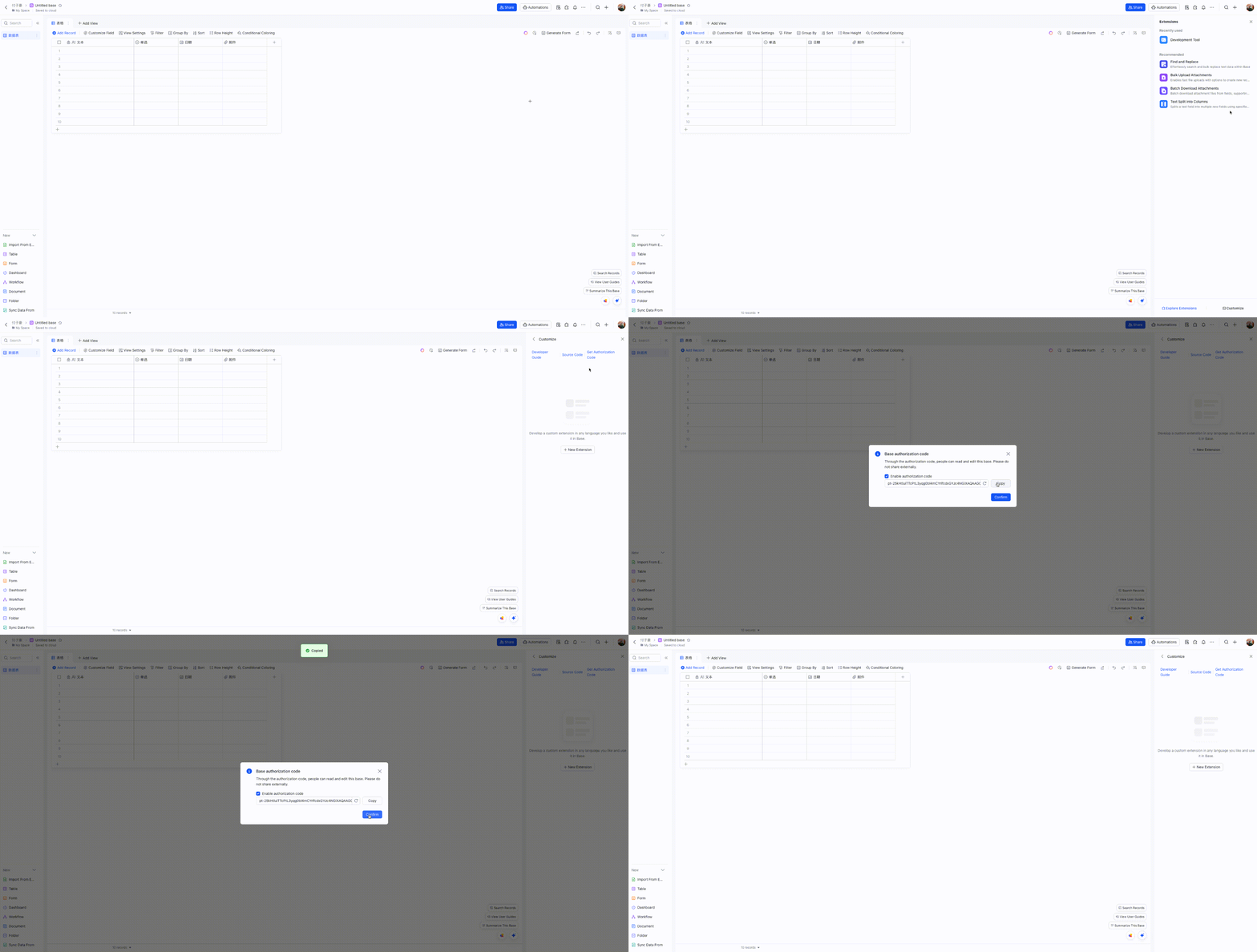
personalBaseToken: find Base Plugin UI in your base, and access Custom Plugin->Get Authorization Code
-
appToken: You can obtain the
appTokenquickly through a Developement Tool plugin. Here’s a simplified step-by-step process on how to do it: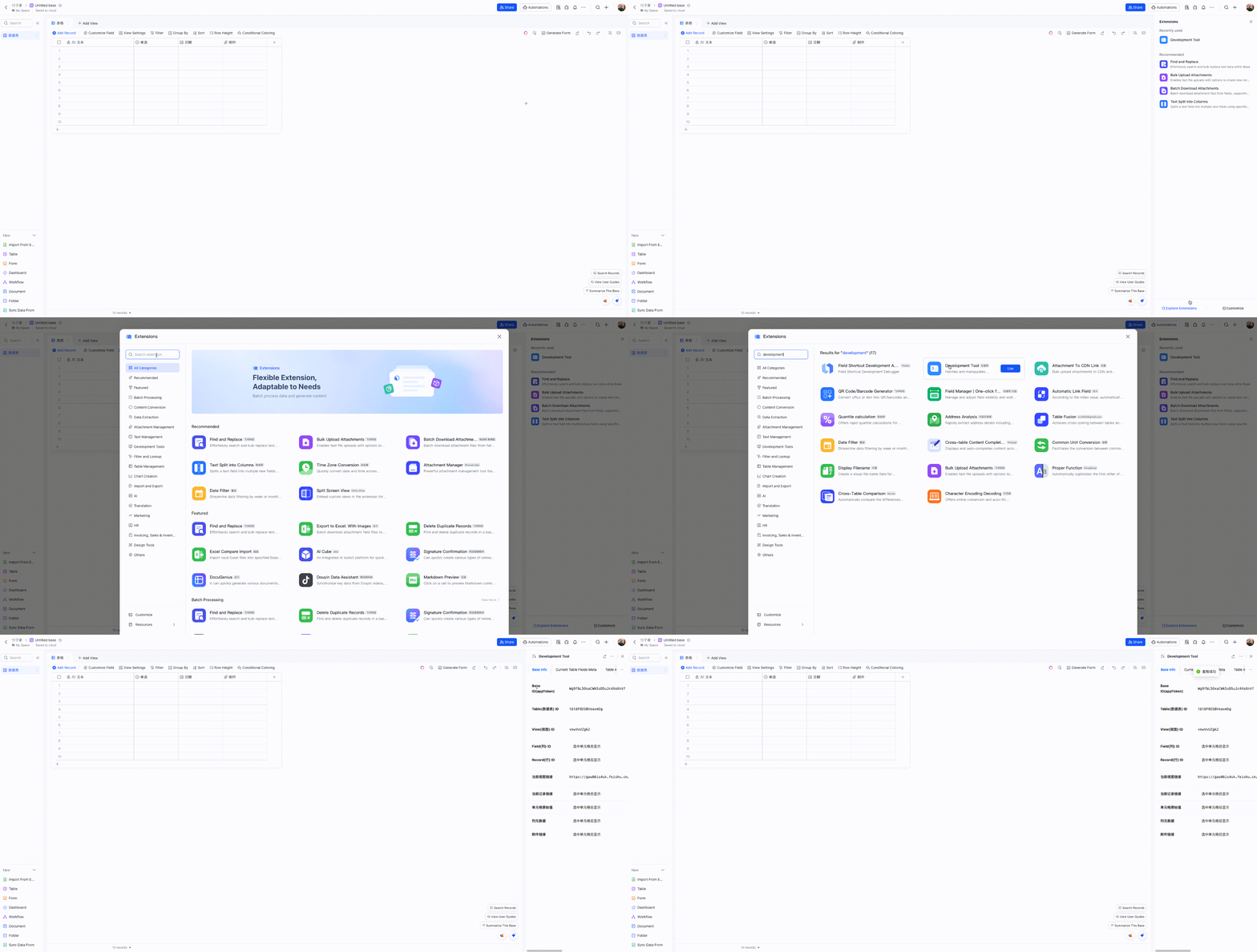
Components
Tools
-
list_tables
- Lists all tables in a base
- No input parameters required
-
list_records
- Lists records from a specified table
- Input parameters:
tableId(string, required): The ID of the table to query
-
get_record
- Gets a specific record by ID
- Input parameters:
tableId(string, required): The ID of the tablerecordId(string, required): The ID of the record to retrieve
-
create_record
- Creates a new record in a table
- Input parameters:
tableId(string, required): The ID of the tablefields(object, required): The fields and values for the new record
-
update_record
- Updates a record in a table
- Input parameters:
tableId(string, required): The ID of the tablerecordId(string, required): The ID of the recordfields(object, required): The fields to update and their new values
-
delete_record
- Deletes a record from a table
- Input parameters:
tableId(string, required): The ID of the tablerecordId(string, required): The ID of the record to delete
-
create_table
- Creates a new table in a base
- Input parameters:
name(string, required): Name of the new tablefields(array, required): Array of field definitions (name, type, description, options)
-
update_table
- Updates a table's name
- Input parameters:
tableId(string, required): The ID of the tablename(string, required): New name for the table
-
delete_table
- Deletes a table
- Input parameters:
tableId(string, required): The ID of the table to delete
-
list_fields
- Lists all fields in a table
- Input parameters:
tableId(string, required): The ID of the table
-
create_field
- Creates a new field in a table
- Input parameters:
tableId(string, required): The ID of the tablenested(object, required): Field configuration object containing:field(object, required): Field definition with name, type, and other properties
-
update_field
- Updates a field in a table
- Input parameters:
tableId(string, required): The ID of the tablefieldId(string, required): The ID of the fieldnested(object, required): Updated field configuration
-
delete_field
- Deletes a field from a table
- Input parameters:
tableId(string, required): The ID of the tablefieldId(string, required): The ID of the field to delete
Development
To get started with development:
- Install Node.js
- Clone the repository
- Install dependencies with
npm install - Run
npm devto start the development server - Run
npm testto run tests - Build with
npm build
Available scripts:
npm dev: Build and run the server in development modenpm start: Run the servernpm test: Run testsnpm test:watch: Run tests in watch modenpm lint: Run ESLintnpm build: Build the projectnpm build:watch: Watch for changes and rebuild automatically
Project Structure
.
├── src/                # Source code
│   ├── index.ts       # Main entry point(stdio)
│   ├── index.sse.ts   # SSE entry point
│   ├── service/       # Service implementations
│   ├── types/         # TypeScript type definitions
│   ├── utils/         # Utility functions
│   └── test/          # Test files
├── dist/              # Compiled output
Dependencies
Main dependencies:
@lark-base-open/node-sdk: Feishu Base Node.js SDK@modelcontextprotocol/sdk: Model Context Protocol SDKexpress: Web frameworkzod: Schema validation
License
MIT
Alternatives



Related Skills
Browse all skillsConduct comprehensive, systematic literature reviews using multiple academic databases (PubMed, arXiv, bioRxiv, Semantic Scholar, etc.). This skill should be used when conducting systematic literature reviews, meta-analyses, research synthesis, or comprehensive literature searches across biomedical, scientific, and technical domains. Creates professionally formatted markdown documents and PDFs with verified citations in multiple citation styles (APA, Nature, Vancouver, etc.).
Comprehensive guide for PostgreSQL psql - the interactive terminal client for PostgreSQL. Use when connecting to PostgreSQL databases, executing queries, managing databases/tables, configuring connection options, formatting output, writing scripts, managing transactions, and using advanced psql features for database administration and development.
Modern web development expertise covering React, Node.js, databases, and full-stack architecture. Use when: building web applications, developing APIs, creating frontends, setting up databases, deploying web apps, or when user mentions React, Next.js, Express, REST API, GraphQL, MongoDB, PostgreSQL, or full-stack development.
Autonomous biomedical AI agent framework for executing complex research tasks across genomics, drug discovery, molecular biology, and clinical analysis. Use this skill when conducting multi-step biomedical research including CRISPR screening design, single-cell RNA-seq analysis, ADMET prediction, GWAS interpretation, rare disease diagnosis, or lab protocol optimization. Leverages LLM reasoning with code execution and integrated biomedical databases.
Notion workspace integration. Use when user wants to read/write Notion pages, search databases, create tasks, or sync content with Notion.
Full Confluence Cloud REST API v2 skill (pages, spaces, folders, databases, whiteboards, comments, labels, tasks, properties, etc.) with basic/OAuth auth, pagination, and migration from confluence-cli.