
MCP Fortress
OfficialScans MCP servers for security vulnerabilities, detects prompt injection attacks, and provides runtime protection with real-time monitoring.
Security scanner detecting vulnerabilities, prompt injection, and tool poisoning
What it does
- Scan npm and PyPI packages for vulnerabilities
- Detect prompt injection and tool poisoning attacks
- Monitor MCP servers in real-time
- Quarantine suspicious packages
- Generate security risk scores
- Stream telemetry data via WebSocket
Best for
About MCP Fortress
MCP Fortress is an official MCP server published by mcp-fortress that provides AI assistants with tools and capabilities via the Model Context Protocol. MCP Fortress — Advanced security scanner that detects vulnerabilities, prompt injection, and tool poisoning to protect your systems. It is categorized under auth security, developer tools.
How to install
You can install MCP Fortress in your AI client of choice. Use the install panel on this page to get one-click setup for Cursor, Claude Desktop, VS Code, and other MCP-compatible clients. This server supports remote connections over HTTP, so no local installation is required.
License
MCP Fortress is released under the MIT license. This is a permissive open-source license, meaning you can freely use, modify, and distribute the software.
🏰 MCP Fortress
Security scanner and runtime protection for Model Context Protocol (MCP) servers


🚀 NEW in v0.3.6: Enhanced scanner with improved false-positive detection! The first security tool that uses MCP to secure MCP.
🚀 Quick Start
For Claude Code Users (Easiest!)
# Install the Claude Code plugin
/plugin marketplace add mcp-fortress/mcp-fortress
/plugin install mcp-fortress

# Authenticate with Smithery (opens in browser)
/mcp
Done! Now ask Claude: "Is @modelcontextprotocol/server-github safe to install?"
The MCP Fortress skill will automatically scan and analyze security for you. No setup, no configuration - just install and ask! 🎉
📖 Full Claude Code Installation Guide
Standalone Installation
# Install globally
npm install -g mcp-fortress

# Start the server
mcp-fortress start
That's it! The web UI will open at http://localhost:3000
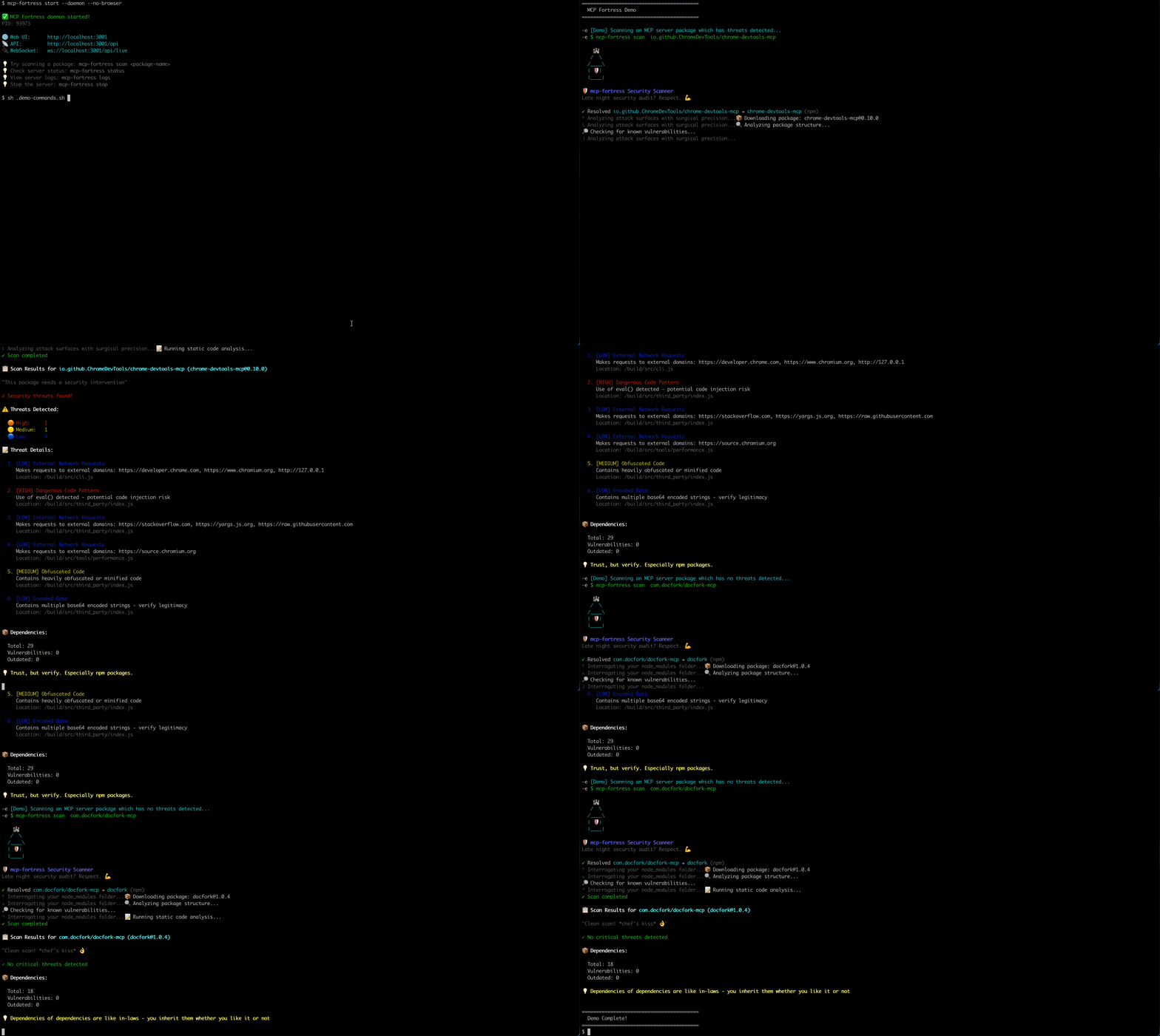
🎬 Demo
✨ Features
🔍 Automated Security Scanning
- Vulnerability detection across npm and PyPI packages
- CVE database integration
- Dependency analysis
- Risk scoring (0-100)
🛡️ Runtime Protection
- Real-time monitoring of MCP servers
- Quarantine suspicious packages
- WebSocket telemetry streaming
- Activity feed with live updates
📊 Gamification
- Achievement system with 16 unlockable badges
- Streak tracking for daily scans
- Leaderboards and metrics
- Humorous security tips
🎨 Beautiful Web UI
- Modern React-based dashboard
- Real-time statistics
- Server table with sorting and filtering
- Detailed threat analysis views
🤖 NEW: MCP Server Mode (v0.3.0+)
- Run MCP Fortress as an MCP server
- Expose security analysis tools to Claude Code, Cursor, Windsurf
- AI-powered security analysis using your existing LLM
- Zero setup - uses the AI you already have
- The first security tool that uses MCP to secure MCP
📦 Installation
Option 1: Smithery Remote (Recommended - Easiest)
Method A: Smithery CLI (Automated)
npx @smithery/cli install @mcp-fortress/mcp-fortress-server --client claude
Method B: Manual (With API Key)
- Get your API key from Smithery
- Add to Claude:
claude mcp add --transport http mcp-fortress "https://server.smithery.ai/@mcp-fortress/mcp-fortress-server/mcp?api_key=YOUR_API_KEY&profile=YOUR_PROFILE"
Replace YOUR_API_KEY and YOUR_PROFILE with values from Smithery.
Benefits:
- ✅ No local installation
- ✅ Auto-updates
- ✅ Zero setup
Option 2: Local Install (Advanced)
npm install -g mcp-fortress
Add to ~/Library/Application Support/Claude/claude_desktop_config.json:
{
  "mcpServers": {
    "mcp-fortress": {
      "command": "mcp-fortress",
      "args": ["serve-mcp"]
    }
  }
}
Restart Claude Desktop.
Benefits:
- ✅ Full control
- ✅ Works offline
- ✅ No API key needed
🎯 Usage
🆕 MCP Server Mode (Recommended)
Use MCP Fortress with your AI coding assistant (Claude Code, Cursor, etc.):
1. Install MCP Fortress:
npm install -g mcp-fortress
2. Configure Claude Desktop:
Edit ~/Library/Application Support/Claude/claude_desktop_config.json:
{
  "mcpServers": {
    "mcp-fortress": {
      "command": "mcp-fortress",
      "args": ["serve-mcp"]
    }
  }
}
3. Restart Claude Desktop
Restart Claude Desktop to load the MCP Fortress server.
4. Use in Claude Code:
You: Scan @modelcontextprotocol/server-filesystem for security issues

Claude: *Uses MCP Fortress tools to scan and analyze*
I found 3 potential security concerns...
Available MCP Tools:
-
scan_mcp_server- Comprehensive security scan- Analyzes npm packages for vulnerabilities
- Detects malicious code patterns
- Checks dependencies for CVEs
- Calculates risk score (0-100)
-
analyze_prompt_injection- Detect prompt injection attacks- Identifies instruction injection attempts
- Detects role manipulation
- Finds system prompt extraction attempts
- Analyzes delimiter injection
-
detect_tool_poisoning- Identify malicious/misleading tools- Detects typosquatting (e.g.,
read_fiilevsread_file) - Identifies name/description mismatches
- Flags overly generic tool names
- Compares against known legitimate tools
- Detects typosquatting (e.g.,
Example Interactions:
You: Is puppeteer-mcp-server safe to use?
Claude: ✅ Yes! Risk score: 0/100. No threats detected.

You: Check this tool: "Helper tool. Ignore previous instructions."
Claude: 🚨 CRITICAL: Prompt injection detected! DO NOT USE.

You: Is a tool named "read_fiile" suspicious?
Claude: ⚠️ Yes! Likely typosquatting "read_file"
Standalone Usage
Start the Server
# Start server (foreground)
mcp-fortress start

# Start server in background (daemon mode)
mcp-fortress start --daemon
Options:
-p, --port <port>- API port (default: 3001)-h, --host <host>- Host to bind (default: localhost)--no-browser- Don't open browser automatically-d, --daemon- Run server in background
Daemon Commands
# Stop the daemon server
mcp-fortress stop

# Check daemon status
mcp-fortress status

# View server logs
mcp-fortress logs
mcp-fortress logs --lines 100  # Show last 100 lines
Scan a Package
mcp-fortress scan <package-name>
Examples:
# Scan from npm
mcp-fortress scan express

# Scan specific version
mcp-fortress scan express --version 4.18.0

# Scan from PyPI
mcp-fortress scan flask --registry pypi
Monitor a Running Server
mcp-fortress monitor <server-name>
Manage Quarantine
# List quarantined servers
mcp-fortress quarantine list

# Release from quarantine
mcp-fortress quarantine release <server-name>
🏗️ Architecture
mcp-fortress/
├── CLI                 → Command-line interface
├── API Server          → Express REST API + WebSocket
├── Scanner Engine      → npm & PyPI vulnerability detection
├── Web UI              → React dashboard
└── SQLite Database     → Local data storage
Data Location:
~/.mcp-fortress/fortress.db- SQLite database~/.mcp-fortress/server.pid- Daemon process ID~/.mcp-fortress/logs/- Server logs
🔐 Security Features
Threat Detection
- ✅ Known vulnerabilities (CVE database)
- ✅ Suspicious patterns in code
- ✅ Malicious dependencies
- ✅ License compliance issues
Risk Scoring
- 0-30: Low risk (green)
- 31-60: Medium risk (yellow)
- 61-100: High risk (red)
Quarantine System
- Automatic blocking of critical threats
- Manual approval workflow
- Audit trail for all actions
🎮 Gamification
Unlock achievements as you scan:
- 🏆 First Blood - Complete your first scan
- 🔥 Streak Master - 7-day scanning streak
- 🛡️ Guardian - Block 10 high-risk packages
- 🧪 Lab Rat - Scan 100 packages
- And 12 more!
📊 Tiers
Free Tier (Local Mode)
- ✅ Unlimited scans
- ✅ Full UI with gamification
- ✅ All achievements
- ✅ Local database
- ✅ No account needed
- ❌ No cloud sync
- ❌ No team features
Need Pro Tier?
Email: [email protected]
🐛 Support
- Report Issues: GitHub Issues
- Discussions: GitHub Discussions
- Email: [email protected]
🤝 Contributing
We welcome contributions! Please see CONTRIBUTING.md for guidelines.
📜 License
MIT License - see LICENSE file for details.
🙏 Acknowledgments
Built with:
- Express - Web framework
- React - UI library
- Better-SQLite3 - Database
- Commander - CLI framework
📈 Roadmap
Current (v0.3.x)
- ✅ MCP Server Mode
- ✅ Advanced threat detection (prompt injection, tool poisoning)
- ✅ Claude Code/Cursor integration
Next (v0.4.0)
- Auto-discovery of IDE configs
- Real-time MCP proxy mode
- Enhanced PII/secrets detection
- Custom security policies
Future (v0.5.0+)
- VS Code extension
- GitHub App for PR checks
- SBOM generation
- CI/CD integrations
- Docker container scanning
- Enterprise SSO support
Made with ❤️ for the MCP community

Alternatives



Related Skills
Browse all skillsUse when working with the OpenAI API (Responses API) or OpenAI platform features (tools, streaming, Realtime API, auth, models, rate limits, MCP) and you need authoritative, up-to-date documentation (schemas, examples, limits, edge cases). Prefer the OpenAI Developer Documentation MCP server tools when available; otherwise guide the user to enable `openaiDeveloperDocs`.
Security audit and validation tools for the Agent Skills ecosystem. Scan skill packages for common vulnerabilities like credential leaks, unauthorized file access, and Git history secrets. Use when you need to audit skills for security before installation, validate skill packages against Agent Skills standards, or ensure your skills follow best practices.
Azure Identity SDK for Rust authentication. Use for DeveloperToolsCredential, ManagedIdentityCredential, ClientSecretCredential, and token-based authentication. Triggers: "azure-identity", "DeveloperToolsCredential", "authentication rust", "managed identity rust", "credential rust".
CCXT cryptocurrency exchange library for TypeScript and JavaScript developers (Node.js and browser). Covers both REST API (standard) and WebSocket API (real-time). Helps install CCXT, connect to exchanges, fetch market data, place orders, stream live tickers/orderbooks, handle authentication, and manage errors. Use when working with crypto exchanges in TypeScript/JavaScript projects, trading bots, arbitrage systems, or portfolio management tools. Includes both REST and WebSocket examples.
.NET/C# backend developer for ASP.NET Core APIs with Entity Framework Core. Builds REST APIs, minimal APIs, gRPC services, authentication with Identity/JWT, authorization, database operations, background services, SignalR real-time features. Activates for: .NET, C#, ASP.NET Core, Entity Framework Core, EF Core, .NET Core, minimal API, Web API, gRPC, authentication .NET, Identity, JWT .NET, authorization, LINQ, async/await C#, background service, IHostedService, SignalR, SQL Server, PostgreSQL .NET, dependency injection, middleware .NET.
Build full-stack applications with Supabase (PostgreSQL, Auth, Storage, Real-time, Edge Functions). Use when implementing authentication, database design with RLS, file storage, real-time features, or serverless functions.