
MCP-UI Widgets
Provides interactive HTML widgets for common tasks like timers, stopwatches, unit conversions, and fact displays that can be embedded in chat interfaces.
Demo: Provides MCP-UI components including timers, stopwatches, fact displays, and unit converters through templated HTML widgets that replace JavaScript configuration objects with user-provided parameters for dynamic content creation.
What it does
- Start customizable timers with audio alerts
- Run stopwatches that count up from zero
- Display facts in easy-to-read cards
- Convert between units with real-time calculations
Best for
About MCP-UI Widgets
MCP-UI Widgets is a community-built MCP server published by ref-tools that provides AI assistants with tools and capabilities via the Model Context Protocol. Explore MCP-UI Widgets, a React UI library offering timers, stopwatches, and unit converters for dynamic, customizable React app interfaces. It is categorized under productivity. This server exposes 4 tools that AI clients can invoke during conversations and coding sessions.
How to install
You can install MCP-UI Widgets in your AI client of choice. Use the install panel on this page to get one-click setup for Cursor, Claude Desktop, VS Code, and other MCP-compatible clients. This server runs locally on your machine via the stdio transport. This server supports remote connections over HTTP, so no local installation is required.
License
MCP-UI Widgets is released under the Unlicense license. This is a permissive open-source license, meaning you can freely use, modify, and distribute the software.
Tools (4)
Start a timer. You don't need to say anything else after answering with this tool.
Start a stopwatch that counts up from zero. You don't need to say anything else after answering with this tool.
Display a simple fact. Should be used when answering a users question that has a short factual answer. You don't need to say anything else after answering with this tool. Example: { description: 'The capital of France', fact: 'Paris' }
Display a unit conversion widget that allows real-time conversion between multiple units. Each unit should contain a formula for each other unit in terms of the current unit. Example input: { units: [{id: 'ft', name: 'Feet', formulas: {in:'{ft} * 12'}, {id: 'in', name: 'Inches', formulas: {ft:'{in} * 12'}}], initialValue: { id: 'ft', value: 1 }}. You don't need to say anything else after answering with this tool.
⚙️ Widget MCP
Add simple widgets to you LLM chat for common situations like timers, conversions and more.
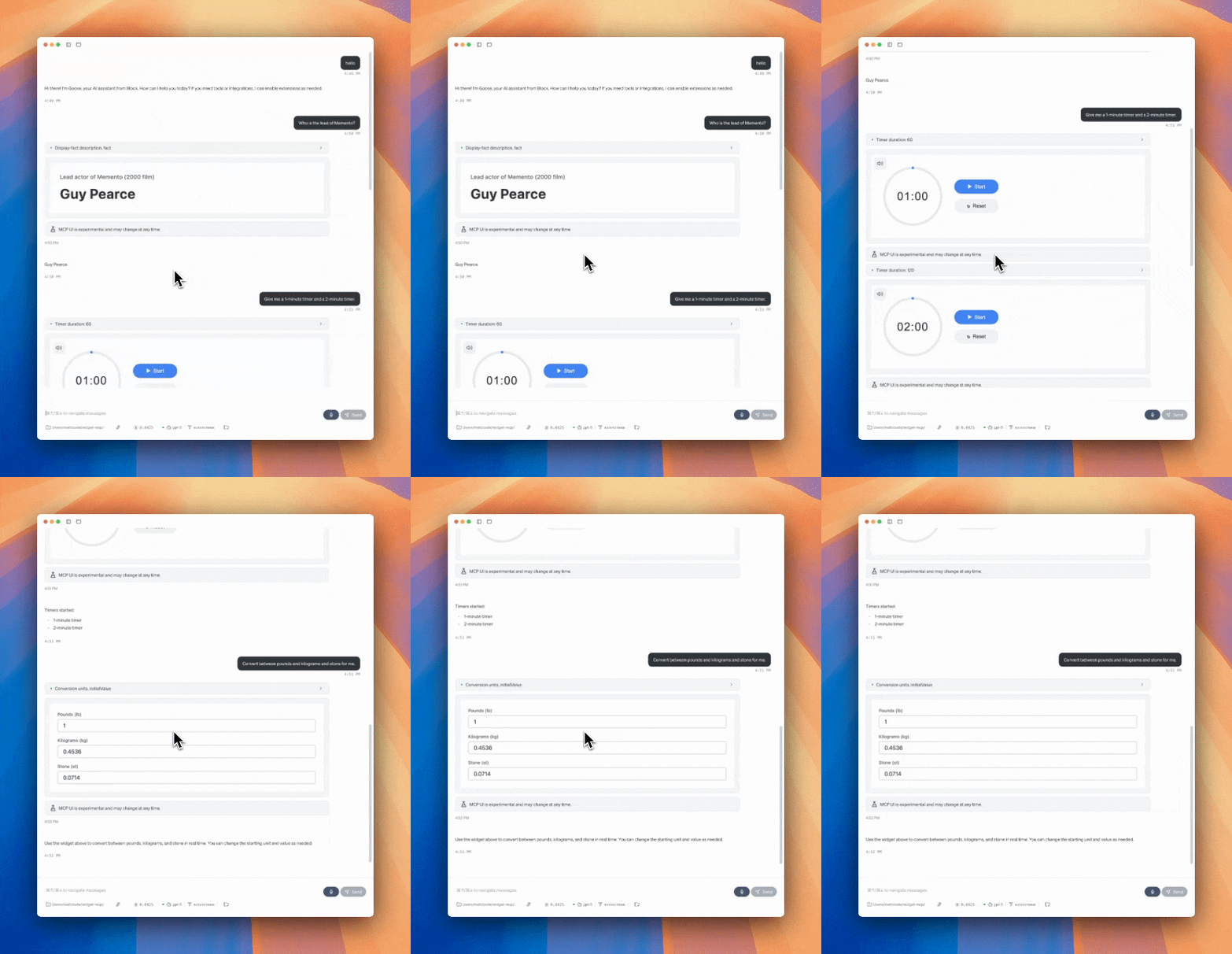
Demo video: https://youtu.be/4gfom42vHkc
Motivation
MCP-UI opens the door to breaking the text wall from chat UIs we've been using the last few years. The full extent of what's possible is
This project shows the floor of what's possible by providing a few simple widgets for common situations.
If you've ever google "convert X to Y" or "2 minute timer" and see the custom UI results, this should feel very familiar.
Current widgets
Timer- Editable timer with a chime.Stopwatch- Timer that just counts up.Conversion- Convert between set of units for which the LLM can write a formula.Display Fact- When the answer is simple, just show it in an easy to read card.
Supported MCP Clients
MCP-UI is new and as of August 2025 is only supported by a few clients.
Smithery
Try widget-mcp in the Smithery playground. (TODO: pending Smithery deploy)
Goose
- Install Goose
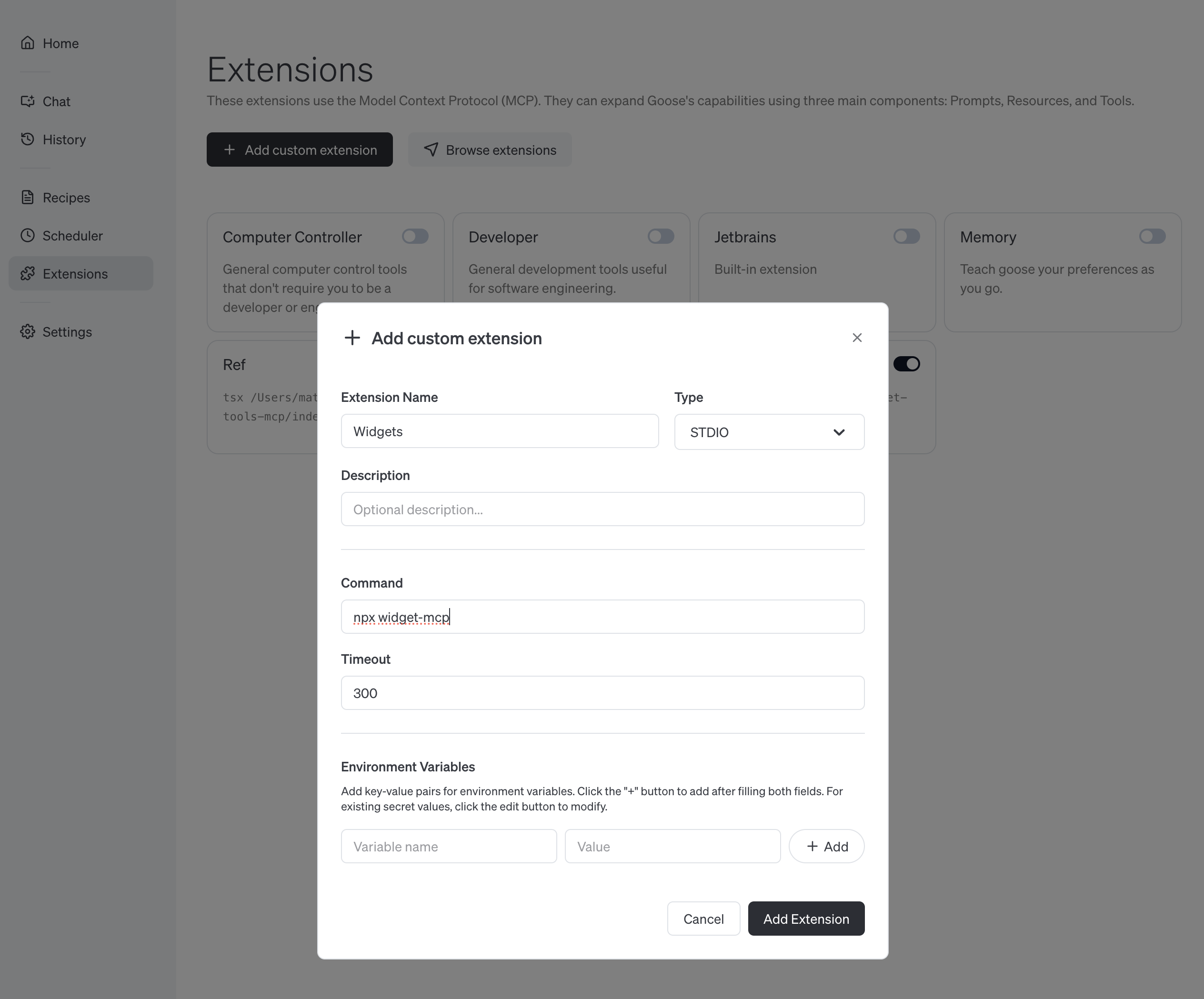
- Click
ExtensionsandAdd custom extension - Fill in name as
Widgetsand commandnpx widget-mcp - Verify it's working by clicking
Chatand prompting2 minute timer
Requests for widgets
Here's a few examples of widgets that could be fun to add.
- Color Picker - Interactive color selection and palette tools. Could be parameterized to allow the LLM to suggest a color and let the user tweak and explore.
- Calculator - Basic and scientific calculator functionality. Initial function seeded by LLM.
- Dice Roller - Custom set of dice based on what you ask the agent for.
I'm sure you have some cool ideas!
Development
Adding new widgets should be very easy! All these widgets are HTML pages that can have variables injected (eg. values provided by the LLM). To add new widgets, add an template file to the html directory and a new tool to index.ts.
You can probably just prompt "Add a widget html and tool to do
# Install dependencies
npm install

# Iterate on the html with hot-reloads
npm run dev:html

# Launch the MCP server with Smithery's web inspector
npm run dev:mcp
Links
Alternatives




Related Skills
Browse all skillsBuild beautiful cross-platform mobile apps with Flutter and Dart. Covers widgets, state management with Provider/BLoC, navigation, API integration, and material design.
Expert guidance for building TUI (Text User Interface) applications with the Textual framework. Invoke when user asks about Textual development, TUI apps, widgets, screens, CSS styling, reactive programming, or testing Textual applications.
Master Flutter development with Dart 3, advanced widgets, and multi-platform deployment. Handles state management, animations, testing, and performance optimization for mobile, web, desktop, and embedded platforms. Use PROACTIVELY for Flutter architecture, UI implementation, or cross-platform features.
PERSONAL APP ARCHITECT - Strategic development orchestrator for personal productivity applications. Analyzes project context, makes architectural decisions for single-developer projects, delegates to specialized skills, and ensures alignment between user experience goals and technical implementation. Optimized for personal apps targeting 10-100 users.
Comprehensive Flutter API reference guide covering widgets, Material Design, Cupertino, animations, gestures, navigation, state management, and platform integration. Use when developing Flutter applications and needing detailed API knowledge for widgets, layout, styling, animations, platform channels, or any Flutter SDK functionality. Essential for building cross-platform mobile, web, and desktop applications with Flutter.
Boost your productivity with automated task management