
Nutrient Document Web Services
OfficialConnects AI assistants to Nutrient's Document Web Services API for PDF manipulation, digital signing, OCR, and document conversion across multiple file formats through natural language commands.
Integrates with Nutrient Document Web Services API to provide PDF manipulation, digital signing, and document processing capabilities across multiple file formats including Office documents and images.
What it does
- Merge and split PDF documents
- Apply digital signatures with PAdES compliance
- Redact sensitive information automatically
- Convert documents between formats (PDF, Office, images)
- Perform OCR on scanned documents
- Extract text and metadata from documents
Best for
About Nutrient Document Web Services
Nutrient Document Web Services is an official MCP server published by pspdfkit that provides AI assistants with tools and capabilities via the Model Context Protocol. Integrate Nutrient Document Web Services API for secure PDF manipulation, digital signing, and document processing across file formats. It is categorized under productivity, file systems.
How to install
You can install Nutrient Document Web Services in your AI client of choice. Use the install panel on this page to get one-click setup for Cursor, Claude Desktop, VS Code, and other MCP-compatible clients. This server runs locally on your machine via the stdio transport.
License
Nutrient Document Web Services is released under the MIT license. This is a permissive open-source license, meaning you can freely use, modify, and distribute the software.
Nutrient DWS MCP Server
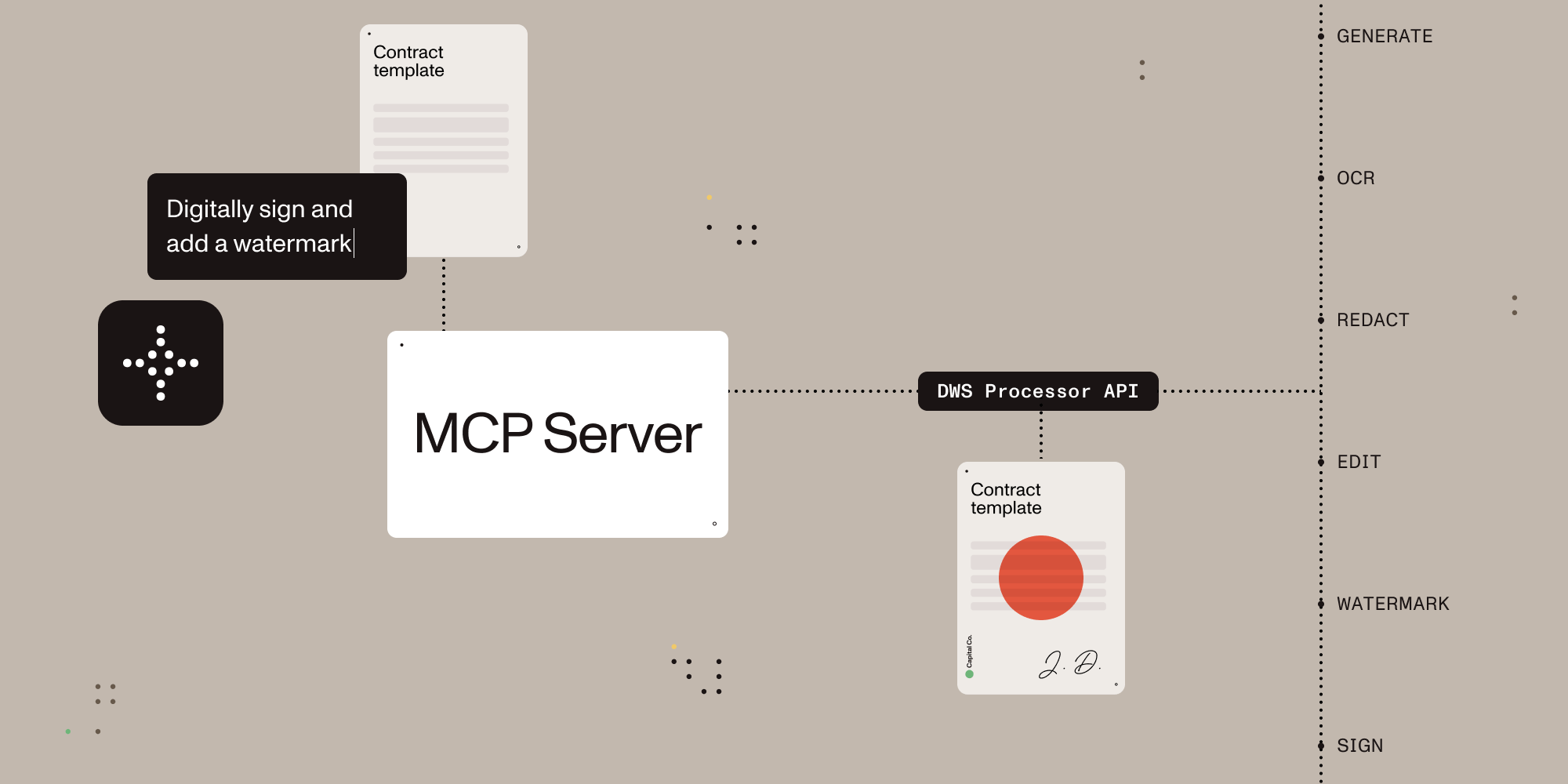

Give AI agents the power to process, sign, and transform documents.
A Model Context Protocol (MCP) server that connects AI assistants to the Nutrient Document Web Service (DWS) Processor API — enabling document creation, editing, conversion, digital signing, OCR, redaction, and more through natural language.
What You Can Do
Once configured, you (or your AI agent) can process documents through natural language:
You: "Merge report-q1.pdf and report-q2.pdf into a single document" AI: "Done! I've merged both reports into combined-report.pdf (24 pages total)."
You: "Redact all social security numbers and email addresses from application.pdf" AI: "I found and redacted 5 SSNs and 3 email addresses. The redacted version is saved as application-redacted.pdf."
You: "Digitally sign this contract with a visible signature on page 3" AI: "I've applied a PAdES-compliant digital signature to contract.pdf. The signed document is saved as contract-signed.pdf."
You: "Convert this PDF to markdown" AI: "Here's the markdown content extracted from your document..."
You: "OCR this scanned document in German and extract the text" AI: "I've processed the scan with German OCR. Here's the extracted text..."
Quick Start
1. Get a Nutrient API Key
Sign up for free at nutrient.io/api.
2. Configure Your AI Client
Choose your platform and add the configuration:
Claude Desktop
Open Settings → Developer → Edit Config, then add:
macOS: ~/Library/Application Support/Claude/claude_desktop_config.json
Windows: %APPDATA%\Claude\claude_desktop_config.json
{
  "mcpServers": {
    "nutrient-dws": {
      "command": "npx",
      "args": ["-y", "@nutrient-sdk/dws-mcp-server"],
      "env": {
        "NUTRIENT_DWS_API_KEY": "YOUR_API_KEY_HERE",
        "SANDBOX_PATH": "/your/sandbox/directory"
        // "C:\\your\\sandbox\\directory" for Windows
      }
    }
  }
}
Cursor
Create .cursor/mcp.json in your project root:
{
  "mcpServers": {
    "nutrient-dws": {
      "command": "npx",
      "args": ["-y", "@nutrient-sdk/dws-mcp-server"],
      "env": {
        "NUTRIENT_DWS_API_KEY": "YOUR_API_KEY_HERE",
        "SANDBOX_PATH": "/your/project/documents"
        // "C:\\your\\project\\documents" for Windows
      }
    }
  }
}
Windsurf
Add to ~/.codeium/windsurf/mcp_config.json:
{
  "mcpServers": {
    "nutrient-dws": {
      "command": "npx",
      "args": ["-y", "@nutrient-sdk/dws-mcp-server"],
      "env": {
        "NUTRIENT_DWS_API_KEY": "YOUR_API_KEY_HERE",
        "SANDBOX_PATH": "/your/sandbox/directory"
        // "C:\\your\\sandbox\\directory" for Windows
      }
    }
  }
}
VS Code (GitHub Copilot)
Add to .vscode/settings.json in your project:
{
  "mcp": {
    "servers": {
      "nutrient-dws": {
        "command": "npx",
        "args": ["-y", "@nutrient-sdk/dws-mcp-server"],
        "env": {
          "NUTRIENT_DWS_API_KEY": "YOUR_API_KEY_HERE",
          "SANDBOX_PATH": "${workspaceFolder}"
        }
      }
    }
  }
}
Other MCP Clients
Any MCP-compatible client can connect using stdio transport:
NUTRIENT_DWS_API_KEY=your_key SANDBOX_PATH=/your/path npx @nutrient-sdk/dws-mcp-server
3. Restart Your AI Client
Restart the application to pick up the new MCP server configuration.
4. Start Processing Documents
Drop documents into your sandbox directory and start giving instructions!
Available Tools
| Tool | Description |
|---|---|
| document_processor | All-in-one document processing: merge PDFs, convert formats, apply OCR, watermark, rotate, redact, flatten annotations, extract text/tables/key-value pairs, and more |
| document_signer | Digitally sign PDFs with PAdES-compliant CMS or CAdES signatures, with customizable visible/invisible signature appearances |
| sandbox_file_tree | Browse files in the sandbox directory (when sandbox mode is enabled) |
| directory_tree | Browse directory contents (when sandbox mode is disabled) |
Document Processor Capabilities
| Feature | Description |
|---|---|
| Document Creation | Merge PDFs, Office docs (DOCX, XLSX, PPTX), and images into a single document |
| Format Conversion | PDF ↔ DOCX, images (PNG, JPEG, WebP), PDF/A, PDF/UA, HTML, Markdown |
| Editing | Watermark (text/image), rotate pages, flatten annotations |
| Security | Redact sensitive data (SSNs, credit cards, emails, etc.), password protection, permission control |
| Data Extraction | Extract text, tables, or key-value pairs as structured JSON |
| OCR | Multi-language optical character recognition for scanned documents |
| Optimization | Compress and linearize PDFs without quality loss |
| Annotations | Import XFDF annotations, flatten annotations |
| Digital Signing | PAdES-compliant CMS and CAdES digital signatures (via document_signer tool) |
Use with AI Agent Frameworks
This MCP server works with any platform that supports the Model Context Protocol:
- Claude Desktop — Direct MCP integration
- Cursor — AI-powered IDE with MCP support
- Windsurf — AI-powered IDE with MCP support
- VS Code + Copilot — GitHub Copilot MCP integration
- LangChain / LangGraph — Via MCP tool adapters
- OpenAI Agents SDK — Via MCP server integration
- Custom agents — Any MCP-compatible system
Why Nutrient?
The Read-Write Gap
AI can read and understand documents — but most tools stop there. Nutrient gives AI agents the ability to actually manipulate documents: merge, redact, sign, watermark, convert formats, extract structured data, and more.
- Beyond PDF reading — Not just text extraction. Full document creation, editing, and transformation.
- Production-grade — Trusted by thousands of companies for mission-critical document processing.
- Standards-compliant — PAdES digital signatures, PDF/A archiving, PDF/UA accessibility.
- Cloud-native — No infrastructure to manage. Send documents to the API, get results back.
- Comprehensive redaction — Built-in presets for SSNs, credit cards, phone numbers, emails, dates, and more.
- Multi-format — Process PDFs, Office documents, images, HTML, and Markdown.
Configuration
Sandbox Mode (Recommended)
The server supports sandbox mode that restricts file operations to a specific directory. Set the SANDBOX_PATH environment variable to enable it:
export SANDBOX_PATH=/path/to/sandbox/directory
npx @nutrient-sdk/dws-mcp-server
When sandbox mode is enabled:
- Relative paths resolve relative to the sandbox directory
- All input file paths are validated to ensure they reside in the sandbox
- Processed files are saved within the sandbox
Note: If no sandbox directory is specified, the server operates without file path restrictions. Sandbox mode is strongly recommended for security.
Output Location
Processed files are saved to a location determined by the AI. To guide output placement, use natural language (e.g., "save the result to output/result.pdf") or create an output directory in your sandbox.
Environment Variables
| Variable | Required | Description |
|---|---|---|
NUTRIENT_DWS_API_KEY | Yes | Your Nutrient DWS API key (get one free) |
SANDBOX_PATH | Recommended | Directory to restrict file operations to |
Troubleshooting
Server not appearing in Claude Desktop?
- Ensure Node.js 18+ is installed (
node --version) - Check the config file path is correct for your OS
- Restart Claude Desktop completely (check Task Manager/Activity Monitor)
"API key invalid" errors?
- Verify your API key at dashboard.nutrient.io
- Ensure the key is set correctly in the
envsection (no extra spaces)
Files not found?
- Check that
SANDBOX_PATHpoints to an existing directory - Ensure your documents are inside the sandbox directory
- Use the
sandbox_file_treetool to verify visible files
Contributing
Please see the contribution guidelines in CONTRIBUTING.md.
License
MIT License — see LICENSE for details.
Alternatives




Related Skills
Browse all skillsConvert Markdown files to HTML similar to `marked.js`, `pandoc`, `gomarkdown/markdown`, or similar tools; or writing custom script to convert markdown to html and/or working on web template systems like `jekyll/jekyll`, `gohugoio/hugo`, or similar web templating systems that utilize markdown documents, converting them to html. Use when asked to "convert markdown to html", "transform md to html", "render markdown", "generate html from markdown", or when working with .md files and/or web a templating system that converts markdown to HTML output. Supports CLI and Node.js workflows with GFM, CommonMark, and standard Markdown flavors.
Convert various file formats (PDF, Office documents, images, audio, web content, structured data) to Markdown optimized for LLM processing. Use when converting documents to markdown, extracting text from PDFs/Office files, transcribing audio, performing OCR on images, extracting YouTube transcripts, or processing batches of files. Supports 20+ formats including DOCX, XLSX, PPTX, PDF, HTML, EPUB, CSV, JSON, images with OCR, and audio with transcription.
Reverse engineer web APIs by capturing browser traffic (HAR files) and generating production-ready Python API clients. Use when the user wants to create an API client for a website, automate web interactions, or understand undocumented APIs. Activate on tasks mentioning "reverse engineer", "API client", "HAR file", "capture traffic", or "automate website".
Query official Microsoft documentation to understand concepts, find tutorials, and learn how services work. Use for Azure, .NET, Microsoft 365, Windows, Power Platform, and all Microsoft technologies. Get accurate, current information from learn.microsoft.com and other official Microsoft websites—architecture overviews, quickstarts, configuration guides, limits, and best practices.
Build document Q&A and searchable knowledge bases with Google Gemini File Search - fully managed RAG with automatic chunking, embeddings, and citations. Upload 100+ file formats (PDF, Word, Excel, code), configure semantic search, and query with natural language.Use when: building document Q&A systems, creating searchable knowledge bases, implementing semantic search without managing embeddings, indexing large document collections (100+ formats), or troubleshooting document immutability errors (delete+re-upload required), storage quota issues (3x input size for embeddings), chunking configuration (500 tokens/chunk recommended), metadata limits (20 key-value pairs max), indexing cost surprises ($0.15/1M tokens one-time), operation polling timeouts (wait for done: true), force delete errors, or model compatibility (Gemini 2.5 Pro/Flash only).
Configure docusaurus config setup operations. Auto-activating skill for Technical Documentation. Triggers on: docusaurus config setup, docusaurus config setup Part of the Technical Documentation skill category. Use when configuring systems or services. Trigger with phrases like "docusaurus config setup", "docusaurus setup", "docusaurus".