
OWL (Web Ontology Language)
Enables AI systems to read, write, and modify Web Ontology Language (OWL) files by adding, removing, and searching axioms using functional syntax.
Enables AI systems to manipulate Web Ontology Language (OWL) ontologies by adding, removing, and finding axioms through string-based representations in OWL functional syntax
What it does
- Add axioms to OWL ontologies
- Remove axioms from OWL files
- Search axioms by pattern matching
- Configure and manage multiple ontologies
- Extract ontology metadata
- Add prefix mappings
Best for
About OWL (Web Ontology Language)
OWL (Web Ontology Language) is a community-built MCP server published by ai4curation that provides AI assistants with tools and capabilities via the Model Context Protocol. OWL (Web Ontology Language) lets AI systems manage ontologies by adding, removing, or finding axioms with functional syntax. It is categorized under file systems, developer tools. This server exposes 19 tools that AI clients can invoke during conversations and coding sessions.
How to install
You can install OWL (Web Ontology Language) in your AI client of choice. Use the install panel on this page to get one-click setup for Cursor, Claude Desktop, VS Code, and other MCP-compatible clients. This server runs locally on your machine via the stdio transport.
License
OWL (Web Ontology Language) is released under the MIT license. This is a permissive open-source license, meaning you can freely use, modify, and distribute the software.
Tools (19)
Add an axiom to the ontology using OWL functional syntax. Args: owl_file_path: Absolute path to the OWL file axiom_str: String representation of the axiom in OWL functional syntax e.g., "SubClassOf(:Dog :Animal)" Returns: str: Success message or error
Adds a list of axioms to the ontology, using OWL functional syntax. Args: owl_file_path: Absolute path to the OWL file axiom_strs: List of string representation of the axiom in OWL functional syntax e.g., ["SubClassOf(:Dog :Animal)", ...] Returns: str: Success message or error
Remove an axiom from the ontology using OWL functional syntax. Args: owl_file_path: Absolute path to the OWL file axiom_str: String representation of the axiom in OWL functional syntax Returns: str: Success message or error
Find axioms matching a pattern in the ontology. Args: owl_file_path: Absolute path to the OWL file pattern: A string pattern to match against axiom strings (simple substring matching) limit: (int) Maximum number of axioms to return (default: 100) include_labels: If True, include human-readable labels after ## in the output annotation_property: Optional annotation property IRI to use for labels (defaults to rdfs:label) Returns: list[str]: List of matching axiom strings
Get all axioms in the ontology as strings. Args: owl_file_path: Absolute path to the OWL file limit: Maximum number of axioms to return (default: 100) include_labels: If True, include human-readable labels after ## in the output annotation_property: Optional annotation property IRI to use for labels (defaults to rdfs:label) Returns: list[str]: List of all axiom strings
OWL-MCP
OWL-MCP is a Model-Context-Protocol (MCP) server for working with Web Ontology Language (OWL) ontologies.


Quick Start
This walks you through using owl-mcp with Goose, but any MCP-enabled AI host will work.
Install Goose
You can use either the Desktop or CLI version of Goose from here:
Follow the instructions for setting up an LLM provider (Anthropic recommended)
Install OWL-MCP extension
You can either install directly from this link:
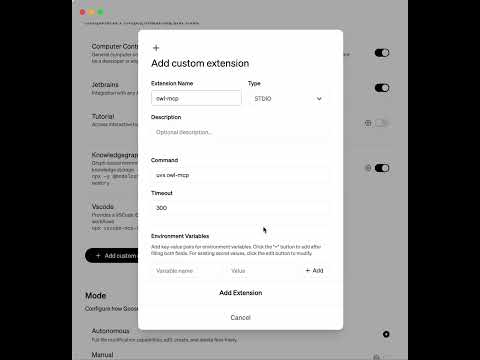
Or to do this manually, in the Extension section of Goose, add a new entry for owlmcp:
uvx owl-mcp
This video shows how to do this manually:
Try it out
You can ask to create an ontology, and add axioms to an ontology:

How this works
The MCP server provides function calls for finding, adding, or removing OWL axioms, using OWL functional syntax. Each function call is accompanied by the file path of the OWL file on your disk. Any format supported by py-horned-owl is accepted (we following OBO guidelines and recommend functional syntax for source).
The server takes care of keeping an instance of the ontology in memory and syncing it with disk. Any CRUD operation simultaneously updates the in-memory model and syncs this with disk. If you have Protege running, Protege will also sync with local disk, and show updates.
The server is well adapted for working with OBO-style ontologies - when OWL strings are sent back to the client, labels for opaque IDs are included after #s comments, as is common for obo-format.
Key Features
- MCP Server Integration: Connect AI assistants directly to OWL ontologies using the standardized Model-Context-Protocol
- Thread-safe operations: All ontology operations are thread-safe, making it suitable for multi-user environments
- File synchronization: Changes to the ontology file on disk are automatically detected and synchronized
- Event-based notifications: Register observers to be notified of changes to the ontology
- Simple string-based API: Work with OWL axioms as strings in functional syntax without dealing with complex object models
- Configuration system: Store and manage settings for frequently-used ontologies
- Label support: Access human-readable labels for entities with configurable annotation properties
Alternatives



Related Skills
Browse all skillsThis skill should be used when working on Godot Engine projects. It provides specialized knowledge of Godot's file formats (.gd, .tscn, .tres), architecture patterns (component-based, signal-driven, resource-based), common pitfalls, validation tools, code templates, and CLI workflows. The `godot` command is available for running the game, validating scripts, importing resources, and exporting builds. Use this skill for tasks involving Godot game development, debugging scene/resource files, implementing game systems, or creating new Godot components.
Convert Markdown files to HTML similar to `marked.js`, `pandoc`, `gomarkdown/markdown`, or similar tools; or writing custom script to convert markdown to html and/or working on web template systems like `jekyll/jekyll`, `gohugoio/hugo`, or similar web templating systems that utilize markdown documents, converting them to html. Use when asked to "convert markdown to html", "transform md to html", "render markdown", "generate html from markdown", or when working with .md files and/or web a templating system that converts markdown to HTML output. Supports CLI and Node.js workflows with GFM, CommonMark, and standard Markdown flavors.
Build document Q&A and searchable knowledge bases with Google Gemini File Search - fully managed RAG with automatic chunking, embeddings, and citations. Upload 100+ file formats (PDF, Word, Excel, code), configure semantic search, and query with natural language.Use when: building document Q&A systems, creating searchable knowledge bases, implementing semantic search without managing embeddings, indexing large document collections (100+ formats), or troubleshooting document immutability errors (delete+re-upload required), storage quota issues (3x input size for embeddings), chunking configuration (500 tokens/chunk recommended), metadata limits (20 key-value pairs max), indexing cost surprises ($0.15/1M tokens one-time), operation polling timeouts (wait for done: true), force delete errors, or model compatibility (Gemini 2.5 Pro/Flash only).
LazyLLM framework for building multi-agent AI applications. Use when task mentioned LazyLLM or AI program for: (1) Flow orchestration - linear, branching, parallel, loop workflows for complex data pipelines, (2) Model fine-tuning and acceleration - finetuning LLMs with LLaMA-Factory/Alpaca-LoRA/Collie and acceleration with vLLM/LMDeploy/LightLLM. Includes comprehensive code examples for all components, (3) RAG systems - knowledge-based QA with document retrieval, vectorization, and generation, (4) Agent development - single/multi-agent systems with tools, memory, planning, and web interfaces.
CCXT cryptocurrency exchange library for TypeScript and JavaScript developers (Node.js and browser). Covers both REST API (standard) and WebSocket API (real-time). Helps install CCXT, connect to exchanges, fetch market data, place orders, stream live tickers/orderbooks, handle authentication, and manage errors. Use when working with crypto exchanges in TypeScript/JavaScript projects, trading bots, arbitrage systems, or portfolio management tools. Includes both REST and WebSocket examples.
Suite of tools for creating elaborate, multi-component claude.ai HTML artifacts using modern frontend web technologies (React, Tailwind CSS, shadcn/ui). Use for complex artifacts requiring state management, routing, or shadcn/ui components - not for simple single-file HTML/JSX artifacts.