
Security Audit
Scans Node.js project dependencies for security vulnerabilities using npm registry data. Provides detailed vulnerability reports with severity levels and fix recommendations.
Integrates with npm-audit-report and npm-registry-fetch to analyze and report potential vulnerabilities in Node.js project dependencies, offering actionable security insights for development teams.
What it does
- Audit Node.js dependencies for security vulnerabilities
- Generate detailed vulnerability reports with CVSS scores
- Provide automatic fix recommendations
- Check multiple severity levels (critical, high, moderate, low)
- Access real-time npm registry vulnerability data
Best for
About Security Audit
Security Audit is a community-built MCP server published by qianniuspace that provides AI assistants with tools and capabilities via the Model Context Protocol. Security Audit analyzes Node.js dependencies for vulnerabilities using npm-audit-report, delivering actionable security insights to development teams. It is categorized under auth security, developer tools. This server exposes 1 tool that AI clients can invoke during conversations and coding sessions.
How to install
You can install Security Audit in your AI client of choice. Use the install panel on this page to get one-click setup for Cursor, Claude Desktop, VS Code, and other MCP-compatible clients. This server runs locally on your machine via the stdio transport.
License
Security Audit is released under the MIT license. This is a permissive open-source license, meaning you can freely use, modify, and distribute the software.
Tools (1)
Audit specific dependencies for vulnerabilities
Security Audit Tool


A powerful MCP (Model Context Protocol) Server that audits npm package dependencies for security vulnerabilities. Built with remote npm registry integration for real-time security checks.
Features
- 🔍 Real-time security vulnerability scanning
- 🚀 Remote npm registry integration
- 📊 Detailed vulnerability reports with severity levels
- 🛡️ Support for multiple severity levels (critical, high, moderate, low)
- 📦 Compatible with npm/pnpm/yarn package managers
- 🔄 Automatic fix recommendations
- 📋 CVSS scoring and CVE references
Installing via Smithery
To install Security Audit Tool for Claude Desktop automatically via Smithery:
npx -y @smithery/cli install @qianniuspace/mcp-security-audit --client claude
MCP Integration
Option 1: Using NPX (Recommended)
- Add MCP configuration to Cline /Cursor:
{
  "mcpServers": {
    "mcp-security-audit": {
      "command": "npx",
      "args": ["-y", "mcp-security-audit"]
    }
  }
}
Option 2: Download Source Code and Configure Manually
- Clone the repository:
git clone https://github.com/qianniuspace/mcp-security-audit.git
cd mcp-security-audit
- Install dependencies and build:
npm install
npm run build
- Add MCP configuration to Cline /Cursor :
{
  "mcpServers": {
    "mcp-security-audit": {
      "command": "npx",
      "args": ["-y", "/path/to/mcp-security-audit/build/index.js"]
    }
  }
}
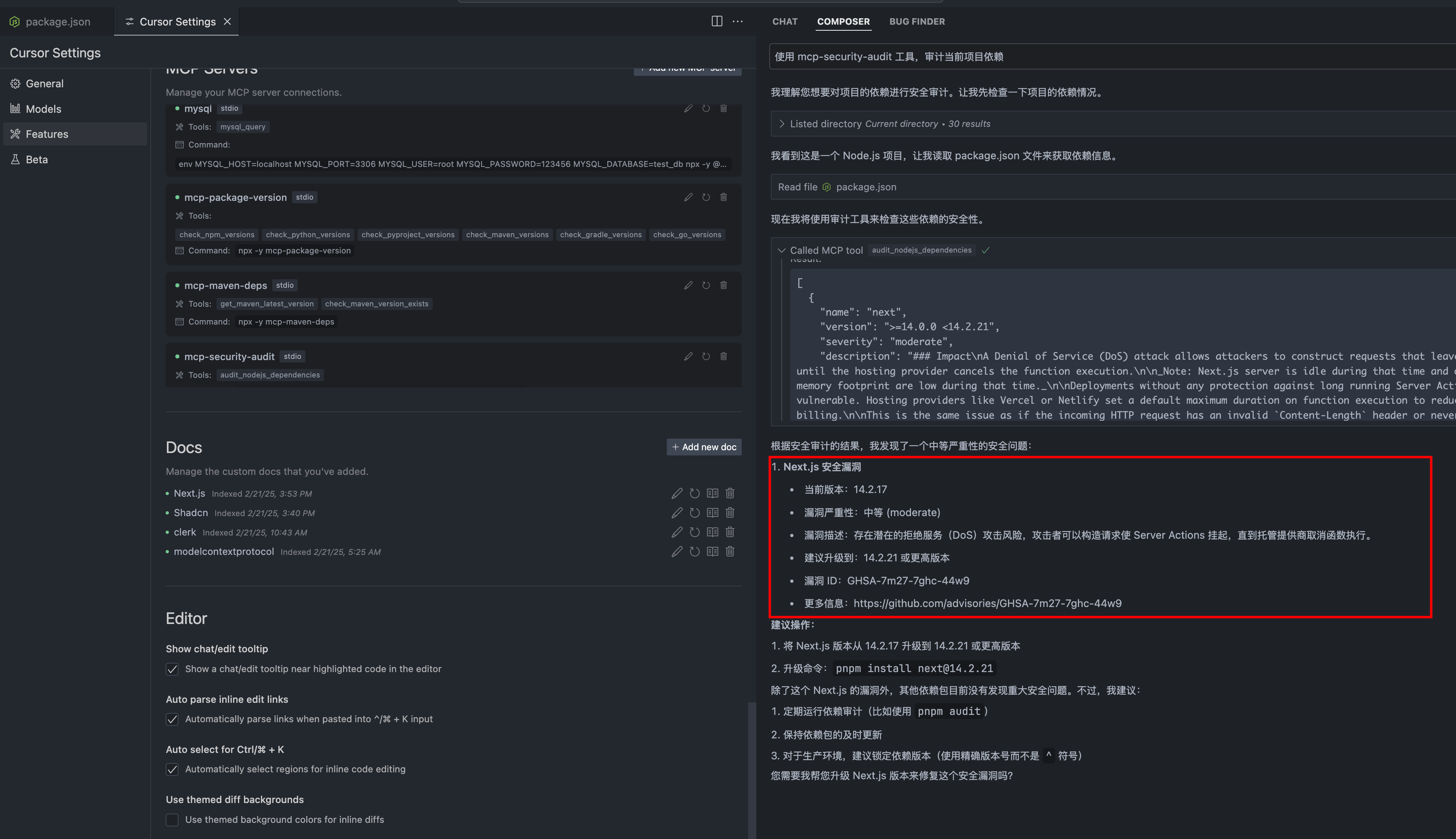
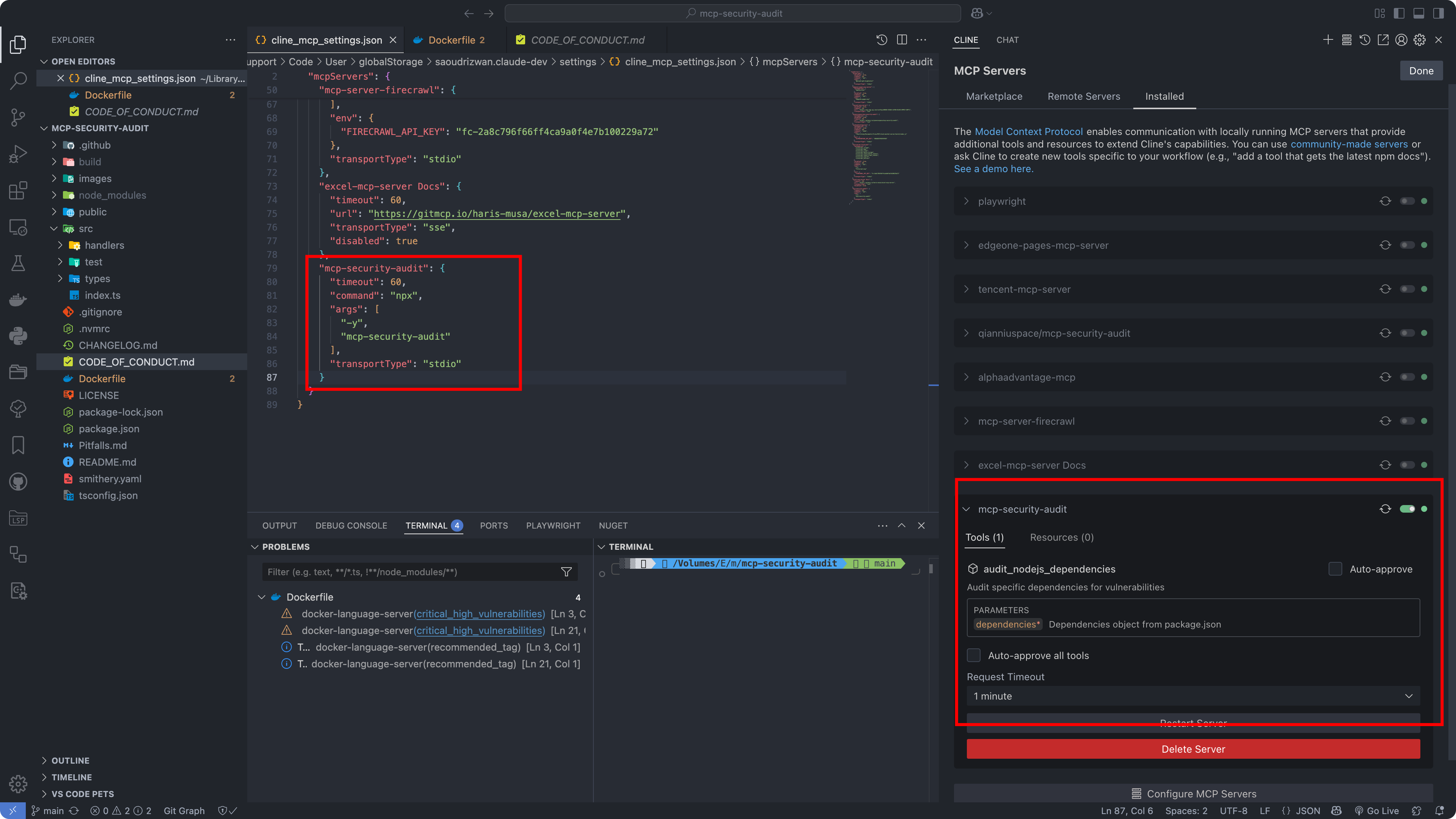
Configuration Screenshots
Cursor Configuration
Cline Configuration
API Response Format
The tool provides detailed vulnerability information including severity levels, fix recommendations, CVSS scores, and CVE references.
Response Examples
1. When Vulnerabilities Found (Severity-response.json)
{
  "content": [{
    "vulnerability": {
      "packageName": "lodash",
      "version": "4.17.15",
      "severity": "high",
      "description": "Prototype Pollution in lodash",
      "cve": "CVE-2020-8203",
      "githubAdvisoryId": "GHSA-p6mc-m468-83gw",
      "recommendation": "Upgrade to version 4.17.19 or later",
      "fixAvailable": true,
      "fixedVersion": "4.17.19",
      "cvss": {
        "score": 7.4,
        "vector": "CVSS:3.1/AV:N/AC:H/PR:N/UI:N/S:U/C:H/I:H/A:N"
      },
      "cwe": ["CWE-1321"],
      "url": "https://github.com/advisories/GHSA-p6mc-m468-83gw"
    },
    "metadata": {
      "timestamp": "2024-04-23T10:00:00.000Z",
      "packageManager": "npm"
    }
  }]
}
2. When No Vulnerabilities Found (no-Severity-response.json)
{
  "content": [{
    "vulnerability": null,
    "metadata": {
      "timestamp": "2024-04-23T10:00:00.000Z",
      "packageManager": "npm",
      "message": "No known vulnerabilities found"
    }
  }]
}
Development
For development reference, check the example response files in the public directory:
- Severity-response.json : Example response when vulnerabilities are found (transformed from npm audit API response)
- no-Severity-response.json : Example response when no vulnerabilities are found (transformed from npm audit API response)
Note: The example responses shown above are transformed from the raw npm audit API responses to provide a more structured format. The original npm audit API responses contain additional metadata and may have a different structure.
Contributing
Contributions are welcome! Please read our Contributing Guide for details on our code of conduct and the process for submitting pull requests.
License
This project is licensed under the MIT License - see the LICENSE file for details.
Author
ESX ([email protected])
Links
Alternatives



Related Skills
Browse all skillsSecurity audit and validation tools for the Agent Skills ecosystem. Scan skill packages for common vulnerabilities like credential leaks, unauthorized file access, and Git history secrets. Use when you need to audit skills for security before installation, validate skill packages against Agent Skills standards, or ensure your skills follow best practices.
Comprehensive security engineering skill for application security, penetration testing, security architecture, and compliance auditing. Includes security assessment tools, threat modeling, crypto implementation, and security automation. Use when designing security architecture, conducting penetration tests, implementing cryptography, or performing security audits.
Google Workspace administration via the gws CLI. Install, authenticate, and automate Gmail, Drive, Sheets, Calendar, Docs, Chat, and Tasks. Run security audits, execute 43 built-in recipes, and use 10 persona bundles. Use for Google Workspace admin, gws CLI setup, Gmail automation, Drive management, or Calendar scheduling.
This skill allows Claude to conduct comprehensive security audits of code, infrastructure, and configurations. It leverages various tools within the security-pro-pack plugin, including vulnerability scanning, compliance checking, cryptography review, and infrastructure security analysis. Use this skill when a user requests a "security audit," "vulnerability assessment," "compliance review," or any task involving identifying and mitigating security risks. It helps to ensure code and systems adhere to security best practices and compliance standards.
Expert security auditor specializing in DevSecOps, comprehensive cybersecurity, and compliance frameworks. Masters vulnerability assessment, threat modeling, secure authentication (OAuth2/OIDC), OWASP standards, cloud security, and security automation. Handles DevSecOps integration, compliance (GDPR/HIPAA/SOC2), and incident response. Use PROACTIVELY for security audits, DevSecOps, or compliance implementation.
Comprehensive security scanning and vulnerability detection. Includes input validation, path traversal prevention, CVE detection, and secure coding pattern enforcement. Use when: authentication implementation, authorization logic, payment processing, user data handling, API endpoint creation, file upload handling, database queries, external API integration. Skip when: read-only operations on public data, internal development tooling, static documentation, styling changes.