
Yingdao RPA
OfficialConnects AI tools to Yingdao RPA platform for automating business processes through local desktop automation or cloud APIs. Supports both local RPA execution and enterprise cloud deployments.
Bridges AI with Yingdao RPA platform to automate business processes through local and cloud-based robotic process automation applications.
What it does
- Query RPA application parameters
- List available RPA applications
- Run RPA automation workflows
- Upload files to RPA processes
- Execute local desktop automation tasks
- Trigger cloud-based RPA workflows
Best for
About Yingdao RPA
Yingdao RPA is an official MCP server published by ying-dao that provides AI assistants with tools and capabilities via the Model Context Protocol. Automate your business with Yingdao RPA, integrating bpm business management process software and robotic process automation for efficient workflows. It is categorized under productivity, developer tools.
How to install
You can install Yingdao RPA in your AI client of choice. Use the install panel on this page to get one-click setup for Cursor, Claude Desktop, VS Code, and other MCP-compatible clients. This server runs locally on your machine via the stdio transport.
License
Yingdao RPA is released under the MIT license. This is a permissive open-source license, meaning you can freely use, modify, and distribute the software.

影刀RPA MCP Server
影刀RPA:一个RPA低代码平台,一款人人可用的RPA自动化产品,能够将人从重复的劳动中解放出来。
影刀AI Power:一个AI低代码平台,能够快速创建AI智能体、AI工作流,帮助用户把AI用起来。
影刀 RPA MCP Server 基于 Model Context Protocol (MCP) 实现,为影刀AI Power及其他可作为MCP Host的工具(如 Claude Desktop、Cursor 等)提供调用RPA的能力。
同时支持SSE Server与Stdio Server两种模式。
如何开始
支持两种方式来运行影刀RPA
本地模式
设置环境变量 注意:本地模式下,智能获取并运行“我获取的应用”并已经被至少执行过一次的应用
RPA_MODEL=local
SHADOWBOT_PATH={your_shadowbot_path} //影刀rpa的exe路径
USER_FOLDER={your_user_folder}       //影刀rpa的用户文件夹路径
影刀RPA的exe路径
Windows 注意:windows下在AI Power客户端中,路径要使用双斜杠
D://Program Files//{安装目录}//ShadowBot.exe
Mac
/Applications/影刀.app
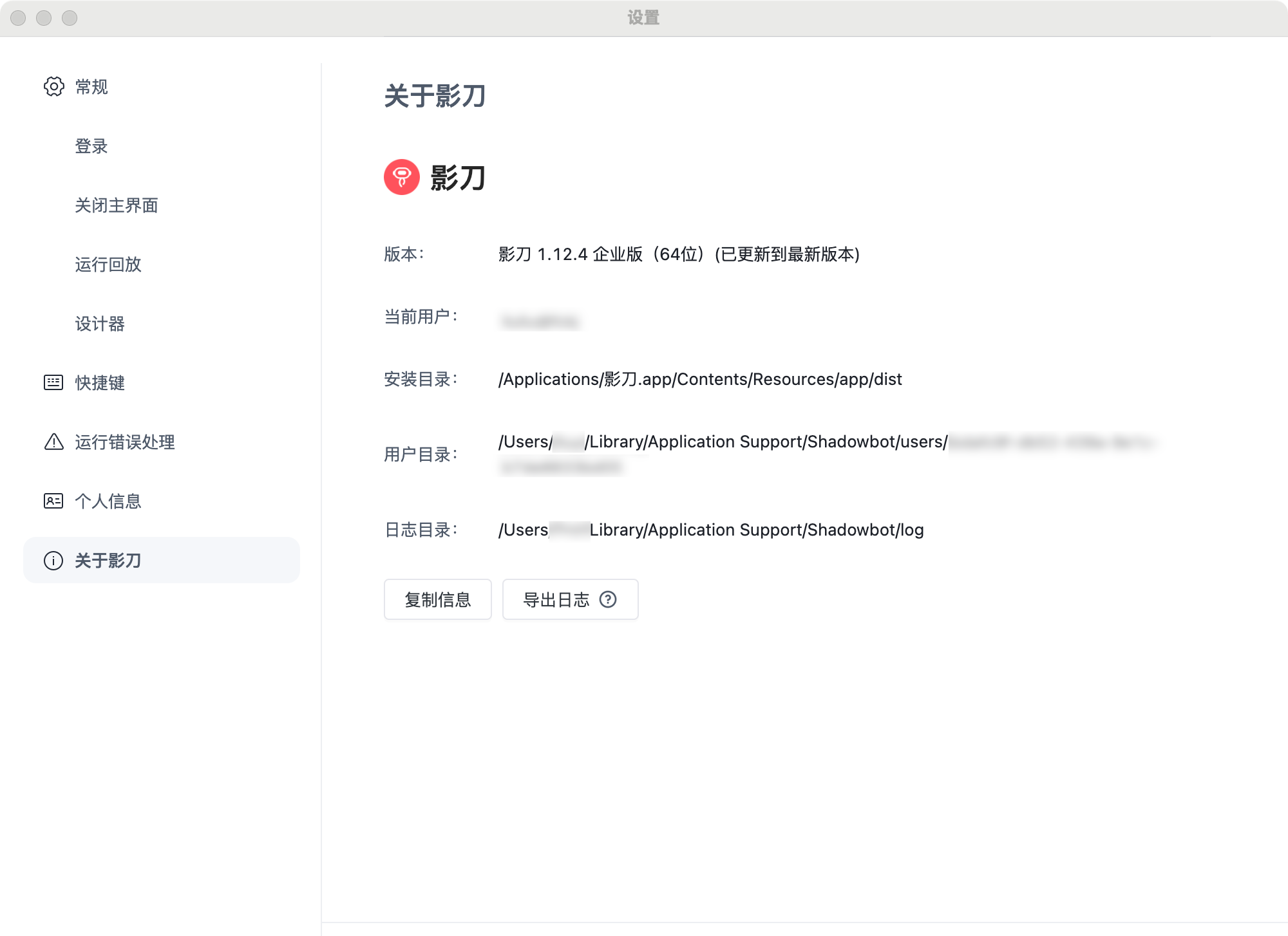
影刀RPA的用户文件夹路径
在影刀RPA的设置中,找用户文件夹选项
开放API模式 (仅支持企业用户)
设置环境变量
RPA_MODEL=openApi
ACCESS_KEY_ID={your_access_key_id}
ACCESS_KEY_SECRET={your_access_key_secret}
获取方式
企业管理员登录影刀RPA控制台获取,请参考影刀RPA帮助文档-鉴权
Stdio Server启动
在客户端中配置
{
  "mcpServers": {
    "YingDao RPA MCP Server": {
      "command": "npx",
      "args": ["-y", "yingdao-mcp-server"],
      "env":{
        "RPA_MODEL":"openApi",
        "ACCESS_KEY_ID":"{your_access_key_id}",
        "ACCESS_KEY_SECRET":"{your_access_key_secret}"
      }
    }
  }
}
SSE Server配置
构建
Clone the repository and build:
git clone https://github.com/ying-dao/yingdao_mcp_server.git
cd yingdao_mcp_server
npm install
npm run build
配置
添加.env文件,配置项参考以上描述
启动
npm run start:server
客户端配置
AI Power 客户端配置
{
  "mcpServers": {
    "YingDao RPA MCP Server": {
      "url": "http://localhost:3000/sse",
      "description": "影刀 MCP Server"
    }
  }
}
默认端口为3000
能力
本地模式
- queryRobotParam: 查询RPA应用的参数
- queryApplist: 查询RPA应用的列表
- runApp: 运行RPA应用
开放API模式
- uploadFile: 上传文件到RPA平台
- queryRobotParam: 查询RPA应用参数
- queryApplist: 获取分页RPA应用列表
- startJob: 启动RPA作业
- queryJob: 查询RPA作业状态
- queryClientList: 查询调度RPA机器人列表
License
MIT
Alternatives



Related Skills
Browse all skillsUI design system toolkit for Senior UI Designer including design token generation, component documentation, responsive design calculations, and developer handoff tools. Use for creating design systems, maintaining visual consistency, and facilitating design-dev collaboration.
Answer questions about the AI SDK and help build AI-powered features. Use when developers: (1) Ask about AI SDK functions like generateText, streamText, ToolLoopAgent, embed, or tools, (2) Want to build AI agents, chatbots, RAG systems, or text generation features, (3) Have questions about AI providers (OpenAI, Anthropic, Google, etc.), streaming, tool calling, structured output, or embeddings, (4) Use React hooks like useChat or useCompletion. Triggers on: "AI SDK", "Vercel AI SDK", "generateText", "streamText", "add AI to my app", "build an agent", "tool calling", "structured output", "useChat".
PERSONAL APP ARCHITECT - Strategic development orchestrator for personal productivity applications. Analyzes project context, makes architectural decisions for single-developer projects, delegates to specialized skills, and ensures alignment between user experience goals and technical implementation. Optimized for personal apps targeting 10-100 users.
Creates educational Teams channel posts for internal knowledge sharing about Claude Code features, tools, and best practices. Applies when writing posts, announcements, or documentation to teach colleagues effective Claude Code usage, announce new features, share productivity tips, or document lessons learned. Provides templates, writing guidelines, and structured approaches emphasizing concrete examples, underlying principles, and connections to best practices like context engineering. Activates for content involving Teams posts, channel announcements, feature documentation, or tip sharing.
Use when working with the OpenAI API (Responses API) or OpenAI platform features (tools, streaming, Realtime API, auth, models, rate limits, MCP) and you need authoritative, up-to-date documentation (schemas, examples, limits, edge cases). Prefer the OpenAI Developer Documentation MCP server tools when available; otherwise guide the user to enable `openaiDeveloperDocs`.
Guide for building TypeScript CLIs with Bun. Use when creating command-line tools, adding subcommands to existing CLIs, or building developer tooling. Covers argument parsing, subcommand patterns, output formatting, and distribution.