
ImageGen
Generate AI images from text prompts using multiple providers including OpenAI DALL-E, Google Gemini, and Replicate models. Automatically saves generated images to local files with consistent parameter handling across all providers.
Provides image generation across multiple AI providers (OpenAI DALL-E, Google Gemini, Replicate Flux) with unified parameter handling, automatic file saving, and provider-specific features like transparent backgrounds and seed control for flexible visual content creation.
What it does
- Generate images using OpenAI DALL-E
- Generate images using Google Gemini and Imagen
- Generate images using Replicate Flux models
- Control image parameters like size and seeds
- Save images automatically to local files
- Return base64 encoded image data
Best for
About ImageGen
ImageGen is a community-built MCP server published by writingmate that provides AI assistants with tools and capabilities via the Model Context Protocol. Generate stunning AI images with ImageGen, a unified AI image generator supporting DALL-E, Gemini & more, with smart parameters and flexible options. It is categorized under ai ml, design. This server exposes 4 tools that AI clients can invoke during conversations and coding sessions.
How to install
You can install ImageGen in your AI client of choice. Use the install panel on this page to get one-click setup for Cursor, Claude Desktop, VS Code, and other MCP-compatible clients. This server runs locally on your machine via the stdio transport.
License
ImageGen is released under the MIT license. This is a permissive open-source license, meaning you can freely use, modify, and distribute the software.
Tools (4)
Generate an image using OpenAI (default model gpt-image-1). Returns a saved file path and optional base64.
Generate an image using Google (e.g., Imagen 3). Requires GOOGLE_API_KEY and GOOGLE_IMAGEN_ENDPOINT. Returns a saved file path and optional base64.
Generate an image using Google Gemini via @google/genai (default gemini-2.5-flash-image-preview). Requires GOOGLE_API_KEY.
Generate an image using Replicate models: Flux 1.1 Pro (default), Qwen Image, or SeedDream-4. Requires REPLICATE_API_TOKEN.
🎨 ImageGen MCP Server
A powerful MCP server for AI image generation with OpenAI GPT-Image-1, Google Imagen 4, Flux 1.1, Qwen Image, SeedDream-4, and Nano Banana (Gemini 2.5 Flash Image) support



GPT-Image-1 MCP • Nano Banana MCP • Google Imagen 4 MCP • Flux 1.1 MCP
npx imagegen-mcp-server

🎬 Quick Demo
⚡ Instant (WritingMate.ai)
- Visit WritingMate.ai
- Say: "Generate an image of a cyberpunk city using Flux 1.1"
- ✅ Done! - No setup, no API keys needed
🛠️ Self-Setup (Other Clients)
# Install and run in one command
npx imagegen-mcp-server
Then in your MCP client:
"Generate an image of a cyberpunk city using Flux 1.1"
✅ Result: High-quality image saved to outputs/ directory
An MCP (Model Context Protocol) server for AI image generation supporting:
- GPT-Image-1 MCP: OpenAI's latest image generation model
- Nano Banana MCP: Gemini 2.5 Flash Image Preview model
- Google Imagen 4 MCP: Advanced photorealistic image generation
- Flux 1.1 MCP: State-of-the-art prompt following via Replicate
🎨 Model Comparison
Same prompt: "A serene mountain landscape with a crystal clear lake reflecting snow-capped peaks, golden hour lighting, highly detailed"
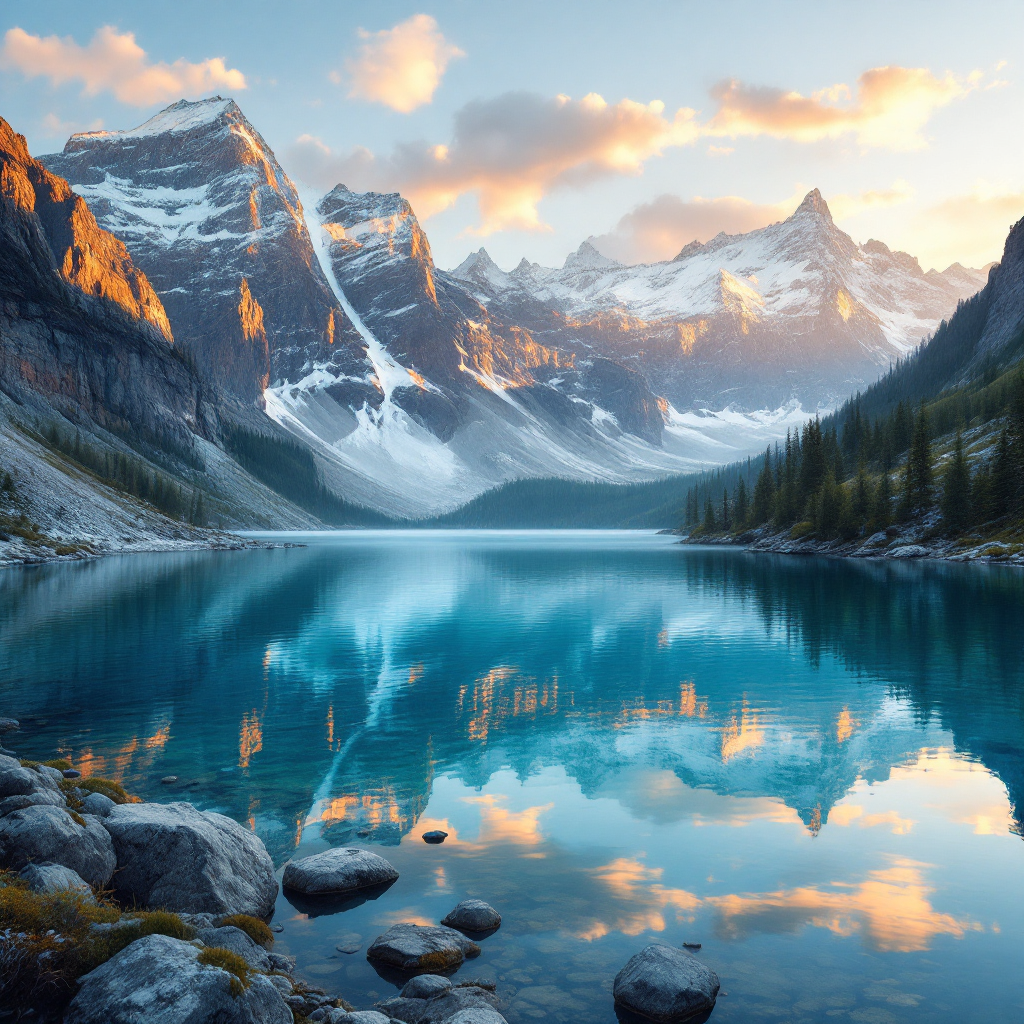
Flux 1.1 Pro MCP |
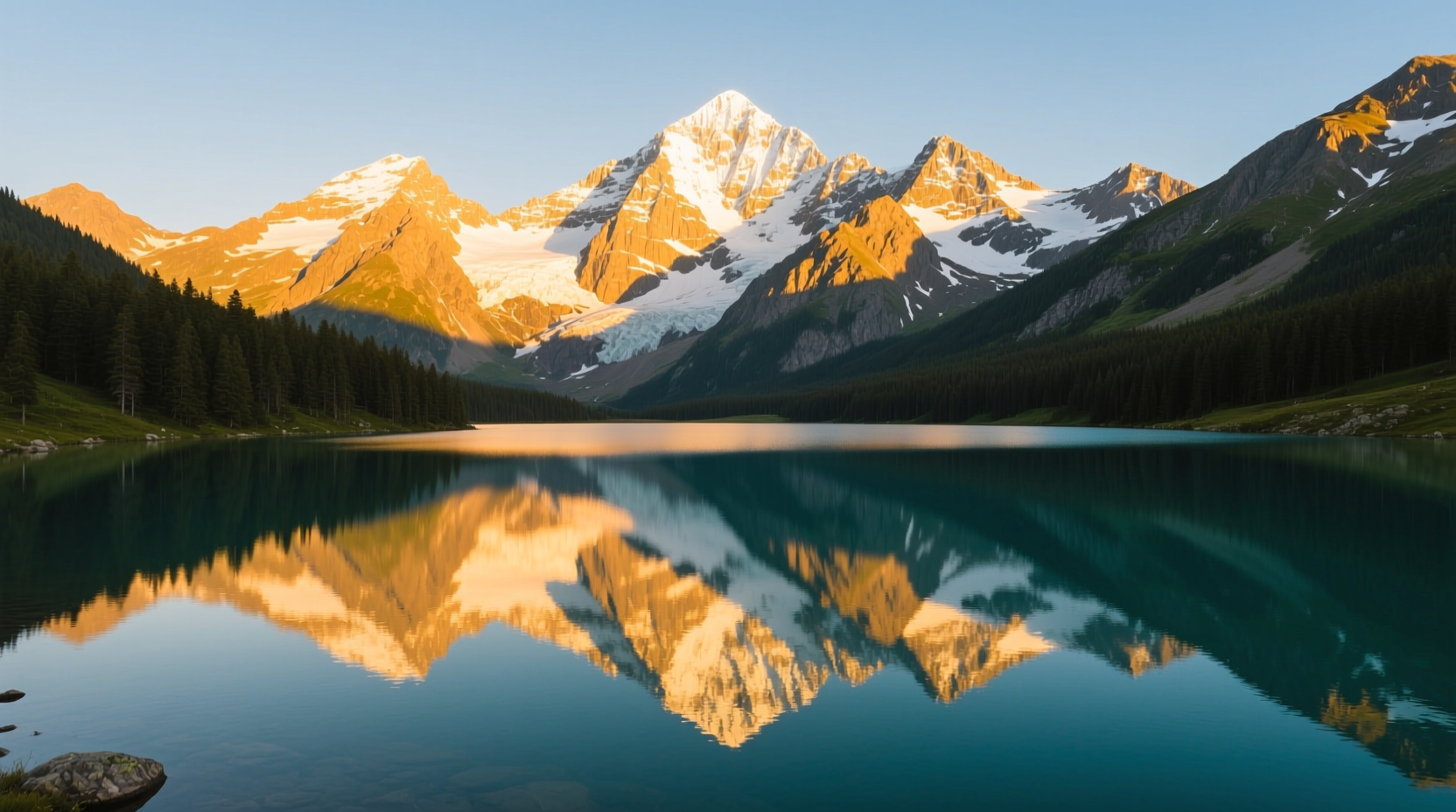
Qwen Image MCP |
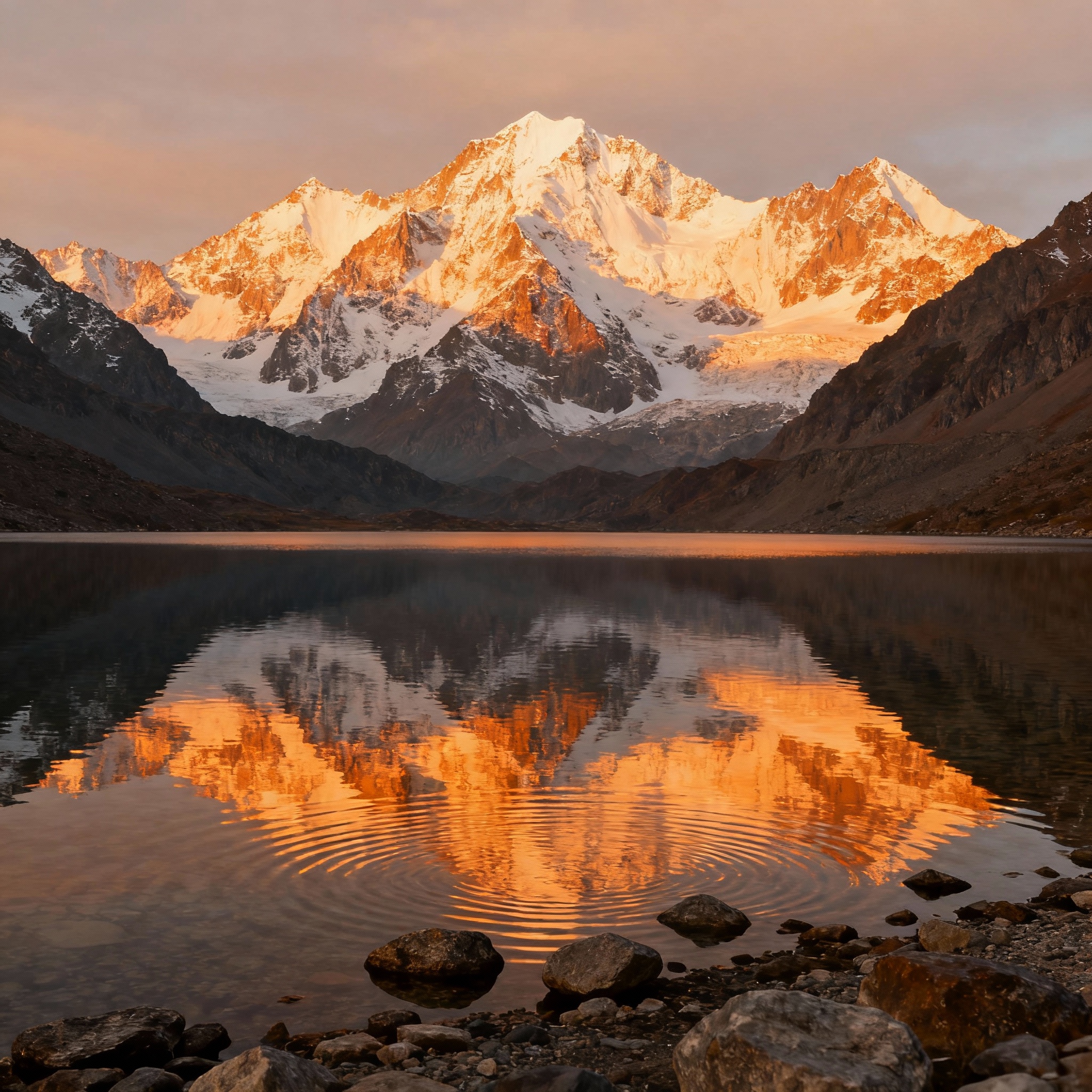
SeedDream-4 MCP |
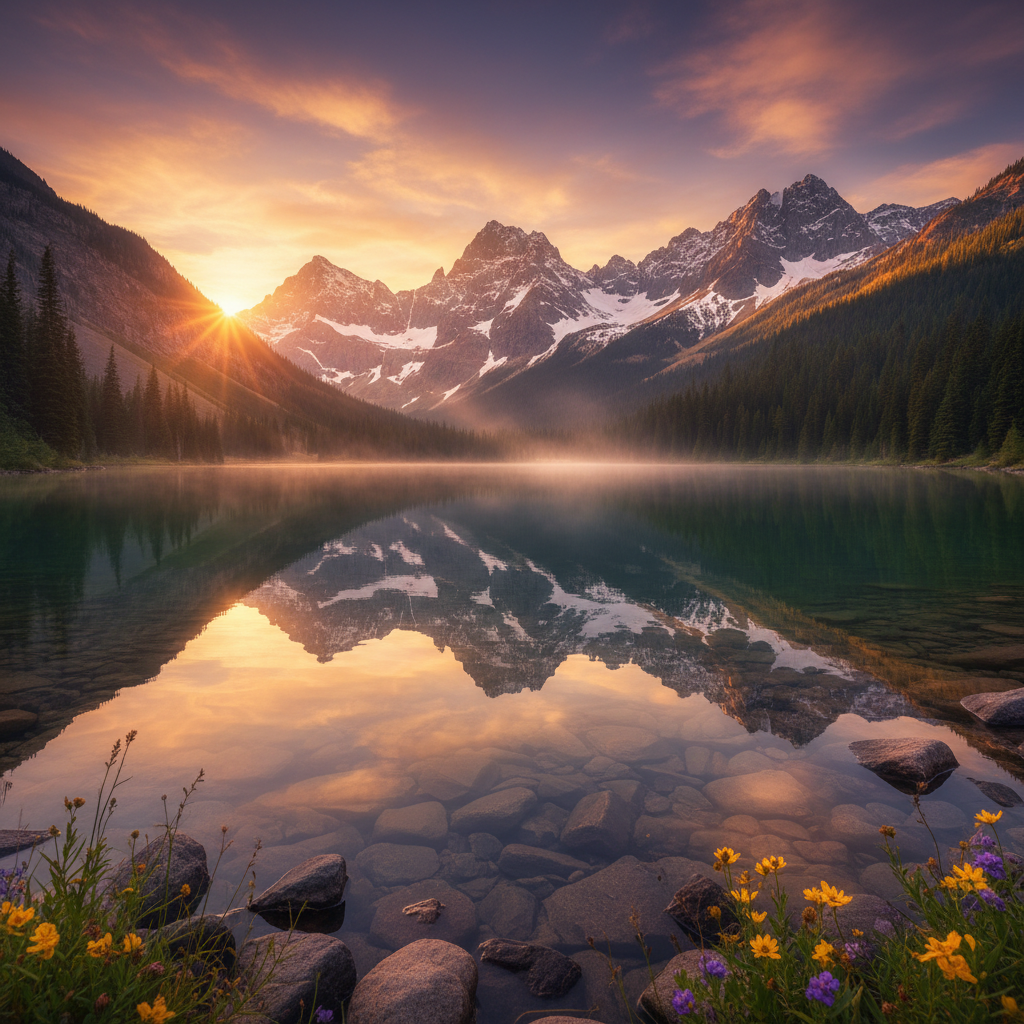
Nano Banana MCP |
✨ Features
| Provider | Models | Keywords | Highlights |
|---|---|---|---|
| 🤖 OpenAI | GPT-Image-1, DALL-E 3, DALL-E 2 | gpt-image-1 mcp, openai image gen | Latest GPT-Image-1 with background control |
| 🧠 Nano Banana | Gemini 2.5 Flash Image Preview | nano banana mcp | Fast generation via official Google SDK |
| 🎨 Google Imagen | Imagen 4 (custom endpoint) | google imagen 4 mcp | Advanced photorealistic image generation |
| ⚡ Replicate | Flux 1.1 Pro, Qwen Image, SeedDream-4 | flux 1.1 mcp, qwen image mcp, seedream-4 mcp | Multiple cutting-edge models via Replicate |
🎯 Core Capabilities
- Multiple Output Formats: PNG, JPEG, WebP support
- Flexible Sizing: Custom dimensions and aspect ratios
- Base64 & File Output: Return images as base64 or save to disk
- Seed Support: Reproducible generation with Flux
- MCP Compatible: Works seamlessly with any MCP client
🆚 Setup Comparison
| Client | Setup Required | API Keys | Configuration | Ready Time |
|---|---|---|---|---|
| WritingMate.ai | ✅ None | ✅ Pre-configured | ✅ Built-in | Instant |
| Claude Desktop | Manual config | Your own keys | JSON editing | ~5 minutes |
| Claude Code CLI | Command/config | Your own keys | Manual setup | ~5 minutes |
| Other MCP clients | Manual setup | Your own keys | Client-specific | ~5-10 minutes |
🚀 Quick Start
Option 1: Install from npm (Recommended)
# Install globally
npm install -g imagegen-mcp-server

# Or use with npx (no installation required)
npx imagegen-mcp-server
Option 2: Install from source
# Clone the repository
git clone https://github.com/writingmate/imagegen-mcp.git
cd imagegen-mcp

# Install dependencies
npm install

# Build the project
npm run build

# Run the server
npm start
Requirements
- Node.js 18+
- API keys:
OPENAI_API_KEY,GOOGLE_API_KEY, and/orREPLICATE_API_TOKEN
Configuration
Create a .env file in your project directory:
# Required: OpenAI API Key for DALL-E models
OPENAI_API_KEY=your-openai-api-key-here

# Required: Google API Key for Imagen and Gemini
GOOGLE_API_KEY=your-google-api-key-here

# Required: Replicate API Token for Flux models
REPLICATE_API_TOKEN=your-replicate-api-token-here

# Optional: Custom Google Imagen endpoint
GOOGLE_IMAGEN_ENDPOINT=

# Optional: Output directory for generated images (default: outputs)
OUTPUT_DIR=outputs
🔧 Setup & Configuration
1. Get API Keys
You'll need at least one of these API keys:
| Provider | How to Get API Key | Cost |
|---|---|---|
| OpenAI | Get OpenAI API Key | ~$0.02-0.08 per image |
| Get Google API Key | Free tier available | |
| Replicate | Get Replicate Token | ~$0.003-0.01 per image |
2. Configure Environment
Create a .env file in your project directory:
# Add the API keys for the providers you want to use
OPENAI_API_KEY=your-openai-api-key-here
GOOGLE_API_KEY=your-google-api-key-here
REPLICATE_API_TOKEN=your-replicate-api-token-here

# Optional settings
OUTPUT_DIR=outputs
GOOGLE_IMAGEN_ENDPOINT=
3. Add to Your MCP Client
Choose your preferred MCP client:
🚀 WritingMate.ai (Recommended - Zero Setup!)
✨ Already installed and configured! No setup required.
- Visit WritingMate.ai
- Start generating images immediately: "Generate an image of a sunset using Flux"
- All providers pre-configured and ready to use
💡 Why WritingMate.ai? ImageGen MCP Server comes pre-installed with all API keys configured. Just start creating!
🖥️ Claude Desktop
macOS: ~/Library/Application Support/Claude/claude_desktop_config.json
Windows: %APPDATA%/Claude/claude_desktop_config.json
{
  "mcpServers": {
    "imagegen": {
      "command": "npx",
      "args": ["imagegen-mcp-server"]
    }
  }
}
⌨️ Claude Code CLI
Add to your MCP configuration:
# Add to Claude Code MCP settings
claude-code config mcp add imagegen npx imagegen-mcp-server
Or manually configure in your Claude Code settings file:
{
  "mcpServers": {
    "imagegen": {
      "command": "npx",
      "args": ["imagegen-mcp-server"]
    }
  }
}
📝 Codeium CLI (Codex)
Add to your Codeium MCP configuration:
{
  "mcp_servers": {
    "imagegen": {
      "command": "npx",
      "args": ["imagegen-mcp-server"],
      "env": {}
    }
  }
}
🔧 Other MCP Clients
For any MCP-compatible client, use:
Command: npx imagegen-mcp-server
Environment: Ensure your .env file is in the working directory with your API keys.
4. Test the Installation
# Test if the server starts correctly
npx imagegen-mcp-server

# Or if installed globally
imagegen-mcp-server
Available Tools
1. OpenAI GPT-Image-1 MCP (image.generate.openai)
Generate images using OpenAI's latest GPT-Image-1 model and DALL-E series. This OpenAI image gen MCP tool supports the newest GPT-Image-1 with advanced background control.
Parameters:
{
  prompt: string;              // Required: Image description
  model?: string;              // "dall-e-2", "dall-e-3", "gpt-image-1" (default)
  size?: string;               // "1024x1024", "1792x1024", "1024x1792", etc.
  width?: number;              // Alternative to size
  height?: number;             // Alternative to size
  quality?: "standard" | "hd" | "low" | "medium" | "high" | "auto";
  format?: "png" | "jpeg" | "jpg" | "webp";
  background?: "transparent" | "opaque" | "auto"; // gpt-image-1 only
  style?: "vivid" | "natural";  // DALL-E 3 only
  returnBase64?: boolean;      // Include base64 in response
  filenameHint?: string;       // Custom filename prefix
}
Model-specific features:
- DALL-E 2: Basic generation, sizes: 256×256, 512×512, 1024×1024
- DALL-E 3: High-quality generation, sizes: 1024×1024, 1792×1024, 1024×1792
- GPT-Image-1: Latest model with background control, multiple formats, flexible sizing
2. Google Imagen 4 MCP (image.generate.google)
Generate images using Google's advanced Imagen 4 model via custom endpoint. This Google Imagen 4 MCP integration provides cutting-edge photorealistic image generation.
Parameters:
{
  prompt: string;              // Required: Image description
  model?: string;              // Model name
  size?: string;               // Image dimensions
  quality?: string;            // Quality setting
  format?: "png" | "jpeg" | "jpg" | "webp";
  returnBase64?: boolean;
  filenameHint?: string;
}
**Requir
README truncated. View full README on GitHub.
Alternatives




Related Skills
Browse all skills"UI/UX design intelligence. 50 styles, 21 palettes, 50 font pairings, 20 charts, 8 stacks (React, Next.js, Vue, Svelte, SwiftUI, React Native, Flutter, Tailwind). Actions: plan, build, create, design, implement, review, fix, improve, optimize, enhance, refactor, check UI/UX code. Projects: website, landing page, dashboard, admin panel, e-commerce, SaaS, portfolio, blog, mobile app, .html, .tsx, .vue, .svelte. Elements: button, modal, navbar, sidebar, card, table, form, chart. Styles: glassmorphism, claymorphism, minimalism, brutalism, neumorphism, bento grid, dark mode, responsive, skeuomorphism, flat design. Topics: color palette, accessibility, animation, layout, typography, font pairing, spacing, hover, shadow, gradient."
Build beautiful cross-platform mobile apps with Flutter and Dart. Covers widgets, state management with Provider/BLoC, navigation, API integration, and material design.
Create distinctive, production-grade frontend interfaces with high design quality. Use this skill when the user asks to build web components, pages, or applications. Generates creative, polished code that avoids generic AI aesthetics.
Guide for quality focused software architecture. This skill should be used when users want to write code, design architecture, analyze code, in any case that relates to software development.
Master iOS Human Interface Guidelines and SwiftUI patterns for building native iOS apps. Use when designing iOS interfaces, implementing SwiftUI views, or ensuring apps follow Apple's design principles.
Comprehensive software architecture skill for designing scalable, maintainable systems using ReactJS, NextJS, NodeJS, Express, React Native, Swift, Kotlin, Flutter, Postgres, GraphQL, Go, Python. Includes architecture diagram generation, system design patterns, tech stack decision frameworks, and dependency analysis. Use when designing system architecture, making technical decisions, creating architecture diagrams, evaluating trade-offs, or defining integration patterns.