
Mindpilot (Mermaid Diagrams)
Creates and renders Mermaid diagrams locally with a web interface for visualizing code architecture, flows, and processes. Keeps all diagram data local with export capabilities.
Enables creation and rendering of Mermaid diagrams with real-time visualization through a local web interface, featuring diagram history, export capabilities, and git repository integration for organizing visual representations by project.
What it does
- Render Mermaid diagrams to SVG format
- Open local web interface for diagram viewing
- Export diagrams as vector images
- Track diagram history across sessions
- Organize diagrams by git repository
Best for
About Mindpilot (Mermaid Diagrams)
Mindpilot (Mermaid Diagrams) is a community-built MCP server published by abrinsmead that provides AI assistants with tools and capabilities via the Model Context Protocol. Create and organize Mermaid diagrams with real-time visualization, export, and git integration—perfect for mermaid js and flowchart apps users. It is categorized under productivity, developer tools. This server exposes 2 tools that AI clients can invoke during conversations and coding sessions.
How to install
You can install Mindpilot (Mermaid Diagrams) in your AI client of choice. Use the install panel on this page to get one-click setup for Cursor, Claude Desktop, VS Code, and other MCP-compatible clients. This server runs locally on your machine via the stdio transport.
License
Mindpilot (Mermaid Diagrams) is released under the MIT license. This is a permissive open-source license, meaning you can freely use, modify, and distribute the software.
Tools (2)
Render a Mermaid diagram to SVG format. CRITICAL RULES: 1) Node IDs must be alphanumeric without spaces (use A1, nodeA, start_node). 2) For node labels with special characters, wrap in quotes: A["Label with spaces"] or A["Process (step 1)"]. 3) For quotes in labels use ", for < use <, for > use >. 4) For square brackets in labels use A["Array[0]"]. 5) Always close all brackets and quotes. 6) Use consistent arrow styles (either --> or ->). Example: graph TD\n A["Complex Label"] --> B{Decision?}\n B -->|Yes| C["Result "OK""]\n\nIMPORTANT: If the diagram fails validation, the error message will explain what needs to be fixed. Please read the error carefully and retry with a corrected diagram.
Open the web-based user interface
Mindpilot MCP


See through your agent's eyes. Visualize legacy code, inspect complex flows, understand everything.
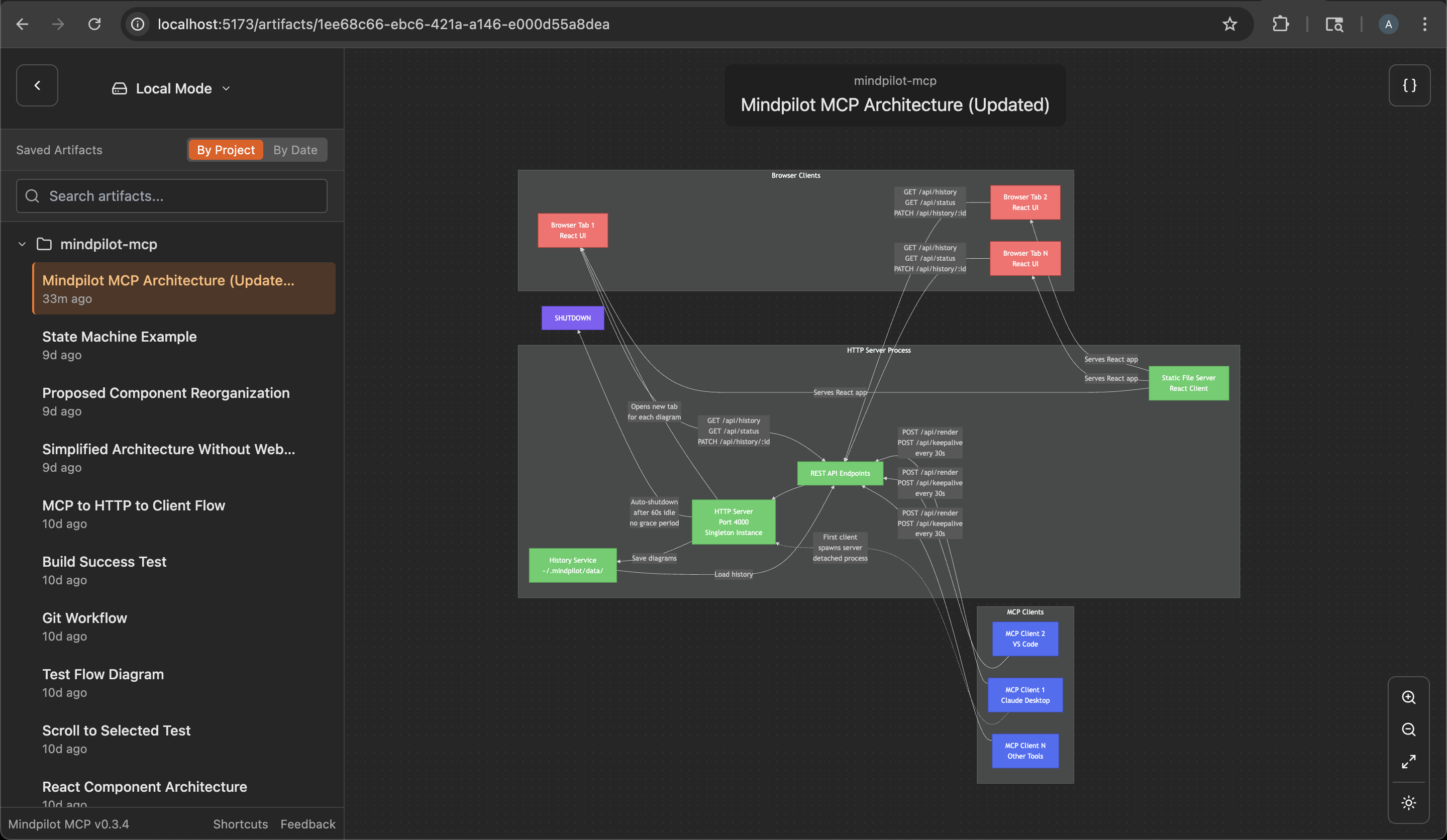
Why Mindpilot?
- Visualize Anything: Use your coding agent to generate on-demand architecture, code, and process diagrams to view your code from different perspectives.
- Vibe Checks: AI-generated code can accumulate unused and redundant constructs. Use visualizations to spot areas that need cleanup.
- Local Processing: Diagrams are never sent to the cloud. Everything stays between you, your agent, and your agent's LLM provider(s).
- Export & Share: Export any diagram as a vector image.
Prerequisites
Node.js v20.0.0 or higher.
Quickstart
Claude Code
claude mcp add mindpilot -- npx @mindpilot/mcp@latest
Cursor
Under Settings > Cursor Settings > MCP > Click Add new global MCP server and configure mindpilot in the mcpServers object.
{
  "mcpServers": {
    "mindpilot": {
      "command": "npx",
      "args": ["@mindpilot/mcp@latest"]
    }
  }
}
VS Code
Follow the instructions here for enabling MCPs in VS Code: https://code.visualstudio.com/docs/copilot/chat/mcp-servers
Go to Settings > Features > MCP, then click Edit in settings json
Then add mindpilot to your MCP configuration:
{
  "mcp": {
    "servers": {
      "mindpilot": {
        "type": "stdio",
        "command": "npx",
        "args": ["@mindpilot/mcp@latest"]
      }
    }
  }
}
Windsurf
Under Settings > Windsurf Settings > Manage Plugins, click view raw config and configure mindpilot in the mcpServers object:
{
  "mcpServers": {
    "mindpilot": {
      "command": "npx",
      "args": ["@mindpilot/mcp@latest"]
    }
  }
}
Zed
In the AI Thread panel click on the three dots ..., then click Add Custom Server...
In the Command to run MCPserver field enter npx @mindpilot/mcp@latest and click Add Server.
Configuration Options
- Port: The server defaults to port 4000 but can be configured using the
--portcommand line switch. - Data Path: By default, diagrams are saved to
~/.mindpilot/data/. You can specify a custom location using the--data-pathcommand line switch.
Multi-Client Support
Mindpilot intelligently handles multiple AI assistants running simultaneously. When you have multiple Claude Desktop windows or IDE instances open:
- The first mcp client to use Mindpilot starts a shared web server
- Additional assistants automatically connect to the existing server
- All assistants share the same diagram history and web interface
- The server will automatically shuts down a minute after the last MCP clinet disconnects
This means you can work with multiple MCP hosts at once without port conflicts, and they'll all contribute to the same collection of diagrams.
Anonymous Usage Tracking
Mindpilot MCP collects anonymous usage data to help us understand how the product is being used and improve the user experience.
Disabling Analytics
If you prefer not to share anonymous usage data, you can disable analytics by adding the --disable-analytics flag to your MCP configuration:
Claude Code:
claude mcp add mindpilot -- npx @mindpilot/mcp@latest --disable-analytics
Other IDEs:
Add "--disable-analytics" to the args array in your configuration:
{
  "command": "npx",
  "args": ["@mindpilot/mcp@latest", "--disable-analytics"]
}
Using the MCP server
After configuring the MCP in your coding agent you can make requests like "create a diagram about x" and it should use the MCP server to render Mermaid diagrams for you in a browser connected to the MCP server.
You can optionally update your agent's rules file to give specific instructions about when to use mindpilot-mcp.
Example requests
- "Show me the state machine for WebSocket connection logic"
- "Create a C4 context diagram of this project's architecture."
- "Show me the OAuth flow as a sequence diagram"
How it works
Frontier LLMs are well trained to generate valid Mermaid syntax. The MCP is designed to accept Mermaid syntax and render diagrams in a web app running on http://localhost:4000 (default port).
Troubleshooting
Port Conflicts
If you use port 4000 for another service you can configure the MCP to use a different port.
Claude Code example:
claude mcp add mindpilot -- npx @mindpilot/mcp@latest --port 5555
Custom Data Path
To save diagrams to a custom location (e.g., for syncing with cloud storage):
Claude Code example:
claude mcp add mindpilot -- npx @mindpilot/mcp@latest --data-path /path/to/custom/location
Other IDEs:
{
  "command": "npx",
  "args": ["@mindpilot/mcp@latest", "--data-path", "/path/to/custom/location"]
}
asdf Issues
If you use asdf as a version manager and have trouble getting MCPs to work (not just mindpilot), you may need to set a "global" nodejs version from your home directory.
cd
asdf set nodejs x.x.x
Development Configuration
Configure the MCP in your coding agent (using claude in this example)
claude mcp add mindpilot -- npx tsx <path to...>/src/server/server.ts
Run claude with the --debug flag if you need to see MCP errors
Start the development client (Vite) to get hot module reloading while developing.
npm run dev
Open the development client
localhost:5173
Alternatives



Related Skills
Browse all skillsCreate, edit, and export live Excalidraw diagrams using mcp-excalidraw-server (MCP tools + canvas REST API). Use when an agent needs to draw/lay out diagrams, convert Mermaid to Excalidraw, query/update/delete elements, or export/import elements from a running canvas server (EXPRESS_SERVER_URL, default http://localhost:3000).
Render beautiful Mermaid diagrams as SVGs or ASCII art. Use when user sends Mermaid code blocks (\`\`\`mermaid ... \`\`\`) and wants to visualize them. Supports: Flowcharts, State, Sequence, Class, ER diagrams. Features: Ultra-fast (100+ diagrams <500ms), zero DOM dependencies, 15 built-in themes, Shiki theme compatibility. Perfect for: Telegram messages, terminal output, web interfaces, CLI tools.
Extracts Mermaid diagrams from markdown files and generates high-quality PNG images using bundled scripts. Activates when working with Mermaid diagrams, converting diagrams to PNG, extracting diagrams from markdown, or processing markdown files with embedded Mermaid code.
Creates ADHD-friendly visual organizational tools using Mermaid diagrams optimized for neurodivergent thinking patterns. Auto-detects overwhelm, provides compassionate task breakdowns with realistic time estimates. Use when creating visual task breakdowns, decision trees, or organizational diagrams for neurodivergent users or accessibility-focused projects.
Generate syntactically correct Mermaid diagrams for technical documentation
UI design system toolkit for Senior UI Designer including design token generation, component documentation, responsive design calculations, and developer handoff tools. Use for creating design systems, maintaining visual consistency, and facilitating design-dev collaboration.