bitcoin-daily
Daily digest of the Bitcoin Development mailing list and Bitcoin Core commits. Use when asked about recent bitcoin-dev discussions, mailing list activity, Bitcoin Core code changes, or to set up daily summaries. Fetches threads from groups.google.com/g/bitcoindev and commits from github.com/bitcoin/bitcoin.
Install
mkdir -p .claude/skills/bitcoin-daily && curl -L -o skill.zip "https://mcp.directory/api/skills/download/6753" && unzip -o skill.zip -d .claude/skills/bitcoin-daily && rm skill.zipInstalls to .claude/skills/bitcoin-daily
About this skill
Bitcoin Dev Digest (📰)
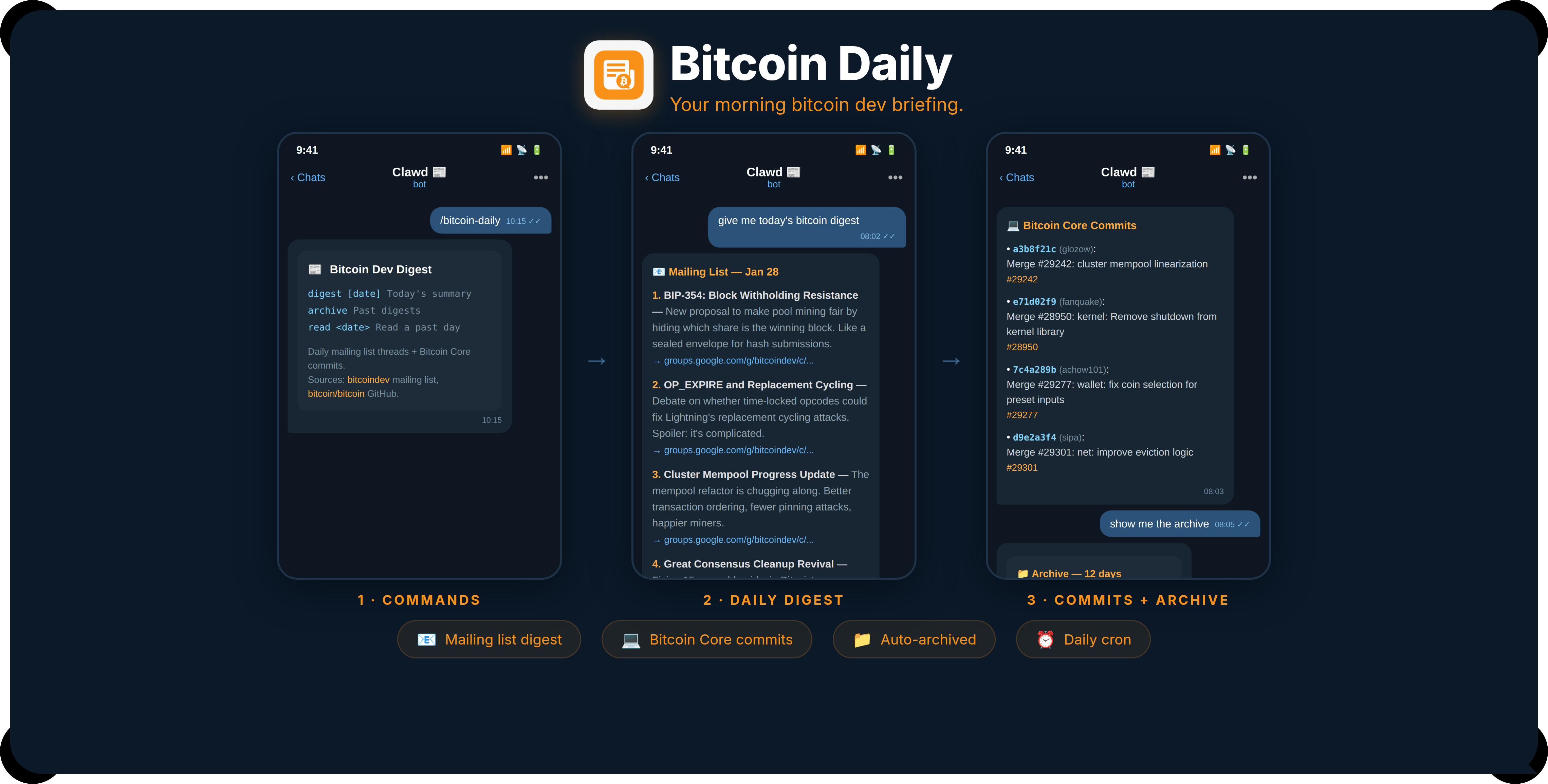
Daily summary of bitcoindev mailing list + Bitcoin Core commits.
Made in 🤠 Texas ❤️ PlebLab
Commands
Run via: node ~/workspace/skills/bitcoin-daily/scripts/digest.js <command>
| Command | Description |
|---|---|
digest [YYYY-MM-DD] | Fetch & summarize (default: yesterday) |
archive | List all archived digests |
read <YYYY-MM-DD> | Read a past summary |
Output
The digest script fetches raw data. The agent then summarizes it for the user in this format:
Mailing list: Numbered list, each item with:
- Bold title — 1-2 sentence ELI10 explanation with a touch of dry humor
- Thread link
Commits: Bullet list of notable merges with PR links.
Keep summaries accessible — explain like the reader is smart but not a Bitcoin Core contributor. Dry humor welcome, not forced.
Archive
Raw data archived to ~/workspace/bitcoin-dev-archive/YYYY-MM-DD/:
mailing-list/*.json— full thread content per topicmailing-list/_index.json— thread indexcommits.json— raw commit datasummary.md— generated summary
Daily Cron
Set up via Clawdbot cron to run every morning. The digest script fetches, archives, and outputs a summary that the agent then sends to the user.
Sources
- Mailing list: https://groups.google.com/g/bitcoindev
- Bitcoin Core: https://github.com/bitcoin/bitcoin/commits/master/
More by openclaw
View all skills by openclaw →You might also like
nano-banana-pro
garg-aayush
Generate and edit images using Google's Nano Banana Pro (Gemini 3 Pro Image) API. Use when the user asks to generate, create, edit, modify, change, alter, or update images. Also use when user references an existing image file and asks to modify it in any way (e.g., "modify this image", "change the background", "replace X with Y"). Supports both text-to-image generation and image-to-image editing with configurable resolution (1K default, 2K, or 4K for high resolution). DO NOT read the image file first - use this skill directly with the --input-image parameter.
ui-ux-pro-max
nextlevelbuilder
"UI/UX design intelligence. 50 styles, 21 palettes, 50 font pairings, 20 charts, 8 stacks (React, Next.js, Vue, Svelte, SwiftUI, React Native, Flutter, Tailwind). Actions: plan, build, create, design, implement, review, fix, improve, optimize, enhance, refactor, check UI/UX code. Projects: website, landing page, dashboard, admin panel, e-commerce, SaaS, portfolio, blog, mobile app, .html, .tsx, .vue, .svelte. Elements: button, modal, navbar, sidebar, card, table, form, chart. Styles: glassmorphism, claymorphism, minimalism, brutalism, neumorphism, bento grid, dark mode, responsive, skeuomorphism, flat design. Topics: color palette, accessibility, animation, layout, typography, font pairing, spacing, hover, shadow, gradient."
youtube-transcribe-skill
feiskyer
Extract subtitles/transcripts from a YouTube video URL and save as a local file. Use when you need to extract subtitles from a YouTube video.
pdf-to-markdown
aliceisjustplaying
Convert entire PDF documents to clean, structured Markdown for full context loading. Use this skill when the user wants to extract ALL text from a PDF into context (not grep/search), when discussing or analyzing PDF content in full, when the user mentions "load the whole PDF", "bring the PDF into context", "read the entire PDF", or when partial extraction/grepping would miss important context. This is the preferred method for PDF text extraction over page-by-page or grep approaches.
flutter-development
aj-geddes
Build beautiful cross-platform mobile apps with Flutter and Dart. Covers widgets, state management with Provider/BLoC, navigation, API integration, and material design.
drawio-diagrams-enhanced
jgtolentino
Create professional draw.io (diagrams.net) diagrams in XML format (.drawio files) with integrated PMP/PMBOK methodologies, extensive visual asset libraries, and industry-standard professional templates. Use this skill when users ask to create flowcharts, swimlane diagrams, cross-functional flowcharts, org charts, network diagrams, UML diagrams, BPMN, project management diagrams (WBS, Gantt, PERT, RACI), risk matrices, stakeholder maps, or any other visual diagram in draw.io format. This skill includes access to custom shape libraries for icons, clipart, and professional symbols.
Related MCP Servers
Browse all servers Task Master
Boost productivity with Task Master: an AI-powered tool for project management and agile development workflows, integrated with popular editors.
 Repomix
Optimize your codebase for AI with Repomix—transform, compress, and secure repos for easier analysis with modern AI tools.
 Figma Context
Unlock seamless Figma to code: streamline Figma to HTML with Framelink MCP Server for fast, accurate design-to-code workflows.
 Uno Platform
Uno Platform — Documentation and prompts for building cross-platform .NET apps with a single codebase. Get guides, samples, and best practices.
 Desktop Commander
Desktop Commander MCP unifies code management with advanced source control, git, and svn support—streamlining development in one interface.
 Genkit
Genkit — consume MCP resources or expose powerful Genkit tools as a server for streamlined development and integration.